Linux Users, Groups and sudo Explained
On this page
Linux users and IDs: who is running this?
Every process runs as a user (with a numeric UID) and a set of groups. File permissions (Day 4) are checked against them.
iduid=1000(alice) gid=1001(alice) groups=1001(alice),1003(deploy)- root (UID 0) bypasses permission checks. Work as a normal user and borrow root only when needed.
- System users run services:
myapphere was created with no home and no login shell, so nobody can log in as it.
sudo useradd --system --no-create-home --shell /usr/sbin/nologin myappAccounts live in /etc/passwd, password hashes in /etc/shadow, groups in /etc/group. Query them with getent, which also covers LDAP and other sources:
$ getent passwd alice
alice:x:1000:1001::/home/alice:/bin/bash
$ getent group deploy
deploy:x:1003:alice
Sharing access with groups
Groups are how you give a team or a service access without opening files to everyone:
sudo groupadd ops
sudo usermod -aG ops alice       # -a appends; without it, -G REPLACES all supplementary groups
Group changes apply to new logins only. Tested:
alice deploy          <- groups before
alice deploy ops      <- after usermod, in a NEW login session (su - alice)
A shell alice already had open still shows the old groups until she logs out and back in (or runs newgrp ops). The same applies to running services: Day 25 shows a service that only got its new group after a restart.
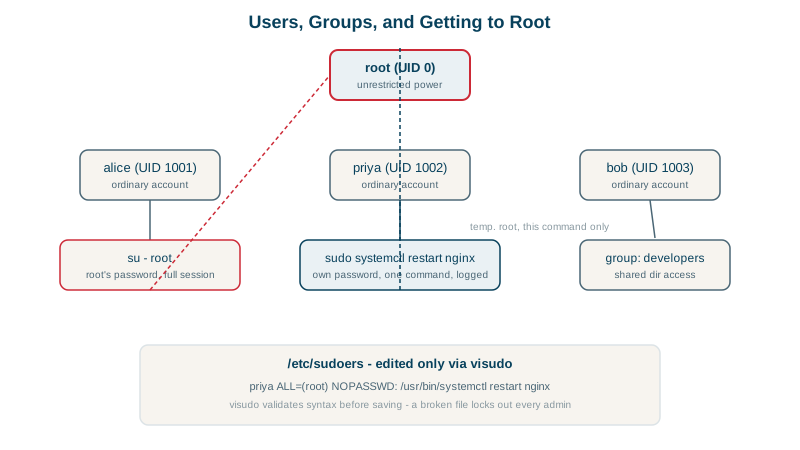
sudo: grant specific powers, not root shells
sudo lets permitted users run commands as root (or another user), logged and controlled by rules. Grant exactly what's needed. Priya on the support rotation needs to restart nginx, nothing else:
sudo visudo -f /etc/sudoers.d/priyapriya ALL=(root) NOPASSWD: /usr/bin/systemctl restart nginxCheck what a user may run:
sudo -l -U priyaUser priya may run the following commands on lima-lab:
(root) NOPASSWD: /usr/bin/systemctl restart nginxWhy you edit sudoers with visudo
A syntax error in sudoers can break sudo for everyone, which may lock you out of administering the server. visudo checks before saving. A broken rule, missing a parenthesis:
priya ALL=(root NOPASSWD: /usr/bin/systemctlvisudo: invalid sudoers filevisudo -c checks all sudoers files: /etc/sudoers: parsed OK. Put rules in separate files under /etc/sudoers.d/ with mode 440.
Users, groups and sudo rules of thumb
- Narrow rules: specific commands with full paths, not
ALL. Be careful with commands that can spawn shells (editors,less,find -exec,tar, scripting languages): granting them is close to granting root. - Prefer groups (
%ops ALL=...) to per-person rules on larger teams. - Use
sudoeditfor editing files as root: it edits a copy with your own editor, without running the editor as root. - Audit: sudo logs every command to the journal (
journalctl _COMM=sudo). - Disable direct root SSH login (Day 27); admins log in as themselves and use sudo.
Check yourself
Group membership is read when a session or process starts. Alice's existing sessions and running processes keep their old groups until she logs in again, or the service is restarted; newgrp or a new SSH session picks up the change.
Without -a, -G sets the complete list of supplementary groups, so it replaces all of alice's groups with just ops. She silently loses membership in groups like deploy or sudo, which can lock her out of work or administration.
Least privilege: the user can do the one task needed, and a mistake or compromised account can't do anything else as root.
id username shows the user id, primary group and all supplementary groups as the system knows them. groups shows the current shell's groups, which can differ if the membership changed after you logged in.
It locks the file and checks the syntax before saving. A broken sudoers file makes sudo refuse to run at all, which can lock every administrator out of root on a machine without another way in.