Linux Disk Usage: df, du and Managing Storage
On this page
df vs du: two views of disk space
dfasks each filesystem how full it is.duadds up the sizes of files under a directory.
df -h /Filesystem Size Used Avail Use% Mounted on
/dev/vda1 8.7G 3.1G 5.6G 36% /du -sh /var/log /var/lib /usr /etc | sort -hWhen /var fills, du drills down to the culprit:
sudo du -xh --max-depth=1 /var | sort -h | tail-x stays on one filesystem; sort -h sorts human-readable sizes correctly. ncdu is a friendly interactive alternative. find -size (Day 11) finds individual large files.
Why df and du disagree: deleted files still open
df says the disk is full, but du can't find the space. The usual cause: a deleted file that a process still has open. The name is gone, but the inode and its data stay allocated until the last handle closes.
Reproduced on the course VM. Write a 500 MB log, have a process hold it open, then delete it:
head -c 500000000 /dev/zero > /var/log/myapp/app.log
python3 -c 'import time; f=open("/var/log/myapp/app.log"); time.sleep(20)' &
rm /var/log/myapp/app.logused before: 3124M, after writing and deleting app.log: 3601MDeleting the file freed nothing. lsof finds it:
sudo lsof -nP +L1 # open files with a link count below 1, i.e. deletedCOMMAND PID FD SIZE/OFF NLINK NODE NAME
python3 10048 3r 500000000 0 262418 /var/log/myapp/app.log (deleted)When the process exited, usage returned to 3124M. In real life the holder is a long-running service that kept writing to a log someone deleted.
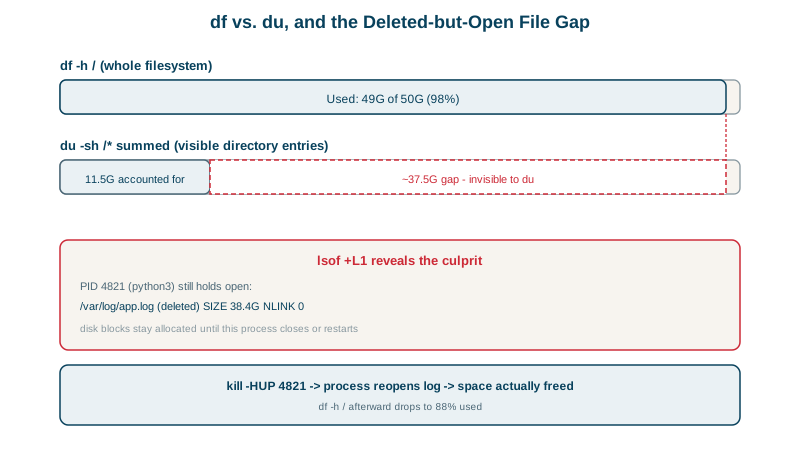
Fixes: restart or reload the process (many services reopen logs on SIGHUP or systemctl reload), or truncate through its file descriptor: : > /proc/<pid>/fd/<fd>. Prevention: truncate instead of deleting (: > app.log or truncate -s 0), and use logrotate with the right signal or copytruncate.
Other ways disks fill up: inodes and logs
- Logs without rotation or journald without limits (
SystemMaxUse=in journald.conf, Day 24). - Docker images and volumes (
docker system df,docker system prune). - Old releases and package caches (
apt clean, Day 21; Day 26's script keeps five releases). - Running out of inodes: millions of tiny files (sessions, caches) exhaust inodes while space remains.
df -ishows it; writes fail with "No space left on device" either way. - Reserved blocks: ext4 keeps about 5% for root, so
dfcan show space available to root but not to a service user.
Preventing full disks
- Alert at 80 to 85% full, per filesystem, and on inode usage (see the observability course).
- Put fast-growing data on its own filesystem (
/var/lib/postgresql,/var/log), so a runaway log can't take the root filesystem down. Day 28 shows exactly this kind of incident. - Retention policies for logs, backups, artifacts and uploads.
Check yourself
A process still had it open, often a log file being written. The data stays allocated until the last file handle closes, so restart or reload the process, or truncate the file through /proc/<pid>/fd.
lsof +L1 lists open files whose link count is zero, meaning they've been deleted but are still held by a process, along with the process id and size.
The filesystem may be out of inodes, which df -i shows, typically from millions of tiny files. Or the remaining space is reserved for root, about 5 percent on ext4 by default.
Configure logrotate for text logs and journald size limits for the journal, set sensible retention, and alert on disk usage at a safe threshold, such as 80 percent, so there's time to act before it reaches 100.