Linux Hard Links vs Symbolic Links and Inodes
On this page
What is an inode? Names vs files
A file on disk is an inode: a structure holding its data blocks, size, owner, permissions and timestamps. A directory entry is just a name pointing at an inode number. Separating the name from the file makes links possible.
Think of a library catalog. The book on the shelf is the inode; each catalog card is a name. A hard link is a second card pointing at the same shelf position: both cards are equally real, and the book stays until the last card is thrown away. A symbolic link is a card that says "see the card titled nginx.conf": if that card is removed, it points at nothing.
Creating hard links and symbolic links
echo "worker_processes 4;" > nginx.conf
ln nginx.conf hard.conf          # hard link: a second name for the same inode
ln -s nginx.conf soft.conf       # symbolic link: a small file containing a path
ls -li262415 -rw-r--r-- 2 hard.conf
262415 -rw-r--r-- 2 nginx.conf
262416 lrwxrwxrwx 1 soft.conf -> nginx.confhard.confandnginx.confshare inode 262415, and the link count is 2. They're two equal names for one file; neither is "the original".soft.confhas its own inode (262416) and contains the pathnginx.conf.
What happens when you delete the original
rm nginx.conf
cat hard.conf
cat soft.confworker_processes 4;
cat: soft.conf: No such file or directoryThe hard link still works: the inode's link count dropped to 1, and data is only freed when the count reaches zero and no process has the file open (Day 14 shows the open-file case). The symlink now points to a path that doesn't exist: a dangling link, still listed by ls -l as soft.conf -> nginx.conf.
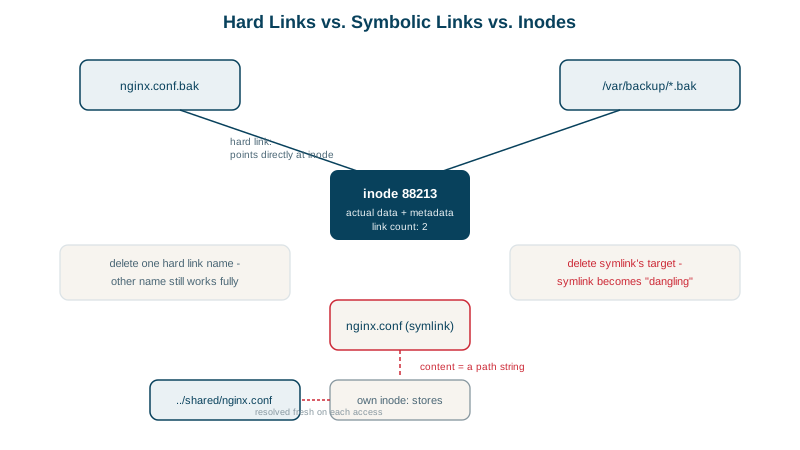
Hard links vs symbolic links compared
| Hard link | Symbolic link | |
|---|---|---|
| Points to | An inode | A path |
| Across filesystems | No | Yes |
| To directories | No (not allowed) | Yes |
| If the target is deleted | Still works | Dangles |
| Shows what it links to | No (ls -i to compare inodes) | Yes (ls -l, readlink) |
| Common uses | Backups with deduplication, package managers | Versioned deploys, config switching, /bin -> usr/bin |
Using symlinks for atomic deploys
A current symlink pointing at a release directory makes deployments and rollbacks a single, atomic switch (Day 26's script does this):
ln -sfn /opt/myapp/releases/20261014231601 /opt/myapp/current.new
mv -T /opt/myapp/current.new /opt/myapp/current     # rename is atomic
-n stops ln following an existing symlink to a directory (otherwise it creates a link inside the old release). Creating a new link and renaming it over the old one means there's never a moment when current doesn't exist.
Useful link and inode commands
readlink -f pathresolves every symlink to the final absolute path.find . -xtype lfinds dangling symlinks.stat fileshows the inode number and link count.df -ishows inode usage: a filesystem can run out of inodes (millions of tiny files) while still having free space, and writes fail with "No space left on device" (Day 14).
Check yourself
Both names pointed to the same inode; deleting one name only reduced the link count, and the data remains while any name or open handle exists.
A hard link is another name for the same inode, and inode numbers are only meaningful within one filesystem. A symlink stores a path instead, which can point anywhere, even to something that doesn't exist.
Creating a new link and renaming it over the old one is atomic, so the current link always points to a complete release. Removing and recreating it leaves a moment with no link.
Each file's inode number. Two names with the same inode number are hard links to the same file, so changing one changes the other. It's a quick way to see whether files are copies or links.
It becomes a dangling link: the link still exists, but opening it fails with "No such file or directory". ls -l shows where it points, and find -xtype l finds dangling links.