Linux Pipes and Redirection Explained
On this page
stdin, stdout and stderr
Every process starts with three open file descriptors:
| FD | Name | Default |
|---|---|---|
| 0 | stdin | Keyboard |
| 1 | stdout | Terminal: normal output |
| 2 | stderr | Terminal: errors and diagnostics |
A file descriptor is just a numbered handle the process uses to read or write something: a file, a terminal, a pipe. Picture every program born with three hoses attached: one feeding input in (0), one for normal output (1) and one for complaints (2). Redirection is reconnecting a hose somewhere else.
Keeping errors on a separate stream means you can save results to a file while still seeing errors, or the reverse.
Redirection with >, >> and <
ls /etc/hostname /nope > out.txt 2> err.txtout.txt: /etc/hostname
err.txt: ls: cannot access '/nope': No such file or directory| Syntax | Effect |
|---|---|
> file | stdout to file (overwrite) |
>> file | stdout to file (append) |
2> file | stderr to file |
> file 2>&1 | both to file |
&> file | both to file (bash shorthand) |
< file | stdin from file |
> /dev/null | discard |
Why the order of 2>&1 matters
2>&1 means "make stderr point where stdout points right now". Redirections apply left to right:
ls /etc/hostname /nope > all.txt 2>&1     # stdout to file, then stderr to the same place
ls /nope 2>&1 > o2.txt # stderr to the terminal (where stdout was), then stdout to fileall.txt lines: 2
ls: cannot access '/nope': No such file or directory <- printed on the terminal
o2.txt size: 0The first form captures both lines. The second sent the error to the terminal and left the file empty. When you want everything in a log, write > file 2>&1.
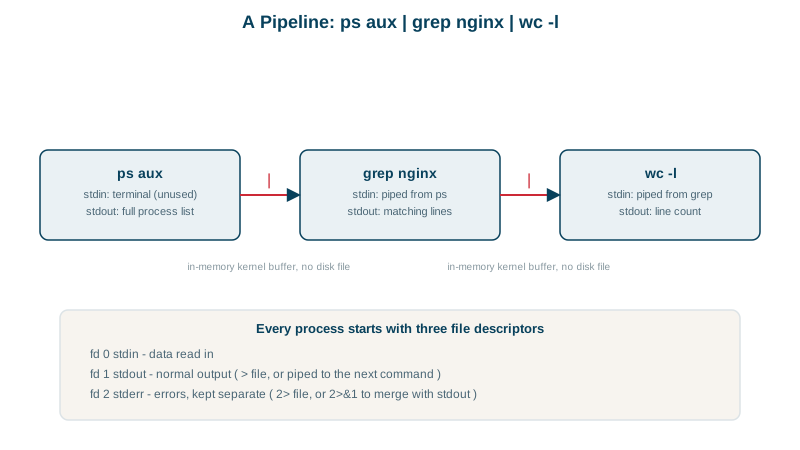
Pipes: connecting commands
A pipe connects one program's stdout to the next one's stdin, and all of them run at the same time:
tail -n 5000 /var/log/nginx/access.log \
  | awk '$9 >= 500 {print $1}' \
  | sort | uniq -c | sort -rn | head -5
Top five client IPs producing server errors in recent traffic. Each tool does one job: filter, extract, sort, count, rank. Days 9 and 10 cover grep, sed and awk.
Only stdout goes through a pipe; to pipe errors too, use 2>&1 | (or |& in bash).
Exit status in pipelines and pipefail
A pipeline's exit status is the last command's, which hides failures earlier in the chain:
false | true; echo "without pipefail: $?"
set -o pipefail
false | true; echo "with pipefail: $?"without pipefail: 0
with pipefail: 1In scripts, set -o pipefail (part of set -euo pipefail, Day 15) makes a failure anywhere in a pipeline fail the whole thing. Otherwise, curl ... | tar xz can report success even when the download failed.
tee, xargs and other pipeline tools
teewrites to a file and passes output on:make 2>&1 | tee build.log.sudoand redirection:sudo echo x > /etc/filefails, because your shell (not sudo) opens the file. Useecho x | sudo tee /etc/file.- Here documents feed multi-line input:
cat > config <<'EOF' ... EOF(quotingEOFstops variable expansion). xargsturns lines of input into arguments, with-0for safe filenames (Day 11).
Check yourself
Redirections are processed left to right. 2>&1 pointed stderr at wherever stdout was at that moment, the terminal, and only then was stdout redirected to the file. The error went to the screen; write > o2.txt 2>&1 to capture both.
A pipeline then fails if any command in it fails, returning the last non-zero status, instead of reporting only the last command's status. Without it, false | true counts as success.
The redirection is performed by your unprivileged shell before sudo runs; use sudo tee to write the file as root.
> truncates the file and writes; >> appends to the end. Using > by mistake on a log or config file erases it.
It reads items from stdin and passes them as arguments to a command, such as deleting a list of files produced by find.