Linux Navigation Commands: pwd, cd and ls
On this page
The Linux directory tree
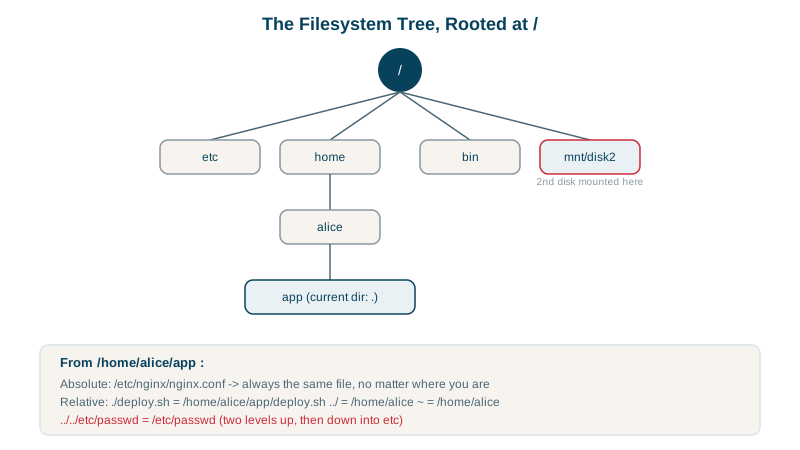
Linux has a single directory tree starting at / (the root). Disks, USB drives and network shares are all mounted somewhere inside it; there are no drive letters. Every file has a path describing its place in that tree.
Where am I? pwd
pwd/home/alice/apppwd prints the current working directory. Every process has one, and relative paths are resolved from it.
Absolute vs relative paths
- Absolute paths start with
/:/home/alice/app/deploy.shmeans the same file from anywhere. - Relative paths start from the current directory: from
/home/alice,app/deploy.shis the same file. .is the current directory,..the parent,~your home directory.
Scripts should use absolute paths (or compute them), because the directory they're run from varies. Cron jobs and systemd services usually start in / or /root, not where you expect (Days 19 and 20).
Moving around with cd
cd /var/log        # absolute
cd ../lib          # relative: /var/lib
cd ~               # home (or just cd)
cd -               # back to the previous directory
How to read ls -la output
cd ~/app && ls -latotal 24
drwxr-xr-x 5 alice alice 4096 Oct 14 23:09 .
drwxr-x--- 3 alice alice 4096 Oct 14 23:08 ..
-rw-r--r-- 1 alice alice 0 Oct 14 23:09 .env
-rw-r--r-- 1 alice alice 0 Oct 14 23:09 README.md
-rw-r--r-- 1 alice alice 15 Oct 14 23:09 deploy.sh
drwxr-xr-x 2 alice alice 4096 Oct 14 23:09 logs
drwxr-xr-x 2 alice alice 4096 Oct 14 23:09 src| Column | Example | Meaning |
|---|---|---|
| Type and permissions | drwxr-xr-x | d directory, - file, l symlink; then permissions (Day 4) |
| Link count | 5 | Hard links to this inode (Day 13); for directories, roughly subdirectories + 2 |
| Owner, group | alice alice | Who owns it (Day 5) |
| Size | 15 | Bytes; directories show their own metadata size, not their contents |
| Modified time | Oct 14 23:09 | Last content change |
| Name | .env | Names starting with . are hidden from plain ls |
-a shows hidden files like .env and the . and .. entries; -l gives the long format.
Useful ls options
ls -lhhuman-readable sizes (3.2M).ls -ltnewest first;ls -ltroldest first (newest at the bottom, handy in log directories).ls -ld dirshows the directory itself, not its contents.tree -L 2(install it) for a quick overview of a project.stat filefor every detail: exact times, inode, permissions in octal.
Keyboard shortcuts that save typing
- Tab completes file and directory names: type
cd /var/loand press Tab to get/var/log/. Press it twice to list the options when there's more than one. It also prevents typos. - Up arrow brings back previous commands; Ctrl+R searches your history as you type (
Ctrl+R sshfinds your last ssh command). - Ctrl+A and Ctrl+E jump to the start and end of the line; Ctrl+C abandons the current line.
Check yourself
/home. Each .. moves up one level: the first from /home/alice/app to /home/alice, the second from /home/alice to /home.
They resolve from the current directory, which differs depending on who or what runs the script, such as cron or systemd.
Names starting with a dot are hidden by convention, which keeps configuration files out of everyday listings. ls -a shows them, and ls -A shows them without . and ...
It switches back to the previous directory, which the shell keeps in $OLDPWD, and prints where you landed. It's handy for jumping between two locations, such as a project folder and /var/log.
The first character is the file type, such as - for a file, d for a directory and l for a symlink. The number after the permissions is the link count.