What Is Cloud Computing? Why AWS
On this page
Why cloud computing: buying servers for your busiest day
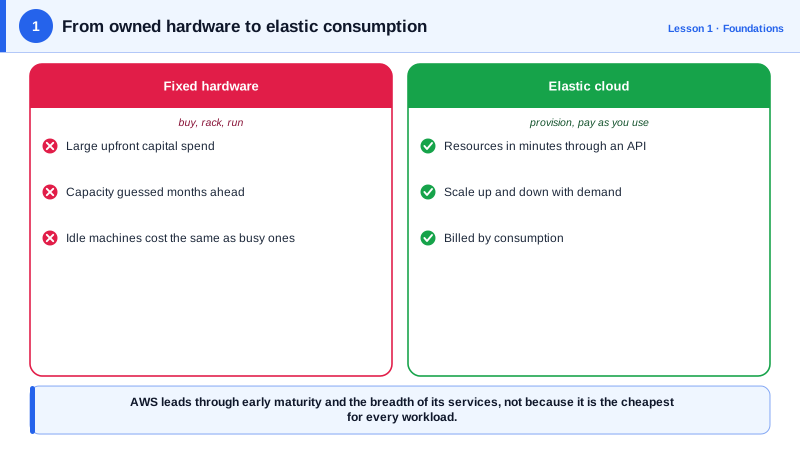
A ticketing site sells out concerts. Most days it needs 4 servers; on a big on-sale morning it needs 60, for two hours. With your own hardware, you buy 60 servers and they sit idle almost all the time. Or you buy fewer and the site falls over on the day that matters. Cloud computing removes that dilemma: rent 60 servers for two hours, then hand them back.
What cloud computing is
You get computing resources (servers, storage, databases, networks) on demand, over an API, paid by use, from a provider that runs huge shared data centers. Five properties define it (from NIST's definition):
- Self-service: create resources yourself in minutes, with no purchase order.
- Network access from anywhere.
- Pooled resources shared across customers, isolated from each other.
- Elasticity: scale up and down quickly, even automatically.
- Measured service: you pay for what you use, often per second.
IaaS vs PaaS vs serverless vs SaaS
| Model | You manage | Provider manages | AWS examples |
|---|---|---|---|
| IaaS (infrastructure) | OS, runtime, app, data | Hardware, virtualization, network | EC2, EBS, VPC |
| PaaS (platform) | App and data | OS, patching, scaling | Elastic Beanstalk, RDS, Fargate |
| Serverless / FaaS | Just code and config | Everything else, scaling to zero | Lambda, DynamoDB, S3 |
| SaaS (software) | Your use of it | The whole application | Amazon WorkMail, or any web product |
The further down the table, the less you operate and the less you control. Most real systems mix them.
Cloud vs on-premises cost for a spiky workload
| Own hardware | Cloud | |
|---|---|---|
| Up front | Buy for peak (60 servers) | Nothing |
| Normal days | Pay for 60, use 4 | Pay for 4 |
| On-sale morning | Capacity is there, if you guessed right | Add 56 for two hours |
| Expense type | Capital (CapEx), depreciated over years | Operating (OpEx), monthly |
Count the server-hours you pay for to see the size of the difference. Say there are four on-sale mornings a month. Owning 60 servers means paying for 60 × 720 hours = 43,200 server-hours a month, whatever you use. Renting means paying for 4 servers all month (4 × 720 = 2,880 server-hours) plus 56 extra for two hours on four mornings (56 × 2 × 4 = 448): 3,328 server-hours, under a tenth as many. An hour of cloud server costs more than an hour of an owned one, but rarely ten times more, which is why spiky workloads moved to the cloud first.
For steady, predictable load, the cloud isn't automatically cheaper: a server running flat out for three years can cost less to own, and cloud commitments (Day 5) narrow the gap. The cloud wins on elasticity, speed and not running data centers.
Cloud trade-offs and the shared responsibility model
- You give up control of hardware and some configuration, and depend on the provider's availability.
- Costs can surprise you: data transfer out, idle resources and forgotten experiments (Day 28).
- Shared responsibility: AWS secures the infrastructure ("security of the cloud"); you secure what you build on it, including IAM, network rules and data ("security in the cloud"). Most cloud breaches come from customer misconfiguration, not provider failures.
Why AWS
AWS launched S3 and EC2 in 2006 and remains the largest cloud provider by market share, with Microsoft Azure and Google Cloud the other two major players. Its strengths: the broadest catalog of services, the most regions, and a huge ecosystem of documentation, tools and people who know it. The concepts in this course (regions, IAM, VPCs, load balancers, managed databases) transfer to the other clouds under different names.
Check yourself
You pay for peak capacity only during the two hours you use it, and scale down the rest of the week. Owning servers means buying hardware sized for the peak that sits idle about 99 percent of the time.
The customer. AWS is responsible for the security of the cloud, its data centers, hardware and core services. You're responsible for security in the cloud: your data, IAM and bucket access settings, so a public bucket is your configuration mistake.
No. For steady, predictable load, owned hardware or committed cloud pricing can cost less; the cloud's main advantages are elasticity, speed and not operating data centers.
With IaaS, such as EC2, you manage the operating system, patching and scaling of virtual servers. With serverless, such as Lambda, you provide code and AWS runs, scales and patches everything underneath, billing per request.
It lets you try ideas without buying hardware, scale for launches in minutes, and shut things down when they fail, which changes how fast teams can move.