AWS Console, CLI and IAM Basics
On this page
Console, CLI and SDK: three doors to one API
Everything in AWS is an API call. Clicking "Launch instance" in the web Console, running aws ec2 run-instances in the CLI, and calling ec2.run_instances() in a Python SDK all send the same signed HTTPS request. Before acting on any of them, AWS asks two questions:
- Authentication: who is calling? (The request is signed with credentials.)
- Authorization: is that identity allowed to do this, to this resource? That's IAM (Identity and Access Management).
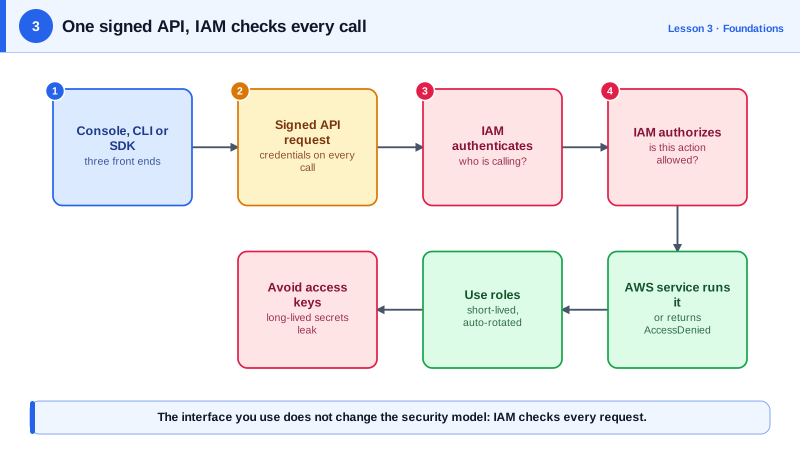
Use the Console to explore and learn. Use the CLI and infrastructure as code (Day 24) for anything you'll repeat, since clicks aren't reviewable or repeatable.
Setting up the AWS CLI with IAM Identity Center
Install AWS CLI version 2, then sign in with IAM Identity Center (AWS's single sign-on), which gives short-lived credentials:
aws configure sso          # one-time: SSO URL, account, role, default region
aws sso login --profile dev
aws sts get-caller-identity --profile dev
sts get-caller-identity answers "who am I?" and is the first command to run whenever permissions look wrong:
{
    "UserId": "AROAEXAMPLEID:naveed",
    "Account": "123456789012",
    "Arn": "arn:aws:sts::123456789012:assumed-role/Developer/naveed"
}
Avoid long-lived access keys stored in ~/.aws/credentials for people. They leak through laptops, Git commits and CI logs, and stay valid until someone notices. Programs running on AWS should use roles (Day 4), which provide rotating temporary credentials automatically.
IAM vocabulary: principals, actions, resources and policies
- Principal: who's calling: a user, a role, or an AWS service.
- Action: what they're doing:
s3:GetObject,ec2:RunInstances. - Resource: what they're doing it to, named by an ARN (Amazon Resource Name), like
arn:aws:s3:::quarterly-reports/q3.pdf. - Policy: a JSON document of statements allowing or denying actions on resources.
Everything is denied by default. Access exists only where a policy allows it.
Reading an ARN
Every ARN has the same six parts, separated by colons:
arn : partition : service : region    : account-id   : resource
arn : aws       : ec2     : us-east-1 : 123456789012 : instance/i-0abc1234def567890
arn : aws       : iam     :           : 123456789012 : role/Developer
arn : aws       : s3      :           :              : quarterly-reports/q3.pdf
(Real ARNs have no spaces; they're added here to line up the parts.) The partition is aws except in special regions such as China (aws-cn) and GovCloud (aws-us-gov). Empty fields mean something too: IAM is a global service, so its ARNs have no region, and S3 bucket names are unique across all of AWS, so S3 ARNs need neither a region nor an account. Once you can read the parts, policies stop looking like noise: arn:aws:s3:::quarterly-reports/* means "every object in that bucket", in any account that owns it.
A least-privilege IAM policy for one S3 bucket
A reporting tool needs to read one bucket, nothing else:
{
  "Version": "2012-10-17",
  "Statement": [
    {
      "Sid": "ReadQuarterlyReports",
      "Effect": "Allow",
      "Action": ["s3:GetObject", "s3:ListBucket"],
      "Resource": [
        "arn:aws:s3:::quarterly-reports",
        "arn:aws:s3:::quarterly-reports/*"
      ]
    }
  ]
}
Two resources, because s3:ListBucket applies to the bucket ARN while s3:GetObject applies to objects (/*). Leaving one out is the most common reason a "read-only" S3 policy doesn't work. "Version": "2012-10-17" is the policy language version, not a date to update.
Attaching it (run against a local AWS emulator):
aws iam create-user --user-name reporting-readonly
aws iam put-user-policy --user-name reporting-readonly \
  --policy-name QuarterlyReportsReadOnly \
  --policy-document file://s3-readonly-policy.json
aws iam list-user-policies --user-name reporting-readonlyarn:aws:iam::123456789012:user/reporting-readonly
POLICYNAMES QuarterlyReportsReadOnlyIf this tool runs on AWS (EC2, Lambda, ECS), attach the same policy to a role instead of creating a user with keys.
Check yourself
Which account and which user or role your current credentials belong to. Run it first when a command fails with access denied: often the problem is the wrong profile or account, not a missing permission.
s3:ListBucket is a bucket-level action, so it applies to the bucket ARN itself, arn:aws:s3:::reports, not to the objects pattern reports/*. Add a separate statement allowing s3:ListBucket on the bucket ARN.
They issue short-lived credentials that expire on their own within hours. Long-lived access keys stay valid until someone revokes them, end up in config files, scripts and repositories, and are a leading cause of account compromise.
S3 bucket names are unique across all of AWS, so the name alone identifies the bucket. EC2 instances exist in one region and one account, so their ARNs include both.