AWS Pricing Explained and Cost Management
On this page
Why AWS bills surprise people
A developer tries a managed service on a Friday, forgets about it, and the bill arrives a month later. Or a project's data transfer quietly grows until it costs more than its servers. AWS pricing isn't hard, but it has a lot of meters running at once, and some of them aren't obvious.
What AWS charges for
Almost every charge falls into four buckets:
- Compute time: per second or hour for instances, containers, databases; per request and duration for Lambda.
- Storage: per GB-month (S3, EBS volumes, snapshots, backups).
- Requests and operations: S3 requests, DynamoDB reads and writes, API Gateway calls.
- Data transfer: data into AWS is free; data out to the internet costs per GB, and so does traffic between regions and, in smaller amounts, between Availability Zones.
Some charges people miss: NAT gateways (per hour and per GB processed), public IPv4 addresses (charged hourly since 2024, attached or not), idle load balancers, old snapshots, and CloudWatch Logs ingestion.
On-Demand vs Savings Plans vs Reserved vs Spot
| Model | Discount vs On-Demand | Commitment | Best for |
|---|---|---|---|
| On-Demand | None | None | Unpredictable or short-lived workloads, new projects |
| Savings Plans | Up to about 66 to 72 percent | A dollar amount per hour for 1 or 3 years | Steady baseline usage; Compute Savings Plans also cover Fargate and Lambda |
| Reserved Instances | Similar to Savings Plans | A specific instance type or database for 1 or 3 years | RDS, ElastiCache, OpenSearch, where Savings Plans don't apply |
| Spot Instances | Up to about 90 percent | None, but AWS can reclaim with 2 minutes' notice | Fault-tolerant batch jobs, CI runners, stateless workers |
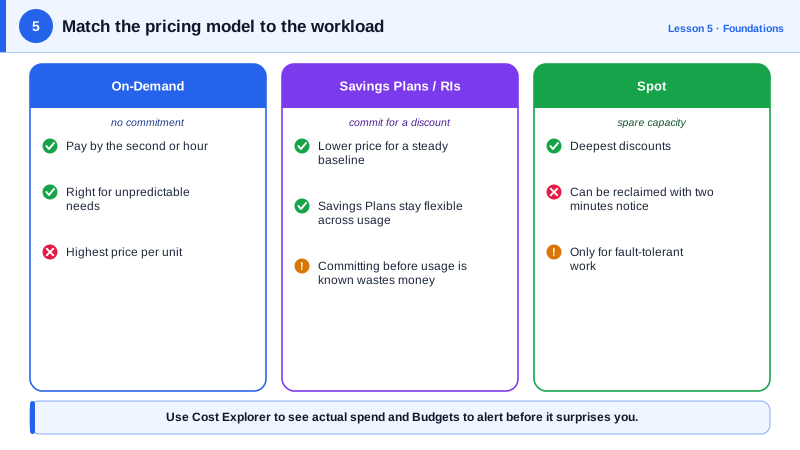
The usual pattern: cover the stable baseline with Savings Plans, run the variable part On-Demand, and push interruptible work to Spot. Commit only after rightsizing (Day 28); committing to oversized instances locks in waste.
Cost Explorer, tags and anomaly detection
- Cost Explorer shows spend by service, account, region and tag, with forecasts.
- Cost allocation tags (like
ProjectandEnvironment) let you split the bill by team. Activate them in the billing console; they only apply from then on. - The Cost and Usage Report (CUR) exports every line item for detailed analysis.
- Cost Anomaly Detection alerts on unusual spikes.
- New accounts get AWS Free Tier credits and always-free allowances for some services; check what's covered before relying on it.
Creating an AWS budget alert
A monthly budget for one project, alerting when the forecast passes 80 percent, so you hear about it before the money is spent (run against a local AWS emulator):
aws budgets create-budget \
  --account-id 123456789012 \
  --budget '{
    "BudgetName": "project-atlas-monthly",
    "BudgetLimit": {"Amount": "5000", "Unit": "USD"},
    "TimeUnit": "MONTHLY",
    "BudgetType": "COST",
    "CostFilters": {"TagKeyValue": ["user:Project$atlas"]}
  }' \
  --notifications-with-subscribers '[{
    "Notification": {
      "NotificationType": "FORECASTED",
      "ComparisonOperator": "GREATER_THAN",
      "Threshold": 80,
      "ThresholdType": "PERCENTAGE"
    },
    "Subscribers": [{"SubscriptionType": "EMAIL", "Address": "team-atlas@example.com"}]
  }]'
The tag filter format is user:<TagKey>$<value>, and it only works once Project is an activated cost allocation tag. Budgets alert; they don't stop spending. To act automatically, add budget actions (for example, apply a restrictive policy), or have the SNS notification trigger a Lambda.
Check yourself
Data into AWS is free; data out to the internet, between regions, and (at a lower rate) between Availability Zones is charged.
A Savings Plan commits you to a level of spend for one or three years. Committing while instances are oversized guarantees paying for that waste for the whole term; shrink first, then commit to the smaller baseline.
For workloads that can't tolerate interruption, such as a single stateful database, since AWS can reclaim Spot capacity with two minutes' notice.
Tags like team, environment and application let Cost Explorer break the bill down by owner. Without them, finding who owns a cost later is slow guesswork.
It learns your normal spending patterns and alerts you when costs for a service, account or tag rise unexpectedly, catching runaway resources within a day instead of at month end.