AWS Security Groups vs Network ACLs
On this page
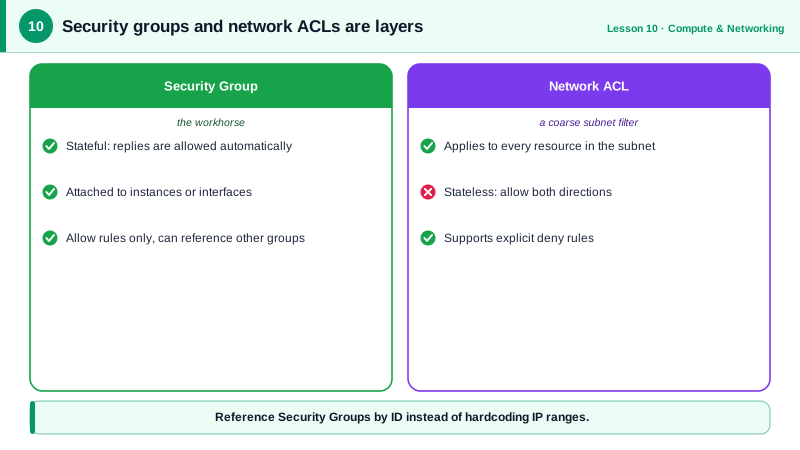
Security groups vs network ACLs compared
AWS gives you two packet filters inside a VPC. New users often configure both the same way and then can't work out why traffic is blocked. They behave differently, and they're meant for different things.
| Security group | Network ACL | |
|---|---|---|
| Applies to | Network interfaces (instances, load balancers, databases) | Whole subnets |
| State | Stateful: replies are allowed automatically | Stateless: replies need their own rule |
| Rules | Allow only | Allow and deny |
| Evaluation | All rules together | In order by rule number; first match wins |
| Default | Deny all inbound, allow all outbound | The default NACL allows everything |
| Sources | IP ranges, prefix lists or other security groups | IP ranges only |
Security groups that reference each other
Build your tiers with security groups that reference each other:
alb-sg: allow 443 from0.0.0.0/0.app-sg: allow 8080 fromalb-sg.db-sg: allow 5432 fromapp-sg.
Referencing a group means "any network interface in that group", so the rules keep working as instances are replaced and scale out. Run against a local AWS emulator:
ALBSG=$(aws ec2 create-security-group --group-name alb-sg --description "ALB" \
  --vpc-id $VPC --query GroupId --output text)
APPSG=$(aws ec2 create-security-group --group-name app-sg --description "App servers" \
  --vpc-id $VPC --query GroupId --output text)

aws ec2 authorize-security-group-ingress --group-id $ALBSG --protocol tcp --port 443 --cidr 0.0.0.0/0
aws ec2 authorize-security-group-ingress --group-id $APPSG --protocol tcp --port 8080 --source-group $ALBSGTrue
tcp 8080 sg-74d81c533ee1849beBecause security groups are stateful, the app servers' responses flow back to the load balancer without an outbound rule.
Network ACLs and ephemeral ports
Use NACLs sparingly, for things security groups can't express:
- Deny specific ranges (a known abusive network) for a whole subnet.
- A hard boundary between subnet tiers as defense in depth.
Rules are evaluated lowest number first, and the first match decides:
aws ec2 create-network-acl-entry --network-acl-id $ACL --ingress \
  --rule-number 100 --protocol -1 --rule-action deny --cidr-block 198.51.100.0/24
aws ec2 create-network-acl-entry --network-acl-id $ACL --ingress \
  --rule-number 200 --protocol -1 --rule-action allow --cidr-block 0.0.0.0/0
aws ec2 create-network-acl-entry --network-acl-id $ACL --egress \
--rule-number 200 --protocol -1 --rule-action allow --cidr-block 0.0.0.0/0100 False deny 198.51.100.0/24
200 False allow 0.0.0.0/0
200 True allow 0.0.0.0/0The egress rule matters. NACLs are stateless, so responses leaving the subnet need an outbound allow, and responses to clients go to ephemeral ports (1024 to 65535). Forgetting this is the classic NACL outage: requests arrive, replies are dropped, connections hang. A custom NACL denies everything until you add rules.
Here's why the ephemeral port range is needed, with real numbers. A client at 203.0.113.7 connects from its port 52344 to your server's port 443. The request matches an inbound rule for 443. The reply travels from port 443 back to 203.0.113.7:52344, and the NACL, which remembers nothing, judges it as a brand-new packet: it needs an outbound rule allowing destination port 52344. The next client picks a different port, so in practice the rule must allow the whole 1024 to 65535 range. A security group in the same position would recognize the reply as part of a connection it already allowed and let it out without any rule.
Debugging blocked VPC traffic
- Check the instance's security group inbound rule for the port and source.
- Check the subnet's NACL in both directions, including ephemeral ports.
- Check route tables (Day 9).
- Use VPC Reachability Analyzer to trace a path, and VPC Flow Logs to see
ACCEPTorREJECTrecords.
Check yourself
Security groups are stateful: once an inbound connection is allowed, its response traffic is allowed automatically in the other direction, regardless of outbound rules.
With a network ACL deny rule numbered lower than the subnet's allow rules, since NACL rules are evaluated in number order. Security groups can't express a deny, only allows. For HTTP traffic, AWS WAF is another option.
NACLs are stateless, so responses need their own outbound rule. Without an outbound allow for the clients' ephemeral ports, typically 1024 to 65535, responses are dropped on the way out.
Responses go back to the client's ephemeral port, such as 52344, not to port 443. The stateless NACL needs an outbound rule allowing ports 1024 to 65535.