AWS Lambda Tutorial: Serverless Compute
On this page
What AWS Lambda is
A user uploads a photo; you need a thumbnail. Running a server all day to wait for uploads is wasteful. With AWS Lambda, you upload a function and connect it to an event. Lambda runs it when the event happens, as many copies in parallel as needed, and you pay only for the time it runs.
How Lambda runs a function: cold starts and concurrency
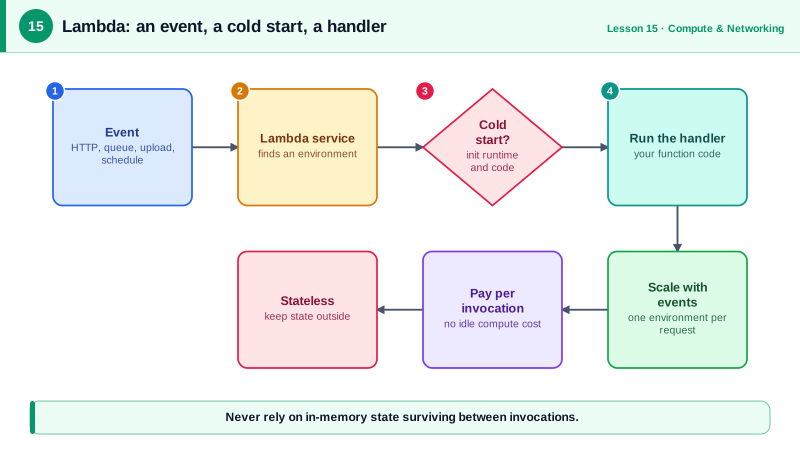
- Events invoke the function: an HTTP request (through API Gateway or a function URL), an S3 upload, an SQS message, a DynamoDB stream record, a schedule from EventBridge.
- Lambda runs the code in an execution environment, a small, isolated micro-VM with the memory you configure (128 MB to 10 GB; CPU scales with memory).
- If no warm environment is free, Lambda creates one: a cold start, typically a few hundred milliseconds to over a second depending on runtime and package size. Warm environments are reused for later invocations.
- Each environment handles one request at a time. Concurrency means more environments.
Limits that shape designs: a maximum of 15 minutes per invocation, payload limits (6 MB for synchronous requests), and an account-wide concurrency limit (1,000 by default per region, raisable).
Concurrency is easy to estimate: requests per second × average duration in seconds. An API receiving 200 requests a second that take 0.5 seconds each keeps about 100 environments busy, well inside the limit. Now suppose a downstream service slows down and each request takes 6 seconds. The same 200 requests a second need 1,200 environments, more than the default limit, and Lambda starts throttling. That's how a slow dependency turns into Lambda errors even though your traffic didn't change.
An S3-triggered Lambda thumbnail function
# thumbnail.py: Lambda handler that writes a 256-pixel thumbnail for each uploaded .jpg
import io, urllib.parse
import boto3
from PIL import Image

s3 = boto3.client("s3")          # created once per execution environment, reused while warm
THUMB_BUCKET = "user-uploads-thumbs"

def handler(event, context):
    for record in event["Records"]:
        bucket = record["s3"]["bucket"]["name"]
        key = urllib.parse.unquote_plus(record["s3"]["object"]["key"])   # keys arrive URL-encoded
        body = s3.get_object(Bucket=bucket, Key=key)["Body"].read()
        img = Image.open(io.BytesIO(body))
        img.thumbnail((256, 256))
        out = io.BytesIO()
        img.save(out, format="JPEG", quality=85)
        s3.put_object(Bucket=THUMB_BUCKET, Key=key, Body=out.getvalue(), ContentType="image/jpeg")
        print(f"thumbnail written: s3://{THUMB_BUCKET}/{key} {img.size} {len(out.getvalue())} bytes")
Calling the handler locally with a 3000 × 2000 test image in an emulated S3, and an event whose key contains a space (beach+day.jpg, as S3 sends it):
original: 94629 bytes
thumbnail written: s3://user-uploads-thumbs/photos/beach day.jpg (256, 171) 1333 bytes
Three details that bite in production:
- Decode the key. S3 events URL-encode object keys; without
unquote_plus, files with spaces fail withNoSuchKey. - Write to a different bucket (or prefix with a filtered trigger). Writing thumbnails back into the source bucket would trigger the function again, in an endless, expensive loop.
- Create clients outside the handler so warm invocations reuse them.
Deploying and wiring it up (the CLI calls were validated client-side; Pillow must be packaged in the zip or a layer):
aws lambda create-function --function-name generate-thumbnail \
  --runtime python3.13 --architectures arm64 \
  --role arn:aws:iam::123456789012:role/thumbnail-lambda \
  --handler thumbnail.handler --memory-size 512 --timeout 30 \
  --zip-file fileb://thumbnail.zip

aws lambda add-permission --function-name generate-thumbnail \
  --statement-id s3invoke --action lambda:InvokeFunction \
  --principal s3.amazonaws.com \
  --source-arn arn:aws:s3:::user-uploads --source-account 123456789012

aws s3api put-bucket-notification-configuration --bucket user-uploads \
  --notification-configuration '{"LambdaFunctionConfigurations": [{
    "LambdaFunctionArn": "arn:aws:lambda:us-east-1:123456789012:function:generate-thumbnail",
    "Events": ["s3:ObjectCreated:*"],
    "Filter": {"Key": {"FilterRules": [{"Name": "suffix", "Value": ".jpg"}]}}}]}'
add-permission is the resource policy that lets S3 invoke the function; the execution role is what the function itself may do (read the source bucket, write the thumbnail bucket, write logs).
When to use Lambda
Good: event handlers, APIs with variable traffic, scheduled jobs, glue between AWS services, anything idle much of the time.
Poor: long-running work over 15 minutes, steady high-throughput services (containers become cheaper), and workloads where cold-start latency is unacceptable (provisioned concurrency or SnapStart help, at a cost).
Also plan for retries: asynchronous invocations retry on failure, so handlers should be idempotent, and failed events should go to a dead-letter queue or failure destination.
Check yourself
The time Lambda takes to create and initialize a new execution environment, when no warm environment is available, such as after idle periods or during scale-up.
Writing into the triggering bucket would fire a new event for every thumbnail, invoking the function in an endless loop.
Split the work into smaller chunks (with Step Functions or a queue), or move it to a container on ECS, Fargate or AWS Batch.
About 100: concurrency is roughly requests per second times duration in seconds, 50 × 2. That's how many execution environments Lambda keeps busy, which matters for the account's concurrency limit and for connections to databases.
It guarantees a function a share of the account's concurrency and caps it at that number, protecting other functions and downstream databases from being overwhelmed.