AWS CloudFormation Tutorial: Infrastructure as Code
On this page
Why infrastructure as code
A VPC, subnets, security groups, a load balancer, an Auto Scaling group, a database: built by hand in the console, nobody can review it, repeat it for staging, or tell what changed last Tuesday. Infrastructure as code describes it in files that live in Git, get reviewed in pull requests, and are applied by a tool. CloudFormation is AWS's built-in one.
CloudFormation templates and stacks
A template (YAML or JSON) declares resources and how they connect. Deploying it creates a stack: CloudFormation works out the order from the dependencies, creates everything, and rolls back if anything fails. Updating the template updates the stack; deleting the stack deletes its resources.
AWSTemplateFormatVersion: "2010-09-09"
Description: One app server, sized by a parameter

Parameters:
  InstanceType:
    Type: String
    Default: m7g.large
    AllowedValues: [m7g.large, r7g.large]
  ImageId:
    Type: AWS::SSM::Parameter::Value<AWS::EC2::Image::Id>
    Default: /aws/service/ami-amazon-linux-latest/al2023-ami-kernel-default-arm64

Resources:
  AppServer:
    Type: AWS::EC2::Instance
    Properties:
      InstanceType: !Ref InstanceType
      ImageId: !Ref ImageId
      MetadataOptions:
        HttpTokens: required
      Tags:
        - Key: Name
          Value: app-server

Outputs:
  InstanceId:
Value: !Ref AppServer- Parameters make one template work for several environments.
- The
ImageIdparameter reads the latest Amazon Linux AMI from a public SSM parameter at deploy time, so no AMI ID is hardcoded. !Refand!GetAttwire resources together; Outputs expose values to people and other stacks.
Lint before deploying. cfn-lint checks resource types, properties and values against the CloudFormation specification; this template passes cleanly:
cfn-lint app-server.yaml && echo lint-cleanlint-cleanPreviewing changes with a CloudFormation change set
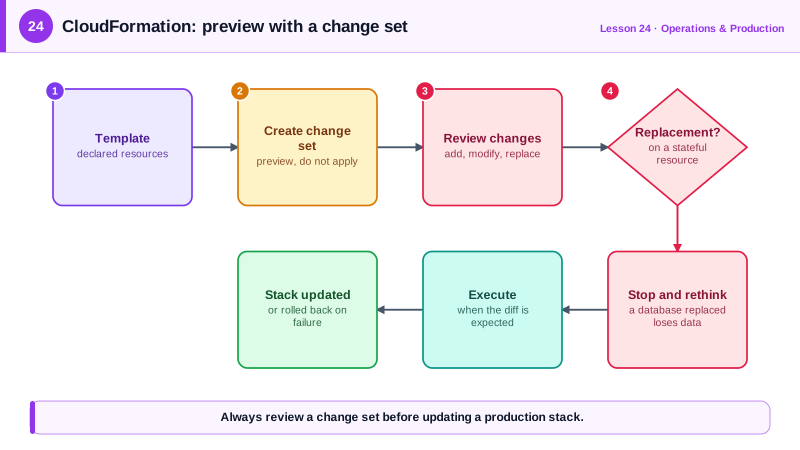
Updating a stack directly is risky: some property changes replace a resource, meaning delete and recreate it, which for a database means losing data. A change set shows what will happen first:
aws cloudformation create-change-set --stack-name app-server \
  --change-set-name resize-to-r7g \
  --use-previous-template \
  --parameters ParameterKey=InstanceType,ParameterValue=r7g.large ParameterKey=ImageId,UsePreviousValue=true

aws cloudformation describe-change-set --stack-name app-server \
  --change-set-name resize-to-r7g \
  --query 'Changes[].ResourceChange.[Action,LogicalResourceId,ResourceType,Replacement]' --output text
For an instance type change on an EBS-backed instance, the real service reports Modify AppServer AWS::EC2::Instance False: an in-place update that stops and starts the instance. Changing ImageId instead would show Replacement True, a new instance. Read the Replacement column every time, then execute-change-set once you're happy.
CloudFormation guard rails
- DeletionPolicy: Retain or Snapshot on databases and buckets, and stack termination protection, so a mistaken delete doesn't destroy data.
- Drift detection finds resources someone changed by hand outside CloudFormation.
- Stack policies block updates to critical resources.
- Nested stacks or StackSets for reuse across stacks, accounts and regions.
CloudFormation vs CDK vs Terraform
| Tool | What you write | Notes |
|---|---|---|
| CloudFormation | YAML or JSON | AWS-native, no state file to manage, new AWS features usually supported quickly |
| AWS CDK | TypeScript, Python, Java, C#, Go | Real code with loops and classes, compiled into CloudFormation |
| Terraform / OpenTofu | HCL | Works across clouds and SaaS providers; you manage a state file |
All three beat the console. Pick one per team and use it for everything, so there's one source of truth.
Check yourself
It previews every change before anything happens, including resources that would be replaced rather than updated, which for a database means a new, empty instance. You review it, then execute or discard it.
Set DeletionPolicy: Retain or Snapshot on the database resource, plus UpdateReplacePolicy, and enable termination protection on the stack so it can't be deleted until someone turns that off.
Drift detection compares each resource's actual configuration with what the template declares and reports the differences. Fix it by updating the template or reverting the manual change, then make console changes rare.
When you want loops, functions and reusable components in a real programming language. CDK still synthesizes CloudFormation, so stacks and change sets work the same.
Networking, databases and applications change at different rates. Separate stacks limit the impact of a mistake and make updates faster and safer.