AWS EC2 Tutorial: Instances, AMIs and Types
On this page
What EC2 is
EC2 (Elastic Compute Cloud) rents virtual machines, called instances. You choose what software it starts with, how big it is and which network it joins, and it's running about a minute later. It's the most flexible compute on AWS, and the one where you manage the most: the operating system, patches and everything on it.
The parts of an EC2 instance: AMI, type, storage, network
- AMI (Amazon Machine Image): the template for the root disk, with an operating system and optionally your software. Use official images (Amazon Linux 2023, Ubuntu, Windows) or build your own with Packer or EC2 Image Builder.
- Instance type: CPU, memory, network and storage capacity.
- Storage: an EBS root volume, plus optional data volumes (Day 18).
- Network: a subnet in a VPC, security groups, and optionally a public IP (Day 9).
- IAM role through an instance profile, so software on the instance gets temporary credentials without keys.
- User data: a script run at first boot.
How to read EC2 instance type names
m7g.large breaks down as:
m: the family, general purpose.7: the generation. Newer is usually faster and cheaper per unit of work.g: an attribute, here AWS Graviton (ARM) processors.iis Intel,ais AMD,dadds local NVMe disks,nadds network bandwidth.large: the size. Each step up (xlarge,2xlarge, ...) roughly doubles CPU, memory and price.
| Family | Optimized for | Examples |
|---|---|---|
t | Burstable general purpose, earns CPU credits while idle | Dev servers, small sites |
m | Balanced CPU and memory | Most web applications |
c | Compute | Encoding, batch processing, busy APIs |
r, x | Memory | Databases, caches, in-memory analytics |
i, d | Fast local storage | Search engines, some databases |
g, p and others | GPUs and accelerators | Machine learning, graphics |
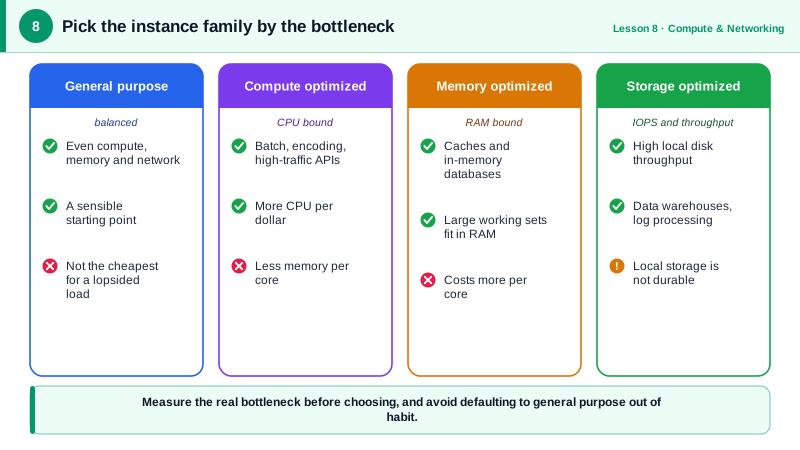
Graviton instances typically give better price-performance for software that runs on ARM, which includes most Linux runtimes and containers. Check your dependencies first.
Launching EC2 with user data and IMDSv2
User data runs once, as root, on the first boot. This one installs nginx on Amazon Linux 2023 (which uses dnf):
#!/bin/bash
# Runs once, as root, on the instance's first boot
dnf install -y nginx
systemctl enable --now nginx
echo "<h1>Hello from $(hostname)</h1>" > /usr/share/nginx/html/index.html
Launching two instances with it (run against a local AWS emulator, so the IDs are fake):
aws ec2 run-instances \
  --image-id ami-01a1b1a4d93797ddc \
  --instance-type t4g.small \
  --count 2 \
  --subnet-id subnet-0a1b2c3d4e5f60789 \
  --security-group-ids sg-0app1234567890abc \
  --user-data file://user-data.sh \
  --metadata-options HttpTokens=required \
  --tag-specifications 'ResourceType=instance,Tags=[{Key=Name,Value=web}]' \
--query 'Instances[].[InstanceId,InstanceType,State.Name,PrivateIpAddress]' --output texti-7a9040f5f49ae086a t4g.small pending 10.0.1.4
i-4aedae15d20ba9984 t4g.small pending 10.0.1.5Notes on that command:
- Look up the current AMI ID rather than hardcoding it. AWS publishes the latest Amazon Linux IDs as public SSM parameters, such as
/aws/service/ami-amazon-linux-latest/al2023-ami-kernel-default-arm64. HttpTokens=requiredenforces IMDSv2 for the instance metadata service, which blocks a class of server-side request forgery attacks that stole credentials through IMDSv1.- No SSH key: connect with Systems Manager Session Manager instead of opening port 22.
- User data logs are in
/var/log/cloud-init-output.log.
Treat EC2 instances as cattle, not pets
Bake or script everything an instance needs, so any instance can be replaced at any moment. Then put them in an Auto Scaling group (Day 12), and don't fix servers by hand: replace them.
Check yourself
c is the compute-optimized family, 7 the generation, g means an AWS Graviton (Arm) processor and n enhanced networking, and 2xlarge is the size, with 8 vCPUs for this family. Sizes double resources at each step.
IMDSv2 requires a session token obtained with a PUT request before reading instance metadata. Most server-side request forgery bugs can only make simple GET requests, so they can't steal the instance role's credentials from the metadata service.
In the cloud-init logs on the instance, such as /var/log/cloud-init-output.log, which show the script's output and errors. Remember that user data runs only on the first boot by default, so changing it on an existing instance does nothing until it's replaced.
They usually give better price performance than comparable x86 instances. Most Linux software, containers built for Arm64 and managed runtimes work on them unchanged.