AWS EKS: Kubernetes on AWS Explained
On this page
What EKS manages for you
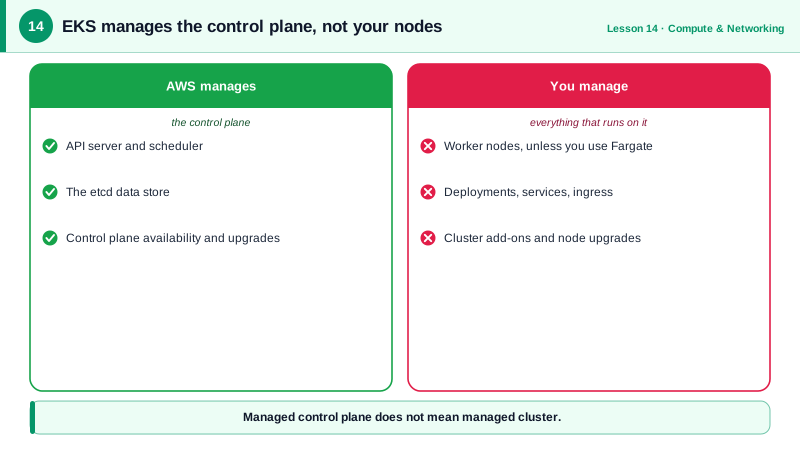
Running Kubernetes yourself means operating its control plane: the API server, the scheduler, and etcd, which stores all cluster state and is unforgiving when it breaks. EKS (Elastic Kubernetes Service) runs that control plane for you across three Availability Zones, upgrades it, and backs it up. You pay an hourly fee per cluster and work with standard Kubernetes: the same kubectl, manifests and Helm charts as anywhere else.
EKS node options: node groups, Karpenter, Fargate, Auto Mode
| Option | What you manage | Good for |
|---|---|---|
| Managed node groups | Choose instance types and scaling; AWS handles node provisioning and rolling updates | The common default |
| Karpenter | Install it; it launches right-sized EC2 nodes for pending pods within seconds | Varied workloads, cost efficiency, Spot |
| Fargate | Nothing: each pod runs in its own micro-VM | Small or bursty workloads; no DaemonSets or GPUs |
| EKS Auto Mode | Very little: AWS manages nodes, scaling, load balancer and storage controllers | Teams that want Kubernetes without node operations |
EKS networking, load balancers and IAM
- Networking: the VPC CNI plugin gives every pod a real VPC IP address. Pods are reachable directly and security groups can apply to them, but large clusters consume many IPs, so size subnets generously.
- Load balancers: the AWS Load Balancer Controller turns a Kubernetes
Ingressinto an ALB and aServiceof typeLoadBalancerinto an NLB. - Who can use the cluster: access entries map IAM roles to Kubernetes permissions, replacing the old
aws-authConfigMap. - What pods can do in AWS: EKS Pod Identity (or the older IRSA) gives a Kubernetes service account an IAM role, so each application gets only its own permissions, not the node's.
- Storage: the EBS and EFS CSI drivers provide persistent volumes.
Creating an EKS cluster
These CLI calls were validated client-side; in practice, eksctl, Terraform or CloudFormation set up the IAM roles and networking for you.
aws eks create-cluster --name prod \
  --role-arn arn:aws:iam::123456789012:role/eks-cluster-role \
  --resources-vpc-config subnetIds=subnet-0a1b2c3d,subnet-0e5f6a7b,endpointPublicAccess=false,endpointPrivateAccess=true \
  --access-config authenticationMode=API

aws eks create-nodegroup --cluster-name prod --nodegroup-name general \
  --node-role arn:aws:iam::123456789012:role/eks-node-role \
  --subnets subnet-0a1b2c3d subnet-0e5f6a7b \
  --instance-types m7g.large --ami-type AL2023_ARM_64_STANDARD \
  --scaling-config minSize=2,maxSize=10,desiredSize=3

# Let the platform team administer the cluster
aws eks create-access-entry --cluster-name prod \
  --principal-arn arn:aws:iam::123456789012:role/platform-admins
aws eks associate-access-policy --cluster-name prod \
  --principal-arn arn:aws:iam::123456789012:role/platform-admins \
  --policy-arn arn:aws:eks::aws:cluster-access-policy/AmazonEKSClusterAdminPolicy \
  --access-scope type=cluster

# Give the orders-api service account its own IAM role
aws eks create-pod-identity-association --cluster-name prod \
  --namespace orders --service-account orders-api \
  --role-arn arn:aws:iam::123456789012:role/orders-api

aws eks update-kubeconfig --name prod
kubectl get nodes
From there, everything is ordinary Kubernetes: Deployments, Services, ConfigMaps (see the Docker and Kubernetes course).
Operating EKS: upgrades and add-ons
- Upgrades: EKS supports each Kubernetes minor version for a limited time, after which extended support costs more. Plan to upgrade the control plane, add-ons and nodes a few times a year.
- Add-ons: VPC CNI, CoreDNS and kube-proxy are versioned add-ons you keep current.
- Observability: CloudWatch Container Insights or Prometheus and Grafana.
EKS vs ECS
Choose EKS when you want the Kubernetes ecosystem (Helm charts, operators, portability across clouds) or already have Kubernetes skills. Choose ECS (Day 13) when you just need to run containers on AWS: it has no cluster fee, fewer moving parts, and no version upgrades to schedule.
Check yourself
The control plane: API servers, scheduler, controllers and etcd, run across three Availability Zones, backed up and upgraded when you ask. You still manage worker nodes, unless you use Fargate or Auto Mode, plus add-ons and your workloads.
Through EKS Pod Identity or IRSA, which associate the pod's service account with a dedicated IAM role and give it temporary credentials. Using the node's role would give every pod on that node the same permissions.
ECS is simpler to operate: there's no cluster fee, no Kubernetes version upgrades every year and fewer moving parts, and it still integrates with load balancers, IAM and autoscaling. EKS pays off when you need Kubernetes' ecosystem or portability.
It watches for pods that can't be scheduled and launches right-sized EC2 instances for them within seconds, and removes or consolidates underused nodes.
Each Kubernetes version gets standard support for about 14 months, after which extended support costs more. Upgrades need testing of deprecated APIs and add-ons, so schedule them regularly.