AWS Auto Scaling Groups Tutorial
On this page
What an Auto Scaling group does
An Auto Scaling group (ASG) does two things:
- Self-healing: keep the desired number of healthy instances. If one fails a health check or its AZ has trouble, launch a replacement.
- Scaling: change that number with load, within a minimum and maximum.
Even a fixed fleet should be an ASG with min, max and desired all equal, just for the self-healing.
Launch templates, capacity and health checks
- Launch template: what to launch: AMI, instance type, security groups, IAM instance profile, user data, IMDSv2 setting. Templates are versioned.
- Group settings: subnets in several AZs, min, max and desired capacity, and target groups to register instances in.
- Health checks: EC2 status checks by default. Set the type to ELB so instances failing the load balancer's health check are replaced too, with a grace period so new instances have time to boot.
- Scaling policies that change the desired capacity.
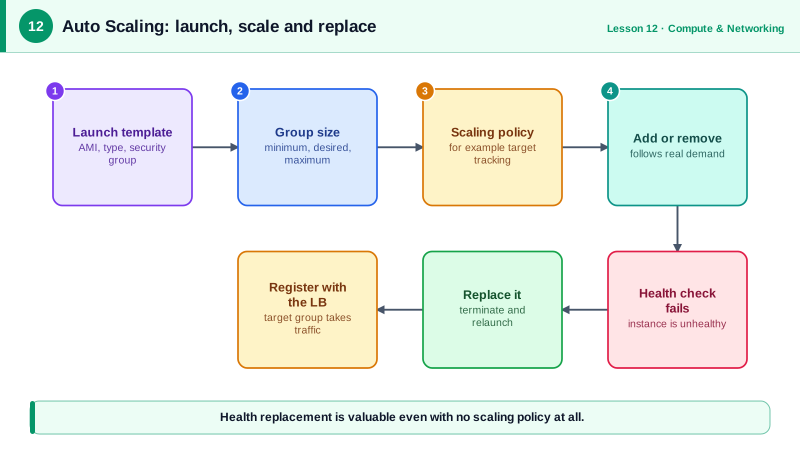
A target tracking Auto Scaling group behind an ALB
Run against a local AWS emulator:
aws ec2 create-launch-template --launch-template-name web-lt \
  --launch-template-data '{
    "ImageId": "ami-01a1b1a4d93797ddc",
    "InstanceType": "t4g.small",
    "SecurityGroupIds": ["sg-0app1234567890abc"],
    "MetadataOptions": {"HttpTokens": "required"}
  }'

aws autoscaling create-auto-scaling-group \
  --auto-scaling-group-name web-asg \
  --launch-template 'LaunchTemplateName=web-lt,Version=$Latest' \
  --min-size 2 --max-size 10 --desired-capacity 2 \
  --vpc-zone-identifier "subnet-private-a,subnet-private-b" \
  --target-group-arns $API_TG_ARN \
  --health-check-type ELB --health-check-grace-period 120

aws autoscaling put-scaling-policy \
  --auto-scaling-group-name web-asg \
  --policy-name cpu-target-60 \
  --policy-type TargetTrackingScaling \
  --target-tracking-configuration '{
    "PredefinedMetricSpecification": {"PredefinedMetricType": "ASGAverageCPUUtilization"},
    "TargetValue": 60.0
  }'

aws autoscaling describe-auto-scaling-groups --auto-scaling-group-names web-asg \
--query 'AutoScalingGroups[0].[MinSize,MaxSize,DesiredCapacity,length(Instances),HealthCheckType]' --output text2 10 2 2 ELBTarget tracking works like a thermostat: keep average CPU near 60 percent, adding instances when it's above and removing them when it's well below. AWS creates and manages the CloudWatch alarms. For web traffic, ALBRequestCountPerTarget often tracks load better than CPU.
The arithmetic is roughly proportional. Four instances averaging 90 percent CPU are doing 4 × 90 = 360 percent of one instance's work. At the 60 percent target, that needs 360 ÷ 60 = 6 instances, so the group scales to 6. Scaling in is deliberately slower and more cautious than scaling out, so a brief dip in traffic doesn't remove capacity you'll need a minute later.
Auto Scaling policy types
| Policy | How it works | Use when |
|---|---|---|
| Target tracking | Hold a metric at a target value | Most workloads; start here |
| Step scaling | Add or remove amounts based on alarm thresholds | You need different responses to different breach sizes |
| Scheduled | Change capacity at set times | Known patterns: business hours, a planned launch |
| Predictive | Forecast from history and scale ahead of time | Regular daily or weekly cycles with slow-starting apps |
Making auto scaling work in practice
- Fast boots: scaling only helps if new instances are ready in time. Bake software into the AMI instead of installing it in user data; consider warm pools of pre-initialized instances.
- Leave headroom: with a target of 60 percent, a sudden spike has room while new instances start.
- Minimum of 2 across 2 AZs for anything that matters.
- Mixed instances and Spot: an ASG can mix several instance types and On-Demand with Spot, which improves Spot availability and cost (Day 5).
- Deploying new versions: update the launch template, then start an instance refresh, which replaces instances in batches while keeping a minimum healthy percentage.
- Graceful shutdown: lifecycle hooks pause termination so instances can drain connections or finish jobs.
Check yourself
The group continuously replaces failed or unhealthy instances to keep the desired count, including after an AZ outage, without anyone being paged. Min, max and desired can all be the same number.
So instances that are running but failing the load balancer's application health check get replaced, not only those failing EC2 status checks.
How long new instances take to become healthy; bake software into the AMI, use warm pools or predictive scaling, and keep more headroom.
You choose a metric and target, such as 50 percent average CPU or a request count per target, and the group adds or removes instances to keep the metric near it.
A set of pre-initialized, stopped instances the group can start quickly during scale-out, cutting the time spent booting and configuring new instances.