AWS CloudTrail: Audit Logging Explained
On this page
What CloudTrail records
Something changed in production: a security group opened to the world, a bucket deleted, an IAM user created at 2 a.m. CloudTrail answers who did it, from which IP, with which credentials, and exactly what they sent. It's essential for incident response, compliance and plain debugging.
CloudTrail management, data and Insights events
Every event includes the caller's identity (user, role, assumed-role session), the time, source IP, user agent, request parameters and the response or error.
| Event type | Examples | Default |
|---|---|---|
| Management events | Creating instances, changing IAM policies, deleting buckets, console sign-ins | Recorded; 90 days of history viewable free in Event history |
| Data events | S3 GetObject and PutObject, Lambda invocations, DynamoDB item reads and writes | Off: high volume, charged per event |
| Insights events | Unusual spikes in API call rates or error rates | Off; optional, charged |
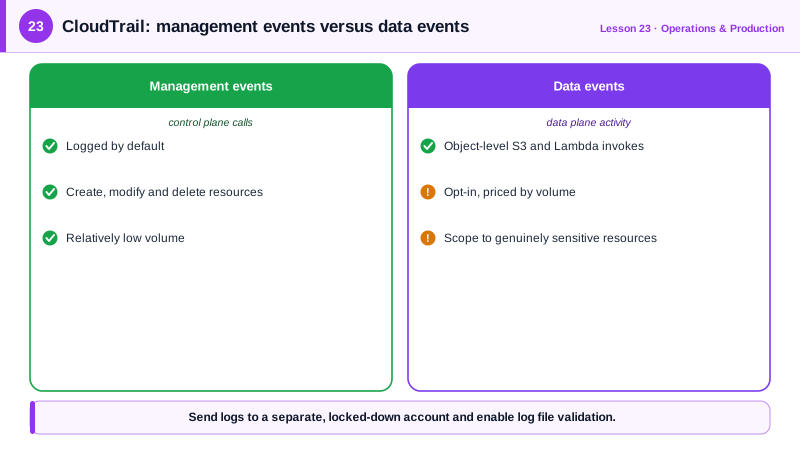
The 90-day event history isn't enough for real use: it's limited, regional, and gone after 90 days. Create a trail.
A hardened multi-region CloudTrail trail
The bucket gets Object Lock in compliance mode, so log files can't be deleted or altered for a year, not even by an administrator. Run against a local AWS emulator:
aws s3api create-bucket --bucket cloudtrail-logs-prod --object-lock-enabled-for-bucket
aws s3api put-object-lock-configuration --bucket cloudtrail-logs-prod \
  --object-lock-configuration '{"ObjectLockEnabled": "Enabled",
    "Rule": {"DefaultRetention": {"Mode": "COMPLIANCE", "Years": 1}}}'

aws cloudtrail create-trail --name org-trail \
  --s3-bucket-name cloudtrail-logs-prod \
  --is-multi-region-trail --enable-log-file-validation
aws cloudtrail start-logging --name org-trailorg-trail True True(The bucket also needs a bucket policy allowing the CloudTrail service to write; the console adds it for you.) Log file validation writes signed digest files, so you can prove later that logs weren't modified. A multi-region trail catches activity in regions you don't normally use, which is exactly where attackers like to launch resources.
Adding data events for one sensitive bucket with advanced event selectors:
aws cloudtrail put-event-selectors --trail-name org-trail --advanced-event-selectors '[
  {"Name": "Management events",
   "FieldSelectors": [{"Field": "eventCategory", "Equals": ["Management"]}]},
  {"Name": "Data events on customer-records",
   "FieldSelectors": [
     {"Field": "eventCategory", "Equals": ["Data"]},
     {"Field": "resources.type", "Equals": ["AWS::S3::Object"]},
     {"Field": "resources.ARN", "StartsWith": ["arn:aws:s3:::customer-records/"]}]}
]'
The first selector is easy to forget: advanced selectors replace the trail's existing selectors, so without it you'd silently stop logging management events.
Organization-wide CloudTrail
In AWS Organizations (Day 26), create an organization trail from the management or delegated administrator account. It logs every member account into a central bucket in a separate log-archive account, and member accounts can't turn it off. Protect it further with a service control policy that denies cloudtrail:StopLogging and cloudtrail:DeleteTrail.
Searching and alerting on CloudTrail logs
- Quick lookups:
aws cloudtrail lookup-events --lookup-attributes AttributeKey=EventName,AttributeValue=DeleteBucket. - Queries at scale: CloudTrail Lake or Amazon Athena over the S3 logs, with SQL.
- Alerts: EventBridge rules on specific events (root sign-in,
AuthorizeSecurityGroupIngresswith0.0.0.0/0,StopLogging) that notify the security team within seconds. GuardDuty analyzes CloudTrail automatically for threats.
Check yourself
A trail keeps logs as long as you need, in a bucket you control, covering all regions, and can include data events; Event history is limited and expires.
An attacker with admin access would otherwise delete the logs that record their actions; compliance-mode Object Lock prevents deletion for the retention period.
Advanced event selectors replace the trail's existing selectors entirely. If you define only a selector for S3 data events, management events are no longer logged, so include a selector for management events in the same configuration.
Root user logins, IAM policy changes, disabling CloudTrail or GuardDuty, console logins without MFA, and changes to security groups that open admin ports to the internet.
It logs every account in the organization to one central bucket, and member accounts can't turn it off, so new accounts are covered automatically.