AWS DynamoDB Tutorial for Beginners
On this page
DynamoDB design starts with the questions
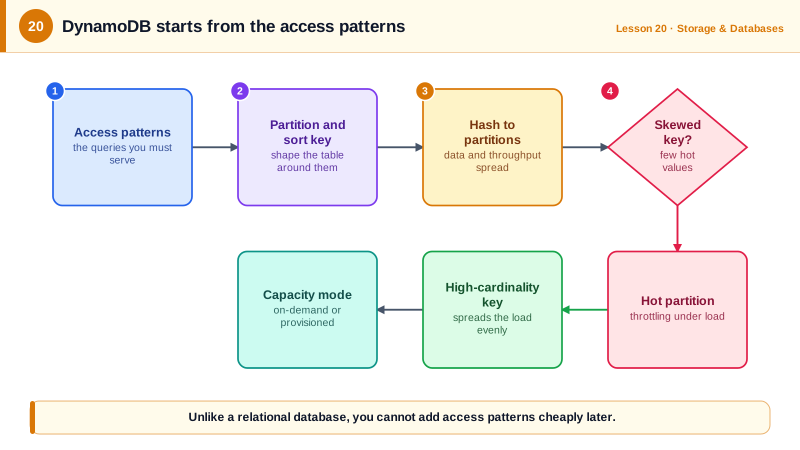
In a relational database you model the data, then write whatever queries you need. DynamoDB reverses that: you list the questions the application will ask, then design keys so each question is a fast, direct lookup. Get it right and it serves millions of requests per second with no servers to manage. Get it wrong and you end up scanning whole tables.
DynamoDB partition keys and sort keys
- Every item has a partition key. DynamoDB hashes it to decide which internal partition stores the item.
- An optional sort key orders items that share a partition key, so you can fetch ranges: "all readings for device 4821 between 14:30 and 14:32".
- Together they form the primary key, which must be unique.
- Global secondary indexes (GSIs) provide additional key structures for other access patterns, maintained automatically and eventually consistent.
A DynamoDB table for sensor readings
The query: "readings for one device over a time range". Partition key = device, sort key = timestamp. Run against a local AWS emulator:
aws dynamodb create-table --table-name sensor-readings \
  --attribute-definitions AttributeName=pk,AttributeType=S AttributeName=sk,AttributeType=S \
  --key-schema AttributeName=pk,KeyType=HASH AttributeName=sk,KeyType=RANGE \
  --billing-mode PAY_PER_REQUEST

aws dynamodb put-item --table-name sensor-readings --item '{
  "pk": {"S": "device#4821"}, "sk": {"S": "2026-10-11T14:30:00Z"},
  "type": {"S": "temperature"}, "value": {"N": "22.0"}}'
# ... more readings ...

aws dynamodb query --table-name sensor-readings \
  --key-condition-expression 'pk = :d AND sk BETWEEN :from AND :to' \
  --expression-attribute-values '{":d": {"S": "device#4821"},
    ":from": {"S": "2026-10-11T14:30:00Z"}, ":to": {"S": "2026-10-11T14:31:59Z"}}' \
--query '[Count, Items[].[sk.S, value.N]]' --output text2
2026-10-11T14:30:00Z 22.0
2026-10-11T14:31:00Z 22.1ISO timestamps sort correctly as strings, which is why they make good sort keys. A Query reads only the matching items. A Scan reads the whole table and should be rare in production paths.
Conditional writes give you safe updates without locks. Writing a reading that already exists, with a condition:
aws dynamodb put-item --table-name sensor-readings \
  --item '{"pk": {"S": "device#4821"}, "sk": {"S": "2026-10-11T14:30:00Z"}, "value": {"N": "99"}}' \
--condition-expression 'attribute_not_exists(pk)'An error occurred (ConditionalCheckFailedException) when calling the PutItem operation: The conditional request failedThat's how you get idempotent inserts and optimistic locking (with a version attribute).
DynamoDB hot partitions
Each partition supports up to 3,000 reads and 1,000 writes per second. If the partition key is low-cardinality or skewed, traffic concentrates on one partition and gets throttled while the table's total capacity sits idle.
| Partition key | Problem |
|---|---|
sensor_type ("temperature", "humidity") | A handful of values; all temperature writes hit one partition |
date | Today's partition takes every write |
device_id | Many values, spread evenly: good |
You can see the difference by hashing keys the way DynamoDB does, here into four partitions, for 10,000 writes from 500 devices where three readings in four are temperatures:
# partitions.py: how a partition key spreads 10,000 writes across 4 partitions
import hashlib, random
from collections import Counter

random.seed(1)
writes = [{"device_id": f"device#{random.randrange(500)}",
           "sensor_type": random.choice(["temperature", "temperature", "temperature", "humidity"])}
          for _ in range(10_000)]

def partition_of(key, partitions=4):
    return int(hashlib.md5(key.encode()).hexdigest(), 16) % partitions

for key_name in ("sensor_type", "device_id"):
    load = Counter(partition_of(w[key_name]) for w in writes)
print(f"key = {key_name:<12}", [load.get(p, 0) for p in range(4)])key = sensor_type [0, 7494, 0, 2506]
key = device_id [2501, 2606, 2486, 2407]With sensor_type as the key there are only two values, so two partitions sit empty while one takes three quarters of all writes. That partition hits its limit while the table as a whole looks barely used. With device_id, 500 values hash evenly and every partition carries about a quarter of the load. The rule of thumb: a good partition key has many distinct values, each used about equally.
The fix is a key with many evenly used values. If one key is unavoidably hot (a viral item), write sharding spreads it: append a random suffix item#42#7 across N keys and combine on read. DynamoDB's adaptive capacity helps with moderate skew, not extreme skew.
DynamoDB capacity modes and features
- On-demand: pay per request, no planning. The default choice, especially for spiky or new workloads.
- Provisioned: set read and write capacity units (with auto scaling); cheaper for steady, predictable traffic.
- Other features: TTL for automatic expiry, Streams for change events (to Lambda), transactions across up to 100 items, point-in-time recovery, and global tables for multi-region replication.
Check yourself
DynamoDB reads efficiently only by primary key and indexes. Queries the keys don't support need a full table scan, which is slow and expensive, so the table must be designed around the questions the application will ask.
All of today's writes share one partition key, so they hit one partition, which has a limit of about 1,000 writes per second regardless of the table's total capacity. Spread writes with a higher-cardinality key, such as sensor id, or add a random suffix.
Use a conditional PutItem with attribute_not_exists on the partition key. If an item with that key already exists, the write fails with ConditionalCheckFailedException instead of silently overwriting it.
With only three values, every write lands on at most three partitions, and most new orders share one status, so one partition takes nearly all writes and hits its per-partition limit.