AWS Cost Optimization Best Practices
On this page
The order of AWS cost optimization
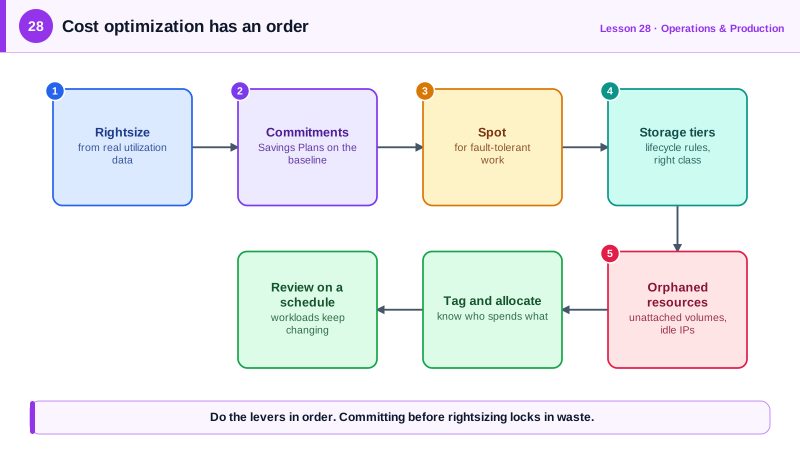
Teams often start by buying Savings Plans. That locks in a discount on whatever is running, including the oversized and forgotten parts. Do it in order instead:
- Visibility: know who spends what.
- Remove waste: delete what nobody uses.
- Rightsize: shrink what's too big.
- Commit: buy discounts for the stable baseline that's left.
- Architect: change designs that are inherently expensive.
1. Visibility: tags, accounts and Cost Explorer
- Enforce tags (
Project,Environment,Owner) with tag policies or IaC checks, and activate them as cost allocation tags (Day 5). - Use separate accounts per team or application (Day 26), which makes ownership obvious.
- Review Cost Explorer by service and account monthly, and turn on Cost Anomaly Detection.
2. Remove waste: idle and orphaned resources
Resources that cost money while doing nothing (run against a local AWS emulator):
# Unattached EBS volumes
aws ec2 describe-volumes --filters Name=status,Values=available \
  --query 'Volumes[].[VolumeId,Size,VolumeType]' --output text

# Elastic IPs not attached to anything
aws ec2 describe-addresses --query 'Addresses[?AssociationId==null].[PublicIp,AllocationId]' --output textvol-a895e40a292950e0f 500 gp3That 500 GB volume was created for a database and never attached (Day 18): it bills every month. Other common waste:
- Old EBS snapshots and AMIs nobody will restore.
- Idle load balancers, NAT gateways in dev accounts, forgotten test databases.
- Log groups with no retention (Day 22) and S3 buckets without lifecycle rules (Day 17).
- Dev and test environments running nights and weekends: stopping them outside working hours cuts their compute cost by around two thirds.
3. Rightsize with Compute Optimizer
Use real utilization data, not guesses. AWS Compute Optimizer analyzes CloudWatch metrics and recommends smaller or different instance types, Lambda memory settings and EBS volumes (validated client-side):
aws compute-optimizer get-ec2-instance-recommendations \
  --filters name=Finding,values=Overprovisioned
Typical wins: instances averaging 5 percent CPU dropped a size or two, moves to Graviton for better price-performance, and gp2 volumes converted to gp3. Rightsize databases carefully, checking memory and I/O, not only CPU.
4. Commit to the baseline with Savings Plans
Once usage is clean and correctly sized, cover the steady baseline with Compute Savings Plans (flexible across instance families, regions, Fargate and Lambda) and Reserved Instances for RDS, ElastiCache and OpenSearch. Check coverage and utilization monthly (validated client-side):
aws ce get-savings-plans-coverage \
  --time-period Start=2026-09-01,End=2026-10-01 --granularity MONTHLY
Commit to the baseline, not the peak; leave the variable part On-Demand. Move interruptible work (CI runners, batch jobs, stateless workers in mixed Auto Scaling groups) to Spot.
5. Architect for cost
- Data transfer: serve public content through CloudFront, keep chatty services in the same AZ where safe, use VPC endpoints instead of NAT for S3 and DynamoDB traffic.
- Storage tiers: lifecycle rules and Intelligent-Tiering for S3.
- Match the compute model to the load: Lambda for spiky, low-volume work; containers or instances for steady, high throughput.
- Caching (Day 21) to shrink database instances.
A monthly AWS cost review
| Step | Question | Tool |
|---|---|---|
| Trend | What changed since last month, and why? | Cost Explorer by service and account |
| Anomalies | Any unexpected spikes? | Cost Anomaly Detection |
| Waste | Anything idle or orphaned? | The sweeps above, Trusted Advisor |
| Rightsizing | What's oversized? | Compute Optimizer |
| Commitments | Is coverage and utilization healthy? | Savings Plans and RI reports |
| Unit cost | Cost per customer, order or request | Your metrics divided by spend |
Track unit cost (for example, cost per thousand orders). A bill that grows with the business is fine; a unit cost that grows means something is getting less efficient.
Check yourself
Commitments lock in a level of spend for one to three years. Committing before removing oversized instances locks in that waste for the whole term; rightsize first, then commit to the smaller, steady baseline.
Unattached EBS volumes, unassociated Elastic IPs and other public IPv4 addresses, idle load balancers and NAT gateways, and old snapshots. A monthly review or automated cleanup catches them.
Compare unit cost, such as cost per order or per active customer. If usage grew 30 percent while the bill grew 20, the system became more efficient; if usage was flat, something is wasting money and needs investigating.
They charge per hour and per GB processed. Traffic to S3, ECR or other AWS services through NAT adds up; VPC endpoints remove most of it.