AWS VPC Tutorial: Subnets and Route Tables
On this page
What a VPC is
Every EC2 instance, database and load balancer sits in a VPC (Virtual Private Cloud): an isolated network with an IP range you choose. Get its layout right and security, routing and high availability follow. Get it wrong and you'll be re-creating resources to fix it.
VPC building blocks: subnets, route tables and gateways
- VPC: a CIDR block such as
10.0.0.0/16(65,536 addresses), in one region. Pick a range that won't overlap other VPCs or your office network. - Subnet: a slice of the VPC's range in one Availability Zone, like
10.0.1.0/24. AWS reserves 5 addresses in each. - Route table: rules for where traffic to each destination goes. Every subnet uses exactly one.
- Internet gateway (IGW): the VPC's door to the internet.
- NAT gateway: lets instances in private subnets make outbound connections while staying unreachable from outside.
Public vs private subnets
There's no "public" checkbox. A subnet is public when its route table sends 0.0.0.0/0 to an internet gateway and its instances have public IPs. A private subnet has no such route; if it needs outbound access (package downloads, external APIs), its default route points at a NAT gateway that lives in a public subnet.
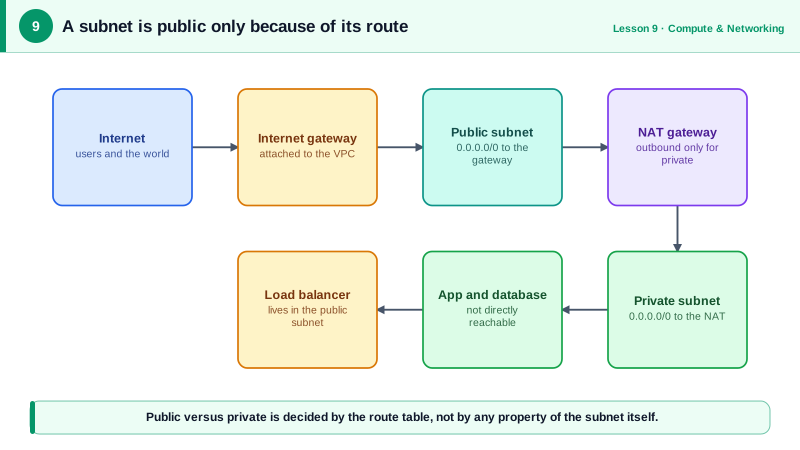
A standard two-tier VPC layout
Load balancers in public subnets, application servers and databases in private ones, across two AZs:
| Subnet | AZ | CIDR | Default route |
|---|---|---|---|
| public-a | us-east-1a | 10.0.1.0/24 | Internet gateway |
| public-b | us-east-1b | 10.0.2.0/24 | Internet gateway |
| private-a | us-east-1a | 10.0.11.0/24 | NAT gateway |
| private-b | us-east-1b | 10.0.12.0/24 | NAT gateway |
Built with the CLI (run against a local AWS emulator; the B subnets mirror the A ones):
VPC=$(aws ec2 create-vpc --cidr-block 10.0.0.0/16 --query Vpc.VpcId --output text)
PUBA=$(aws ec2 create-subnet --vpc-id $VPC --cidr-block 10.0.1.0/24 \
  --availability-zone us-east-1a --query Subnet.SubnetId --output text)

# The internet gateway and the route that makes public-a public
IGW=$(aws ec2 create-internet-gateway --query InternetGateway.InternetGatewayId --output text)
aws ec2 attach-internet-gateway --vpc-id $VPC --internet-gateway-id $IGW
RTB=$(aws ec2 create-route-table --vpc-id $VPC --query RouteTable.RouteTableId --output text)
aws ec2 create-route --route-table-id $RTB --destination-cidr-block 0.0.0.0/0 --gateway-id $IGW
aws ec2 associate-route-table --route-table-id $RTB --subnet-id $PUBA

# A NAT gateway in the public subnet, and the private route table pointing at it
EIP=$(aws ec2 allocate-address --domain vpc --query AllocationId --output text)
NAT=$(aws ec2 create-nat-gateway --subnet-id $PUBA --allocation-id $EIP \
  --query NatGateway.NatGatewayId --output text)
PRTB=$(aws ec2 create-route-table --vpc-id $VPC --query RouteTable.RouteTableId --output text)
aws ec2 create-route --route-table-id $PRTB --destination-cidr-block 0.0.0.0/0 --nat-gateway-id $NAT
The two route tables afterwards:
10.0.0.0/16	local
0.0.0.0/0	igw-2914b88ef04d69389
10.0.0.0/16	local
0.0.0.0/0	nat-f5073ebc68ee4c08e
The local route is automatic: everything inside the VPC can route to everything else, and security groups decide what's allowed (Day 10). In practice you'd build this with infrastructure as code (Day 24) rather than shell variables.
Follow one packet out of a private subnet
Route tables are easier to understand when you follow a single request. An app server at 10.0.11.25 in private-a calls an external API at 203.0.113.10:
- The destination isn't inside
10.0.0.0/16, so thelocalroute doesn't match. The private route table's0.0.0.0/0route sends the packet to the NAT gateway. - The NAT gateway, sitting in
public-a, rewrites the source address to its own Elastic IP and remembers the mapping, exactly as a home router does (see the Networking course's NAT lesson). - The public subnet's route table sends
0.0.0.0/0to the internet gateway, which puts the packet on the internet. - The reply comes back to the Elastic IP. The internet gateway hands it to the NAT gateway, which translates it back to
10.0.11.25.
Now two other cases. A call from 10.0.11.25 to a database at 10.0.12.40 matches the local route and never leaves the VPC. And a connection attempt from the internet to 10.0.11.25 can't happen at all: the instance has no public address, and the NAT gateway only translates replies to connections that started inside. That one-way door is what "private subnet" means in practice.
VPC design notes: NAT per AZ, endpoints and peering
- One NAT gateway per AZ for production. With a single one, losing its AZ cuts outbound access for every private subnet. NAT gateways charge per hour and per GB, so watch the bill.
- VPC endpoints let private subnets reach S3, DynamoDB and other AWS services without NAT. Gateway endpoints for S3 and DynamoDB are free.
- Leave room: you can add CIDR blocks to a VPC later, but you can't resize a subnet.
- Connect VPCs with peering for a few, or a Transit Gateway for many.
Check yourself
Its route table has a route for 0.0.0.0/0 to an internet gateway. Instances in it also need a public IP or Elastic IP to actually use that route, so a public subnet doesn't make every instance in it reachable.
That the private subnet's route table sends 0.0.0.0/0 to a NAT gateway, that the NAT gateway sits in a public subnet whose route table points to the internet gateway, and that security groups and network ACLs allow the outbound traffic.
Through an S3 gateway VPC endpoint added to the private subnets' route tables. Traffic to S3 then stays on the AWS network, and gateway endpoints for S3 and DynamoDB are free.
First the private subnet's table, whose 0.0.0.0/0 route sends it to the NAT gateway; then the public subnet's table, where the NAT gateway lives, whose 0.0.0.0/0 route sends it to the internet gateway.