AWS S3 Security, Versioning and Lifecycle Rules
On this page
How S3 data leaks and data loss happen
Over the years, many large data leaks have come from S3 buckets someone made public by mistake. And many data losses come from a script or a person deleting objects, with no way back. S3 has controls for both. The defaults have improved, but you still need to know them.
S3 Block Public Access, bucket policies and ACLs
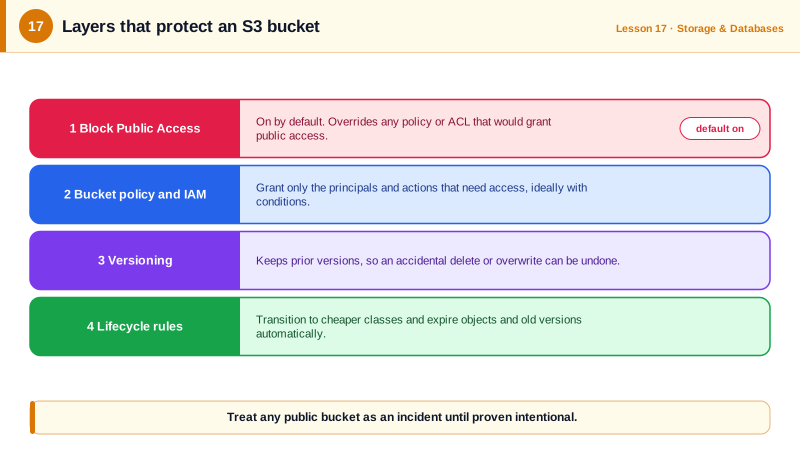
Access is decided by several layers together (Day 4's evaluation rules apply):
- Block Public Access: four settings that override any policy or ACL granting public access. On by default for new buckets since April 2023. Turn it on at the account level too, and treat turning it off as a reviewed decision.
- IAM policies on users and roles in your account.
- Bucket policies: resource-based JSON policies on the bucket, for cross-account access, enforcing conditions, or (rarely, deliberately) public content.
- ACLs: a legacy mechanism, disabled by default on new buckets (Object Ownership "bucket owner enforced"). Leave them off.
For a public website, don't make the bucket public at all: serve it through CloudFront with origin access control, which keeps the bucket private.
An S3 bucket policy that requires TLS
Deny any request that doesn't use HTTPS:
{
  "Version": "2012-10-17",
  "Statement": [{
    "Sid": "DenyInsecureTransport",
    "Effect": "Deny",
    "Principal": "*",
    "Action": "s3:*",
    "Resource": ["arn:aws:s3:::compliance-docs", "arn:aws:s3:::compliance-docs/*"],
    "Condition": {"Bool": {"aws:SecureTransport": "false"}}
  }]
}
Applied in a local AWS emulator, which listens on plain HTTP, the policy did its job on the very next upload:
$ aws s3api put-bucket-policy --bucket compliance-docs --policy file://tls-only.json
$ aws s3api put-object --bucket compliance-docs --key a.txt --body lifecycle.json
aws: [ERROR]: An error occurred (403) when calling the PutObject operation: Forbidden
Explicit deny statements like this are useful because no allow anywhere can override them.
S3 encryption at rest and in transit
- At rest: every new object is encrypted by default with S3-managed keys (SSE-S3) since January 2023. Use SSE-KMS with your own KMS key when you need key-level access control and audit trails of key use; enable S3 Bucket Keys to cut KMS request costs.
- In transit: HTTPS, enforced by the policy above.
S3 versioning: undo for objects
With versioning on, an overwrite keeps the old version, and a delete adds a delete marker instead of removing data. Tested in the emulator: upload twice, delete, list, then remove the delete marker:
aws s3api put-bucket-versioning --bucket team-docs --versioning-configuration Status=Enabled
echo v1        | aws s3 cp - s3://team-docs/policy.txt
echo v2-longer | aws s3 cp - s3://team-docs/policy.txt
aws s3 rm s3://team-docs/policy.txt
aws s3api list-object-versions --bucket team-docs --prefix policy.txt \
--query '[Versions[].[Key,IsLatest,Size], DeleteMarkers[].[Key,IsLatest]]' --output textpolicy.txt False 10
policy.txt False 3
policy.txt TrueBoth versions survive, hidden behind a delete marker. Deleting the marker (delete-object --version-id <marker id>) brings the file back:
$ aws s3 cp s3://team-docs/policy.txt -
v2-longer
For stronger protection, Object Lock makes versions undeletable for a retention period (Day 23), and replication copies objects to another region or account.
S3 lifecycle rules
Versioning keeps everything, which costs money. Lifecycle rules move and expire objects automatically:
{
  "Rules": [{
    "ID": "compliance-tiering",
    "Status": "Enabled",
    "Filter": {},
    "Transitions": [
      {"Days": 60, "StorageClass": "STANDARD_IA"},
      {"Days": 180, "StorageClass": "GLACIER"}
    ],
    "NoncurrentVersionExpiration": {"NoncurrentDays": 90},
    "AbortIncompleteMultipartUpload": {"DaysAfterInitiation": 7}
  }]
}aws s3api put-bucket-lifecycle-configuration --bucket compliance-docs \
--lifecycle-configuration file://lifecycle.jsonCurrent objects move to Standard-IA after 60 days and Glacier Flexible Retrieval after 180; old versions are deleted 90 days after being replaced; abandoned multipart uploads, which are invisible but billed, are cleaned up after 7 days.
Check yourself
Block Public Access is enabled at the bucket or account level, and it overrides any policy or ACL that would grant public access. That's intended; for public content, prefer serving through CloudFront with origin access control.
A delete in a versioned bucket only adds a delete marker as the latest version. Delete that marker and the previous version becomes current again, or copy a specific older version back over the key.
Without it, every overwritten or deleted version is kept forever, so frequently updated objects multiply storage costs. Expire noncurrent versions after a reasonable recovery window, like 30 or 90 days.
With Object Ownership set to bucket owner enforced, ACLs are off and access is controlled only by policies, which are easier to audit than per-object ACLs.
Both encrypt at rest. SSE-KMS uses a KMS key you control, adding key policies, CloudTrail logs of key use and the ability to revoke access, at extra request cost.