AWS ECS and Fargate Tutorial
On this page
What ECS and Fargate are
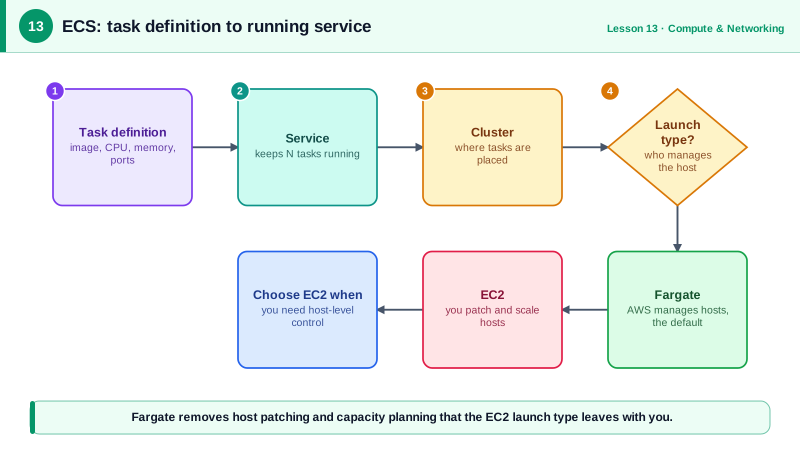
You have a Docker image. You want two copies running behind a load balancer, replaced if they crash, updated without downtime. ECS (Elastic Container Service) is AWS's own orchestrator for exactly that. With Fargate, AWS also runs the machines underneath: you never see an EC2 instance.
ECS clusters, task definitions, tasks and services
- Cluster: a logical group for your services.
- Task definition: the blueprint, like a Compose file: images, CPU and memory, ports, environment variables, secrets, logging, IAM roles. Versioned as revisions.
- Task: one running copy of a task definition.
- Service: keeps a desired number of tasks running, replaces failed ones, registers them with a load balancer, and handles rolling deploys.
- Capacity: Fargate (serverless, per-task billing), or EC2 instances you manage (cheaper at steady scale, needed for GPUs and some special cases).
An ECS Fargate task definition
{
  "family": "api-service",
  "networkMode": "awsvpc",
  "requiresCompatibilities": ["FARGATE"],
  "cpu": "512",
  "memory": "1024",
  "runtimePlatform": {"cpuArchitecture": "ARM64", "operatingSystemFamily": "LINUX"},
  "executionRoleArn": "arn:aws:iam::123456789012:role/ecsTaskExecutionRole",
  "taskRoleArn": "arn:aws:iam::123456789012:role/api-service-task-role",
  "containerDefinitions": [{
    "name": "api",
    "image": "123456789012.dkr.ecr.us-east-1.amazonaws.com/api:1.4.2",
    "essential": true,
    "portMappings": [{"containerPort": 8080, "protocol": "tcp"}],
    "logConfiguration": {
      "logDriver": "awslogs",
      "options": {
        "awslogs-group": "/ecs/api-service",
        "awslogs-region": "us-east-1",
        "awslogs-stream-prefix": "api"
      }
    }
  }]
}
Things worth noticing:
- Two roles. The execution role is used by ECS itself to pull the image from ECR and write logs. The task role is what your application code gets, for example to read an S3 bucket. Mixing them up is a common source of
AccessDenied. cpu: 512is half a vCPU, andmemorymust be a valid pairing with it on Fargate.- A pinned tag (
1.4.2), notlatest, so every deploy is traceable and rollbacks are exact. awsvpcnetworking gives each task its own network interface, private IP and security groups.
Running an ECS service behind a load balancer
Run against a local AWS emulator:
aws ecs create-cluster --cluster-name prod
aws ecs register-task-definition --cli-input-json file://task-def.json \
  --query 'taskDefinition.[family,revision,cpu,memory]' --output text

aws ecs create-service \
  --cluster prod \
  --service-name api-service \
  --task-definition api-service \
  --desired-count 2 \
  --launch-type FARGATE \
  --network-configuration 'awsvpcConfiguration={subnets=[subnet-private-a,subnet-private-b],securityGroups=[sg-app],assignPublicIp=DISABLED}' \
  --load-balancers targetGroupArn=$API_TG_ARN,containerName=api,containerPort=8080 \
--deployment-configuration 'deploymentCircuitBreaker={enable=true,rollback=true}'ACTIVE
api-service 1 512 1024
api-service 2 FARGATETasks run in private subnets with no public IP. They need a route to ECR and CloudWatch Logs: through a NAT gateway, or more cheaply through VPC endpoints. The deployment circuit breaker rolls back automatically if new tasks keep failing to start or pass health checks.
ECS in production: secrets, scaling and debugging
- Secrets: reference Secrets Manager or SSM Parameter Store in the task definition's
secretsfield, not plain environment variables. - Scaling: Application Auto Scaling with target tracking on CPU or requests per target, like an ASG (Day 12).
- Fargate Spot runs interruptible tasks at a large discount.
- Debugging: ECS Exec opens a shell in a running task; stopped tasks show a
stoppedReason, which is the first thing to read when tasks keep restarting.
Check yourself
The execution role is used by ECS itself to pull the image from ECR, fetch secrets and send logs to CloudWatch. The task role is what your application code uses to call AWS services, like reading from S3. Keep them separate and minimal.
A network path to ECR. Tasks need either a NAT gateway or VPC interface endpoints for ecr.api and ecr.dkr, plus an S3 gateway endpoint, because image layers are stored in S3. Also check the execution role has ECR permissions.
For steady, large workloads where reserved or Spot EC2 capacity is cheaper than Fargate's per-task pricing, or when you need features Fargate doesn't support, such as GPUs, specific instance types or privileged containers.
Through the task definition's secrets section, referencing Secrets Manager or Parameter Store, so the value is injected at start and never stored in the definition or image.
It keeps a desired number of tasks running, replaces failed ones, registers them with a load balancer and handles rolling deployments.