AWS CodePipeline and CodeDeploy CI/CD Tutorial
On this page
CI/CD on AWS
Every merged change should reach production the same way: built once, tested, deployed gradually, and rolled back automatically if it misbehaves. AWS's native tools for this are CodePipeline (orchestration), CodeBuild (builds and tests) and CodeDeploy (releases). Many teams use GitHub Actions or GitLab CI for the build and still use these deployment ideas; the concepts carry over.
CodePipeline stages
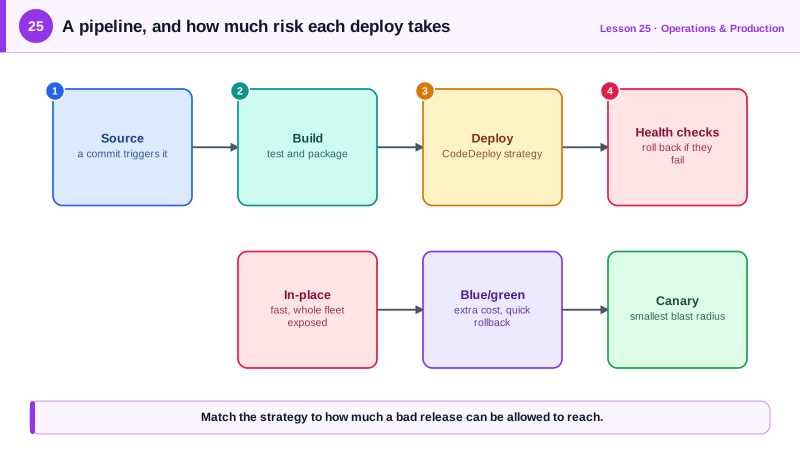
- Source: a commit to the main branch triggers the pipeline, through an AWS CodeConnections connection (renamed from CodeStar Connections in 2024) to GitHub, GitLab or Bitbucket, or from S3 or ECR.
- Build: CodeBuild runs your
buildspec.ymlin a fresh container: run tests, build the image, push it to ECR. - Deploy to staging, then run integration or smoke tests.
- Approval (optional): a manual gate for regulated releases.
- Deploy to production with a safe strategy.
A CodeBuild buildspec for a Docker image
version: 0.2
env:
  shell: bash
  variables:
    REPO: 123456789012.dkr.ecr.us-east-1.amazonaws.com/api
phases:
  pre_build:
    commands:
      - aws ecr get-login-password | docker login --username AWS --password-stdin ${REPO%%/*}
      - TAG=${CODEBUILD_RESOLVED_SOURCE_VERSION:0:12}
  build:
    commands:
      - docker build -t $REPO:$TAG .
      - docker push $REPO:$TAG
  post_build:
    commands:
      - printf '{"ImageURI":"%s"}' "$REPO:$TAG" > imageDetail.json
artifacts:
  files:
    - imageDetail.json
    - appspec.yaml
    - taskdef.json
The image is tagged with the first 12 characters of the commit SHA, so every deployment maps to exact code and a rollback means redeploying a known tag. ${REPO%%/*} strips the path to get the registry host for login. shell: bash is needed for the ${VAR:0:12} substring syntax. The CodeBuild project's IAM role needs ECR push permissions.
Rolling vs blue/green vs canary deployments
| Strategy | How | Trade-off |
|---|---|---|
| In-place / rolling | Update existing servers or tasks in batches | Cheap and simple; old and new versions mix during the rollout, and rollback is another rollout |
| Blue/green, all at once | Start a full new (green) set, switch all traffic | Instant rollback by switching back; double capacity during deploy |
| Canary | Shift a small share (say 10 percent) first, wait, then the rest | Limits the blast radius of a bad release |
| Linear | Shift in equal steps (10 percent every minute) | Gradual, slower |
A CodeDeploy canary deployment for ECS
CodeDeploy's ECS blue/green deployments use two target groups behind the ALB. This group shifts 10 percent of traffic, waits 5 minutes, then shifts the rest, rolling back automatically if the api-5xx-high alarm from Day 22 fires. Validated client-side:
aws deploy create-deployment-group \
  --application-name api-app --deployment-group-name api-canary \
  --service-role-arn arn:aws:iam::123456789012:role/codedeploy-ecs \
  --deployment-config-name CodeDeployDefault.ECSCanary10Percent5Minutes \
  --ecs-services clusterName=prod,serviceName=api-service \
  --deployment-style deploymentType=BLUE_GREEN,deploymentOption=WITH_TRAFFIC_CONTROL \
  --blue-green-deployment-configuration 'terminateBlueInstancesOnDeploymentSuccess={action=TERMINATE,terminationWaitTimeInMinutes=60},deploymentReadyOption={actionOnTimeout=CONTINUE_DEPLOYMENT}' \
  --load-balancer-info 'targetGroupPairInfoList=[{targetGroups=[{name=api-blue},{name=api-green}],prodTrafficRoute={listenerArns=[arn:aws:elasticloadbalancing:us-east-1:123456789012:listener/app/web-alb/abc/def]}}]' \
  --auto-rollback-configuration enabled=true,events=DEPLOYMENT_FAILURE,DEPLOYMENT_STOP_ON_ALARM \
  --alarm-configuration 'enabled=true,alarms=[{name=api-5xx-high}]'
The ECS service must be created with the CODE_DEPLOY deployment controller. The appspec.yaml from the build artifact tells CodeDeploy which container and port receive traffic:
version: 0.0
Resources:
  - TargetService:
      Type: AWS::ECS::Service
      Properties:
        TaskDefinition: <TASK_DEFINITION>
        LoadBalancerInfo:
          ContainerName: "api"
          ContainerPort: 8080
The old (blue) tasks stay up for 60 minutes after success, so rolling back is a fast traffic switch. ECS also offers built-in blue/green, canary and linear deployments without CodeDeploy, which is simpler for new services.
Habits that make pipelines safe
- Build once, promote the same artifact through every stage; never rebuild for production.
- Alarms as gates: the rollback alarm is only as good as the metric. Alarm on error rate and latency for the new version.
- Database migrations must be backward compatible with the old version, since both run at once during the rollout.
- No long-lived keys in CI: use IAM roles, or OIDC federation from GitHub Actions (Day 4).
Check yourself
Each deployment then maps to exact code, logs and builds can be traced back to a commit, and rolling back means deploying a known older tag. latest changes underneath you, so two tasks can run different code with the same tag.
It shifts 10 percent of traffic to the new version, waits 5 minutes, then shifts the remaining 90 percent if no rollback was triggered.
Old and new versions serve traffic at the same time, and a rollback returns to the old version, so schema changes must be compatible with both.
A build runs code from the repository and its dependencies. A role with broad permissions lets a compromised dependency change production directly.
CloudWatch alarms on error rate and latency for the new version during the deployment, so CodeDeploy reverts traffic without waiting for a person.