AWS Organizations and Multi-Account Strategy
On this page
Why use multiple AWS accounts
In a single AWS account, a developer's experiment, a staging deploy and production share the same limits, the same bill and, through IAM mistakes, potentially the same access. A compromised CI key in staging could reach the production database. Separate accounts draw hard walls: resources and permissions don't cross between accounts unless you deliberately allow it.
AWS Organizations and Control Tower
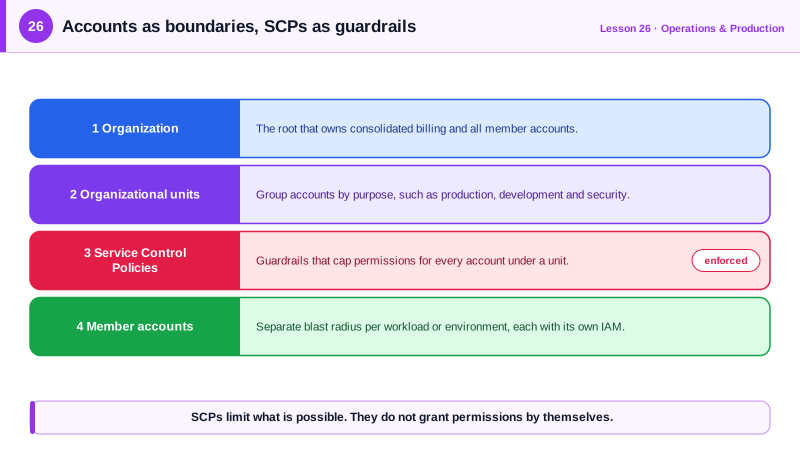
Organizations manages many accounts centrally:
- A management account at the top: billing, organization settings, and as little else as possible. Never run workloads there.
- Organizational units (OUs) group accounts by purpose, such as Security, Infrastructure, Workloads/Prod, Workloads/NonProd, Sandbox.
- Consolidated billing: one bill, with volume discounts and Savings Plans shared across accounts.
- Policies applied to OUs or accounts: service control policies, plus tag, backup and AI opt-out policies.
AWS Control Tower sets this up with best-practice defaults: a landing zone with log-archive and audit accounts, an organization trail, guardrails, and an Account Factory for creating new accounts consistently.
A sensible AWS account layout
| OU | Accounts | Purpose |
|---|---|---|
| Security | log-archive, security-tooling | Central CloudTrail and Config logs; GuardDuty and Security Hub administration |
| Infrastructure | network, shared-services | Transit Gateway, DNS, CI/CD tooling |
| Workloads/Prod | one per application or team | Production |
| Workloads/NonProd | dev and staging per application | Everything before production |
| Sandbox | one per developer or team | Experiments, with budget limits |
People sign in once through IAM Identity Center and get roles in the accounts they need (Day 3).
Service control policies (SCPs)
An SCP sets the maximum permissions for every identity in the accounts it applies to, including each account's administrators and root user. It grants nothing on its own: an action needs to be allowed by the SCP and by IAM (Day 4). SCPs don't affect the management account.
A guardrail for the Sandbox OU:
{
  "Version": "2012-10-17",
  "Statement": [
    {
      "Sid": "ProtectAuditTrail",
      "Effect": "Deny",
      "Action": ["cloudtrail:StopLogging", "cloudtrail:DeleteTrail", "cloudtrail:UpdateTrail"],
      "Resource": "*"
    },
    {
      "Sid": "ApprovedRegionsOnly",
      "Effect": "Deny",
      "NotAction": [
        "iam:*", "organizations:*", "sts:*", "route53:*", "cloudfront:*",
        "support:*", "budgets:*", "ce:*", "health:*"
      ],
      "Resource": "*",
      "Condition": {
        "StringNotEquals": {"aws:RequestedRegion": ["us-east-1", "us-west-2"]}
      }
    },
    {
      "Sid": "NoLargeInstances",
      "Effect": "Deny",
      "Action": "ec2:RunInstances",
      "Resource": "arn:aws:ec2:*:*:instance/*",
      "Condition": {
        "StringNotLike": {"ec2:InstanceType": ["t4g.*", "t3.*", "m7g.large"]}
      }
    }
  ]
}- The region rule uses NotAction to exempt global services, whose calls can be recorded against
us-east-1or no specific region; a plain deny on*can break IAM, billing and support. - The instance rule stops sandbox users launching expensive types.
Creating the OU and attaching the policy (run against a local AWS emulator):
ROOT=$(aws organizations list-roots --query 'Roots[0].Id' --output text)
OU=$(aws organizations create-organizational-unit --parent-id $ROOT --name Sandbox \
  --query OrganizationalUnit.Id --output text)
P=$(aws organizations create-policy --name sandbox-guardrails \
  --type SERVICE_CONTROL_POLICY --description "Sandbox guardrails" \
  --content file://sandbox-scp.json --query Policy.PolicySummary.Id --output text)
aws organizations attach-policy --policy-id $P --target-id $OU
aws organizations list-policies-for-target --target-id $OU \
--filter SERVICE_CONTROL_POLICY --query 'Policies[].Name' --output textFullAWSAccess sandbox-guardrailsFullAWSAccess is attached by default and allows everything; your deny statements then carve away from it. Test SCPs on a test OU first: a wrong SCP can lock every account out of something important at once.
Check yourself
No. An SCP only sets the maximum permissions available in an account. Identities still need IAM policies that allow an action, and the action must be allowed by both for it to succeed.
SCPs don't apply to the management account, and it controls the whole organization, including billing and account creation. Anything compromised there has the widest possible reach, so keep it nearly empty.
Global services like IAM, Organizations and billing aren't tied to the allowed regions in the same way; exempting them prevents breaking essential account functions.
Accounts are hard security and billing boundaries. A mistake or breach in a development account can't touch production resources, and costs are separated naturally.
A landing zone with preset accounts for logging and auditing, guardrails implemented as SCPs and Config rules, and an account factory for creating new accounts consistently.