Secure a New AWS Account: Root, MFA, Billing Alerts
On this page
The AWS root user
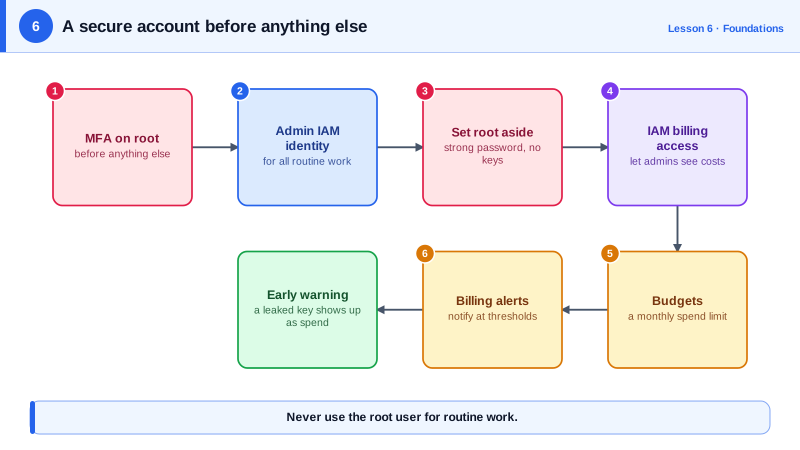
The email and password you used to sign up belong to the root user. Root can do anything in the account, including closing it, changing billing and removing every other user's access, and no IAM policy can restrict it. A leaked root password is the worst thing that can happen to an account. So the first job is to put root away.
Securing a new AWS account in the first hour
1. Protect root.
- Use a strong, unique password and a shared, monitored email address (a team alias, not one person's inbox).
- Enable MFA on root. Prefer a passkey or hardware security key (FIDO2); AWS supports several MFA devices on root, so register a backup.
- Delete any root access keys. Root should never have them.
- Set the account's alternate contacts (billing, operations, security).
2. Create everyday access that isn't root.
Enable IAM Identity Center and create a user for yourself with an administrator permission set. Sign in through the access portal from now on. Everyone gets short-lived credentials, and MFA is enforced in one place. (A standalone IAM user with a password and MFA works too, but Identity Center scales better as people join.)
3. Turn on the audit trail.
Create a CloudTrail trail for all regions, writing to an S3 bucket (Day 23). The 90-day event history exists by default, but a trail keeps records as long as you need and survives someone poking around in the console.
4. Set up cost alarms.
Enable "Receive billing alerts" in billing preferences, then create a budget (Day 5) or a CloudWatch billing alarm. Billing metrics live only in us-east-1. Run against a local AWS emulator:
aws sns create-topic --name billing-alerts --region us-east-1
aws cloudwatch put-metric-alarm --region us-east-1 \
  --alarm-name billing-over-100usd \
  --namespace AWS/Billing --metric-name EstimatedCharges \
  --dimensions Name=Currency,Value=USD \
  --statistic Maximum --period 21600 \
  --threshold 100 --comparison-operator GreaterThanThreshold \
  --evaluation-periods 1 \
  --alarm-actions arn:aws:sns:us-east-1:123456789012:billing-alerts
Subscribe your email to the SNS topic and confirm the subscription, or the alarm fires into silence.
5. Turn on safety nets.
- GuardDuty for threat detection (unusual API calls, crypto-mining, leaked credentials in use).
- S3 Block Public Access at the account level.
- IAM Access Analyzer to flag anything shared outside the account.
- A default EBS encryption setting per region.
When you still need the root user
Rarely: changing the account's contact details or support plan, closing the account, restoring access if all administrators are locked out, and a handful of other tasks. Sign in, do it, sign out. In an AWS Organization (Day 26), you can centrally manage member accounts' root access and remove their root credentials entirely.
Common AWS account compromise mistakes
- Access keys committed to Git. Bots scan public repositories within minutes and start mining crypto. If it happens: deactivate the key immediately, check CloudTrail for what it did, and look for new users, roles and instances in every region.
- No MFA on human logins.
- Long-lived admin keys on laptops and CI servers. Use Identity Center and OIDC roles.
- No billing alert, so abuse is discovered on the invoice.
Check yourself
It has unrestricted power that no policy can limit; if its credentials leak, the attacker controls everything, so it should be locked away behind MFA.
Usually the email subscription to the SNS topic was never confirmed, so nothing is delivered. Other causes are that billing alerts weren't enabled in billing preferences, or the alarm wasn't created in us-east-1, where billing metrics live. AWS Budgets avoids these pitfalls.
Deactivate the key, then use CloudTrail to see what it was used for, and check every region for resources or identities the attacker created.
A few account-level tasks, such as changing the account's support plan, closing the account, restoring IAM permissions after lockout, and some billing settings. Lock root away for those.
CloudTrail records every API call for investigation, and GuardDuty flags suspicious activity like unusual credential use or crypto mining, so a compromise is noticed quickly.