AWS IAM Explained: Users, Roles and Policies
On this page
Why AWS says access denied
Sooner or later a deploy fails with AccessDenied, or worse, something has access it shouldn't. Both come down to how IAM combines identities and policies. Once you know the evaluation rules, you can predict the answer instead of adding permissions until the error goes away.
IAM users, groups and roles
- IAM users are long-lived identities with passwords or access keys. Keep them rare: break-glass accounts, or legacy tools that can't use anything else.
- Groups collect users so they share policies. Groups can't be principals themselves.
- Roles are identities without permanent credentials. Someone or something assumes the role and receives temporary credentials (typically 1 hour) from STS, the Security Token Service. Use roles for: - AWS services: an EC2 instance profile, a Lambda execution role, an ECS task role. - People: IAM Identity Center maps your company login to roles. - Other accounts and systems: cross-account access, and CI/CD through OIDC federation (GitHub Actions can assume a role with no stored keys).
A role has two policies to get right: a trust policy (who may assume it) and permission policies (what it may do).
IAM policy types
| Type | Attached to | Purpose |
|---|---|---|
| Identity-based | Users, groups, roles | What this identity may do |
| Resource-based | Resources (S3 buckets, KMS keys, SQS queues) | Who may access this resource, including other accounts |
| Permissions boundary | Users, roles | The maximum an identity's own policies can grant |
| Service control policy | Accounts and OUs in Organizations (Day 26) | The maximum for every identity in the account |
| Session policy | A single assumed session | Narrows that session further |
AWS managed policies (like ReadOnlyAccess) are convenient but broad. Customer managed policies let you scope to your resources.
How IAM evaluates a request
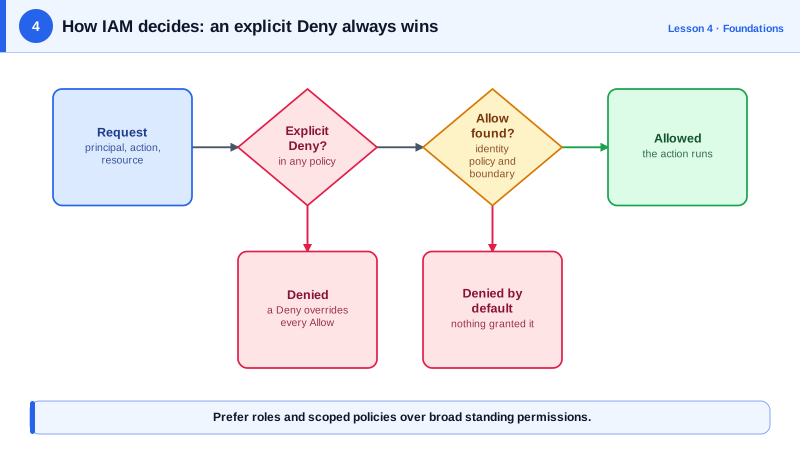
For a request inside one account:
- Start at deny (implicit).
- If any applicable policy has an explicit Deny matching the request, the answer is deny. Nothing overrides it.
- Otherwise, an SCP, a permissions boundary or a session policy that doesn't allow the action caps it: deny.
- Otherwise, if an identity-based or resource-based policy allows it, the answer is allow.
- Otherwise, the implicit deny stands.
Tracing an IAM decision step by step
An analyst's role has the AWS managed policy AmazonS3ReadOnlyAccess attached, plus this deny:
{
  "Version": "2012-10-17",
  "Statement": [
    {
      "Sid": "DenyPayrollBucket",
      "Effect": "Deny",
      "Action": "s3:*",
      "Resource": ["arn:aws:s3:::payroll-data", "arn:aws:s3:::payroll-data/*"]
    }
  ]
}| Request | Explicit deny? | Allow? | Result |
|---|---|---|---|
s3:GetObject on sales-data/q3.csv | No | Yes, read-only policy | Allowed |
s3:GetObject on payroll-data/june.csv | Yes | Yes | Denied: the deny wins |
s3:PutObject on sales-data/x.csv | No | No (read-only) | Denied implicitly |
The rule is short enough to write in a few lines of Python. This model leaves out SCPs, boundaries and conditions, but it makes the same three decisions as the table:
# iam_eval.py: a simplified model of IAM's decision for one request inside one account
from fnmatch import fnmatch

policies = [
    {"Effect": "Allow", "Action": ["s3:Get*", "s3:List*"], "Resource": ["*"]},          # like AmazonS3ReadOnlyAccess
    {"Effect": "Deny",  "Action": ["s3:*"],
     "Resource": ["arn:aws:s3:::payroll-data", "arn:aws:s3:::payroll-data/*"]},          # the extra deny
]

def matches(statement, action, resource):
    return (any(fnmatch(action, a) for a in statement["Action"]) and
            any(fnmatch(resource, r) for r in statement["Resource"]))

def decide(action, resource):
    hits = [s for s in policies if matches(s, action, resource)]
    if any(s["Effect"] == "Deny" for s in hits):
        return "DENY (explicit deny wins)"
    if any(s["Effect"] == "Allow" for s in hits):
        return "ALLOW"
    return "DENY (implicit: nothing allowed it)"

for action, resource in [("s3:GetObject", "arn:aws:s3:::sales-data/q3.csv"),
                         ("s3:GetObject", "arn:aws:s3:::payroll-data/june.csv"),
                         ("s3:PutObject", "arn:aws:s3:::sales-data/x.csv")]:
print(f"{action:<13} {resource:<38} -> {decide(action, resource)}")s3:GetObject arn:aws:s3:::sales-data/q3.csv -> ALLOW
s3:GetObject arn:aws:s3:::payroll-data/june.csv -> DENY (explicit deny wins)
s3:PutObject arn:aws:s3:::sales-data/x.csv -> DENY (implicit: nothing allowed it)The order of the checks is the whole lesson. IAM first collects every statement that matches the request, then looks for a deny among them. It doesn't matter which policy came first, how many allows there are, or how broad they are: one matching deny ends the decision. Only if there's no deny does it look for an allow, and if nothing matches at all, the answer is still no. When you debug AccessDenied, ask the same two questions in the same order: is anything denying this, and is anything allowing it?
Cross-account access adds one rule: the request needs an allow on both sides, the caller's identity policy and the resource's policy (or a role assumed in the target account).
Least privilege with Access Analyzer
- Start narrow: specific actions, specific resource ARNs, and conditions where useful (
aws:SourceIp,aws:PrincipalTag,s3:prefix). - Use IAM Access Analyzer to generate policies from real CloudTrail activity, and to find resources shared outside your account.
- Check last accessed information and remove permissions nobody uses.
- Debug denials with the IAM policy simulator, and read the error message: modern
AccessDeniedmessages often name the policy type that denied the request.
Check yourself
No. An explicit deny always overrides any allow, wherever it comes from. The role can do every other S3 action, but s3:DeleteObject is denied.
The trust policy says who may assume the role; the permission policies say what the role may do once assumed.
It uses OIDC federation to assume an IAM role whose trust policy accepts tokens from that repository, receiving temporary credentials.
No. IAM looks for a matching explicit deny before considering any allows, and one deny overrides any number of allows.
A managed policy that sets the maximum permissions an IAM user or role can have. Effective permissions are where its identity policies and the boundary overlap, which lets you safely delegate role creation.