AWS High Availability and Disaster Recovery
On this page
High availability vs disaster recovery
- High availability (HA): will the system keep running when an instance, a database node or an Availability Zone fails? Answered with redundancy inside a region: multiple AZs, load balancers, Auto Scaling, Multi-AZ databases (Days 11, 12 and 19).
- Disaster recovery (DR): how do we recover when something takes out a whole region, or corrupts or deletes our data? Answered with copies elsewhere and a practiced recovery plan.
Multi-AZ doesn't protect against a bad deploy that drops a table, a ransomware attack, or a region-wide outage. That's DR's job.
RTO and RPO
- RTO (recovery time objective): how long can the system be down? Minutes? A day?
- RPO (recovery point objective): how much data can you lose, measured in time? Zero? An hour?
Lower numbers cost more. Set them per workload with the business, then choose the cheapest strategy that meets them.
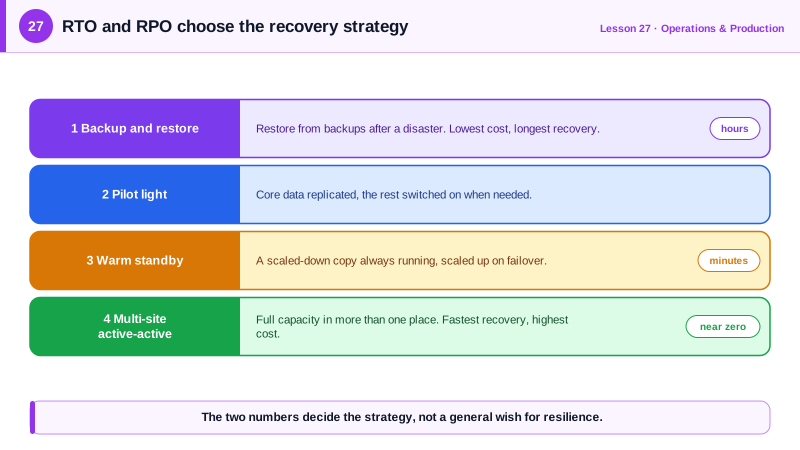
The four AWS disaster recovery strategies
| Strategy | What runs in the recovery region | Typical RTO | Typical RPO | Cost |
|---|---|---|---|---|
| Backup and restore | Nothing; backups copied there | Hours | Hours (since the last backup) | Lowest |
| Pilot light | Core data replicated (databases), compute off | Tens of minutes | Seconds to minutes | Low |
| Warm standby | A scaled-down, working copy of everything | Minutes | Seconds | Medium |
| Multi-site active-active | Full capacity, serving traffic | Near zero | Near zero | Highest |
Matching DR strategies to workloads
An internal reporting dashboard. The business can live without it for a day and can lose a day of data: RTO 24 hours, RPO 24 hours. Backup and restore is enough. Daily snapshots, copied to a second region (the snapshot command ran against a local AWS emulator; the copy was validated client-side):
aws rds create-db-snapshot --db-instance-identifier dashboard-db \
  --db-snapshot-identifier dashboard-db-2026-10-11

aws rds copy-db-snapshot --region us-west-2 --source-region us-east-1 \
  --source-db-snapshot-identifier arn:aws:rds:us-east-1:123456789012:snapshot:dashboard-db-2026-10-11 \
  --target-db-snapshot-identifier dashboard-db-2026-10-11-dr \
  --kms-key-id alias/rds-dr
In practice, AWS Backup plans do this on a schedule, with cross-region and cross-account copies and a vault lock so backups can't be deleted. Encrypted snapshots need a KMS key in the destination region, hence --kms-key-id.
A payments API. Minutes of downtime cost real money and losing confirmed payments is unacceptable: RTO 15 minutes, RPO under a few seconds. That needs warm standby at least. Aurora Global Database replicates to a secondary region with typically under a second of lag, and the secondary can be promoted in minutes (validated client-side):
aws rds create-global-cluster --global-cluster-identifier payments-global \
  --source-db-cluster-identifier arn:aws:rds:us-east-1:123456789012:cluster:payments-primary

aws rds create-db-cluster --region us-west-2 \
  --db-cluster-identifier payments-secondary \
  --global-cluster-identifier payments-global \
  --engine aurora-postgresql --engine-version 16.6
Add a smaller copy of the application tier in the second region, scaled up on failover, and Route 53 failover records or Application Recovery Controller to move traffic.
Testing disaster recovery
- Test it. A DR plan that's never been exercised usually fails: missing permissions, expired AMIs, capacity limits, forgotten DNS TTLs. Run game days, and restore backups regularly to prove they work.
- Protect backups from the same attacker: copy them to a separate account with restricted access and locked vaults.
- Watch quotas in the recovery region: service limits there may be far below what a failover needs.
- Don't depend on the failed region to fail over: deploy pipelines, DNS changes and runbooks must work without it.
- AWS Elastic Disaster Recovery continuously replicates servers for low RTO and RPO when you can't re-architect.
Check yourself
RTO, recovery time objective, is how long the system may be down after a disaster. RPO, recovery point objective, is how much data may be lost, measured in time before the failure. An RPO of 5 minutes means losing at most the last 5 minutes of writes.
No. Multi-AZ replicates every change to the standby, including the drop, within moments. Recovering needs a backup or point-in-time recovery to a moment before the mistake.
It meets relaxed RTO and RPO at a fraction of the cost; spending on faster recovery only makes sense where downtime or data loss is expensive.
Data is replicated to a second region continuously, but compute is off or minimal. In a disaster you start and scale the application there, recovering in tens of minutes at low ongoing cost.
Untested plans fail on missing permissions, outdated images or unreplicated resources. Regular drills measure the real RTO and RPO.