AWS Regions, Availability Zones and Edge Locations
On this page
Where AWS resources really live
When you create a server on AWS, it runs in a specific building in a specific part of the world. Knowing which, and what fails together, is the basis of every availability decision in this course.
AWS regions
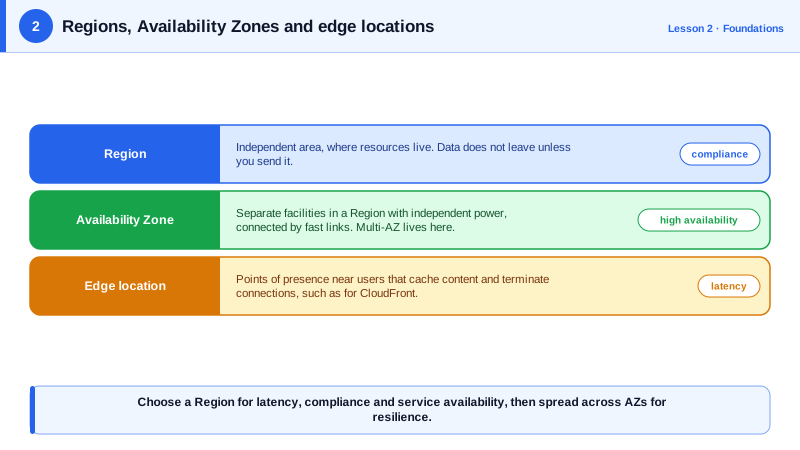
A region is a geographic area with its own independent set of data centers, such as us-east-1 (Northern Virginia), eu-west-1 (Ireland) or ap-southeast-2 (Sydney). AWS runs more than 35 of them.
- Regions are isolated from each other: an outage in one usually doesn't affect others.
- Most resources are regional. A database in
eu-west-1isn't visible fromus-east-1unless you replicate it. - A few services are global: IAM, Route 53, CloudFront and Organizations.
- Data stays in the region you choose unless you move it, which matters for data residency laws.
AWS Availability Zones
Each region has at least three Availability Zones (AZs), named like us-east-1a. An AZ is one or more data centers with independent power, cooling and networking, kilometers apart from the other AZs but joined by fast private links (typically single-digit milliseconds round trip).
AZs exist so that a fire, flood or power failure in one building doesn't take down your application. The rule this course repeats: run production across at least two AZs, ideally three. A single instance in a single AZ has no protection.
Zone names are mapped per account, so your us-east-1a may be a different physical zone from someone else's. Use AZ IDs (use1-az1) when coordinating across accounts.
Edge locations, Local Zones and Outposts
- Edge locations (several hundred, in many more cities than regions) run CloudFront and Route 53, serving cached content and DNS answers close to users.
- Local Zones put some compute in large cities, for single-digit-millisecond latency to users there.
- Outposts put AWS hardware in your own data center, and Wavelength inside telecom 5G networks. Both are specialist options.
How to choose an AWS region
Work through four questions:
| Question | Why it matters |
|---|---|
| Compliance: where must the data live? | Laws or contracts may require data to stay in a country or the EU. This can decide the answer alone. |
| Latency: where are your users? | Each 1,000 km adds several milliseconds each way; across continents, round trips reach 100 to 300 ms. |
| Services: does it offer what you need? | New services and instance types launch in some regions first. Check the regional services list. |
| Price: what does it cost? | Prices differ by region, often by 10 to 30 percent, and data transfer between regions costs extra. |
Example: a European health-records startup must keep patient data in the EU, so the choice is between EU regions. With most users in Germany, eu-central-1 (Frankfurt) gives the lowest latency. A second EU region can hold backups for disaster recovery (Day 27).
us-east-1 is the oldest and largest region and gets many new features first, but it has also had some of AWS's most visible outages. Don't choose it by default if your users are elsewhere.
Check yourself
A region is a separate geographic area; an AZ is an isolated group of data centers within a region, close enough to its siblings for fast synchronous links.
A single AZ can fail from power, cooling or network problems, and AWS designs its own service guarantees around multi-AZ deployments. Spreading instances and databases across AZs keeps the application running when one zone has trouble.
São Paulo may lack a service or instance type you need, and prices there are noticeably higher than in US regions. Weigh the latency benefit for users against service availability and cost; a nearby US region plus a CDN may be good enough.
Services that sit close to users, mainly CloudFront caching, Route 53 DNS and AWS Global Accelerator. You don't run general workloads there.
No. Regions are isolated by design, and data stays in the region you put it in unless you configure replication, such as S3 cross-region replication.