AWS S3 Tutorial: Buckets and Storage Classes
On this page
What S3 is
Images, backups, logs, data lake files, static websites, build artifacts: they all end up in S3 (Simple Storage Service). You never provision disks or worry about filling them. You put objects in, read them back over HTTPS, and pay per GB stored and per request.
S3 buckets, objects, keys and durability
- A bucket is a container in one region. Its name is globally unique across all AWS accounts.
- An object is a file plus metadata, up to 5 TB. Uploads over 100 MB should use multipart upload (the CLI does this automatically).
- A key is the object's full name:
site/logo.png. There are no real folders; the console shows/-separated prefixes as folders.
Since December 2020, S3 gives strong read-after-write consistency: after a successful write, every read and list returns the new data.
Durability is designed for 99.999999999 percent (eleven nines) for most classes: objects are stored redundantly across at least three Availability Zones. AWS's own way of picturing it: store 10 million objects and you can expect to lose a single one about once every 10,000 years. Durability isn't backup, though. A deleted or overwritten object is gone unless you enable versioning (Day 17).
S3 storage classes compared
You choose a class per object. The trade-off: lower storage price in exchange for retrieval fees, minimum storage durations, or slower access.
| Class | Access pattern | Retrieval | Notes |
|---|---|---|---|
| Standard | Frequent | Milliseconds | The default |
| Intelligent-Tiering | Unknown or changing | Milliseconds (archive tiers optional) | Moves objects between tiers automatically for a small monitoring fee |
| Standard-IA | Monthly or less | Milliseconds, per-GB fee | 30-day minimum, 128 KB minimum billable size |
| One Zone-IA | Infrequent, re-creatable | Milliseconds, per-GB fee | One AZ only: lost if that AZ is |
| Glacier Instant Retrieval | Quarterly | Milliseconds, higher fee | 90-day minimum |
| Glacier Flexible Retrieval | Rare | Minutes to hours | 90-day minimum |
| Glacier Deep Archive | Almost never | Up to 12 hours (48 for bulk) | Cheapest; 180-day minimum |
| Express One Zone | Very frequent, latency-sensitive | Single-digit milliseconds | Special directory buckets in one AZ |
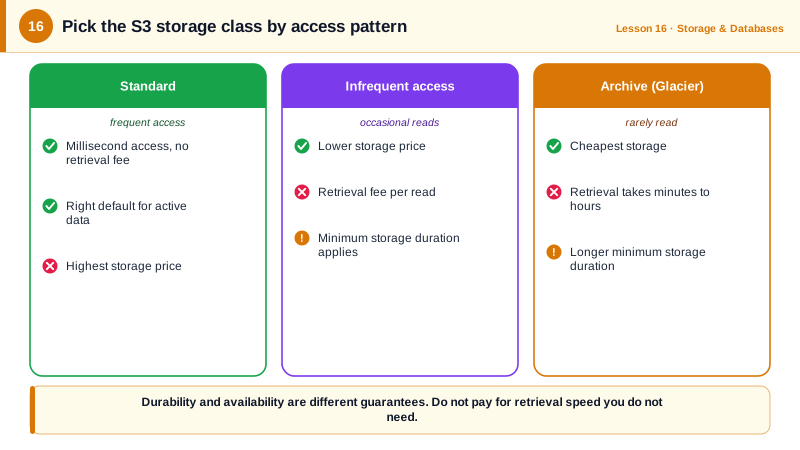
Choosing S3 storage classes for a media app
| Data | Pattern | Class |
|---|---|---|
| Website images and thumbnails | Read constantly | Standard (behind CloudFront) |
| User uploads | Hot for weeks, then rarely viewed | Intelligent-Tiering |
| Raw source videos from past years | Kept for legal reasons, occasionally needed fast | Glacier Instant Retrieval |
| Old backups | Kept for years, almost never read | Glacier Deep Archive |
| Generated previews | Can be regenerated | One Zone-IA |
Setting a class on upload, then checking (run against a local AWS emulator):
aws s3 cp logo.png s3://media-assets-demo/site/logo.png
aws s3 cp raw.mov s3://media-assets-demo/archive/2024/raw.mov --storage-class GLACIER_IR
aws s3api list-objects-v2 --bucket media-assets-demo \
--query 'Contents[].[Key,Size,StorageClass]' --output textarchive/2024/raw.mov 2000000 GLACIER_IR
site/logo.png 3 STANDARDRather than setting classes by hand, use lifecycle rules to move objects as they age (Day 17).
S3 presigned URLs
A presigned URL grants time-limited access to one object, signed with your credentials:
aws s3 presign s3://media-assets-demo/site/logo.png --expires-in 300The URL works for 5 minutes for anyone who has it. It's the standard way to let browsers download private files, or upload directly to S3 (with a presigned PUT) without passing data through your servers.
S3 cost traps
- Small objects in IA classes are billed as 128 KB each.
- Minimum durations: deleting Glacier objects early still bills the minimum.
- Requests add up for millions of small objects, and data transfer out to the internet costs per GB; serve public content through CloudFront.
Check yourself
No. Since December 2020, S3 provides strong read-after-write consistency: once a write or delete succeeds, every following read and list returns the latest data, at no extra cost.
It stores data in a single Availability Zone, so a fire, flood or major failure of that zone can lose it. It suits data you can recreate, like thumbnails, or secondary copies of data stored elsewhere.
Your backend, which has AWS credentials, generates a presigned PUT URL for one specific key, valid for a few minutes. The browser uploads directly to S3 with it, so the file doesn't pass through your servers and the bucket stays private.
It moves objects between access tiers automatically based on how often they're read, for a small monitoring fee per object. It suits data with unknown or changing access patterns.
S3 charges per request as well as per GB. Millions of tiny objects or frequent LIST calls can cost more than the storage itself.