AWS ElastiCache: Redis Caching Strategies
On this page
Why use a cache
The product page runs the same database query thousands of times a minute, and the answer barely changes. A cache keeps that answer in memory: sub-millisecond reads, and a database that only sees cache misses. ElastiCache runs the cache for you, with replication, failover, patching and backups.
Valkey vs Redis OSS vs Memcached
| Valkey / Redis OSS | Memcached | |
|---|---|---|
| Data structures | Strings, hashes, lists, sets, sorted sets, streams | Strings only |
| Replication and failover | Yes, Multi-AZ | No |
| Persistence and backups | Snapshots | No |
| Scaling | Cluster mode shards data | Add nodes; client-side hashing |
| Use for | Almost everything: caching, sessions, leaderboards, rate limiting | Simple, multithreaded caching where loss is fine |
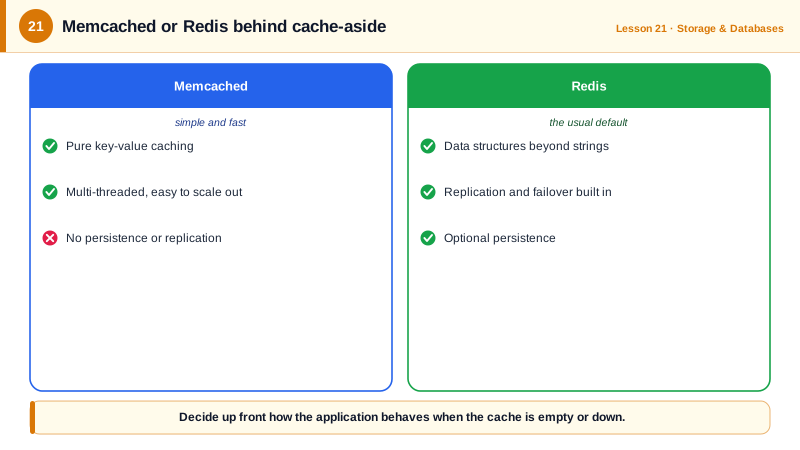
Valkey is the open-source fork of Redis, now the default engine on ElastiCache and priced lower than Redis OSS; clients and commands are compatible. ElastiCache Serverless removes node sizing entirely and scales automatically, at a per-usage price.
The cache-aside pattern with a fallback
The most common pattern: the application checks the cache, reads the database on a miss, and fills the cache with a TTL. The cache is an optimization, so its failure must slow reads, not break them:
# cache_aside.py: cache-aside with a TTL, where a cache outage slows reads but never fails them
import json
import redis

def get_product(cache, db, product_id):
    key = f"product:{product_id}"
    try:
        cached = cache.get(key)
        if cached is not None:
            return json.loads(cached), "cache"
    except redis.RedisError:
        pass                                  # cache down: fall through to the database
    row = db.execute("SELECT id, name, price_cents FROM products WHERE id = ?", (product_id,)).fetchone()
    product = {"id": row[0], "name": row[1], "price_cents": row[2]}
    try:
        cache.set(key, json.dumps(product), ex=300)   # 5-minute TTL bounds staleness
    except redis.RedisError:
        pass                                  # failing to fill the cache must not fail the read
    return product, "database"

cache = redis.Redis(host=CACHE_HOST, port=6379, socket_timeout=0.2, socket_connect_timeout=0.2)
Run twice against a local Redis, then against a port with no cache listening (with SQLite standing in for the database):
cache up:
database Trail shoes  1.46 ms
cache    Trail shoes  0.29 ms
cache down:
database Trail shoes  2.26 ms
database Trail shoes  0.57 ms
The first read misses and fills the cache (TTL product:42 then reported 300 seconds); the second is a hit. With the cache down, every read goes to the database, and nothing fails. The short socket timeouts matter: without them, a dead cache makes every request wait for a long connection timeout, which can be worse than having no cache.
Cache invalidation, TTLs and stampedes
- TTL on every key caps how stale data can get, and cleans up keys nobody reads.
- Invalidate on write: after updating a product, delete its cache key so the next read refills it. Deleting is safer than writing the new value into the cache, which can race with concurrent reads.
- Stampede protection: when a hot key expires, thousands of requests may hit the database at once. Use a short lock so one request refills it, or refresh popular keys early. Adding a little random jitter to TTLs stops many keys expiring together.
- Write-through (update the cache on every write) suits data that's read immediately after writing.
Running ElastiCache on AWS
- Put the cluster in private subnets, allow port 6379 only from the app's security group, enable encryption in transit (TLS) and AUTH or IAM authentication.
- Enable Multi-AZ with automatic failover for anything users depend on.
- Watch
CacheHitRate, evictions, memory use and CPU in CloudWatch. A falling hit rate or rising evictions means the cache is too small or keys are poorly chosen. - Size for the database load you'd face on a cold cache, too: after a failover or flush, every request misses at first.
Check yourself
The cache is an optimization. If its errors propagate, a cache outage or timeout becomes an application outage; catching them and falling back to the database means users get slower reads instead of errors. Keep a short timeout on cache calls too.
Deleting avoids a race where a concurrent read loads the old value from the database and writes it to the cache after your update, leaving stale data until the TTL. After a delete, the next read simply refills from the database.
For a simple string cache where losing data is acceptable and multithreaded performance per node matters, with no need for replication or data structures.
When a popular key expires, many requests miss at once and all hit the database. Use a lock so one request refills it, refresh early, or add jitter to TTLs.
Caches often hold session data and personal information. Keeping them off the internet and requiring encryption and authentication stops anyone with network access from reading them.