AWS RDS Tutorial: Managed Relational Databases
On this page
What RDS manages for you
Running a database on EC2 means you install it, patch it, schedule backups, test restores, set up replication and handle failover at 3 a.m. RDS (Relational Database Service) does those for PostgreSQL, MySQL, MariaDB, Oracle, SQL Server and Db2. You still design schemas, write queries, add indexes and choose the instance size.
RDS Multi-AZ vs read replicas
| Multi-AZ | Read replica | |
|---|---|---|
| Purpose | Availability: survive an instance or AZ failure | Read scaling: offload reads |
| Replication | Synchronous | Asynchronous (replicas can lag) |
| Can you query it? | Classic Multi-AZ: no, it's a hidden standby. Multi-AZ DB clusters: two readable standbys | Yes |
| Failover | Automatic, typically 1 to 2 minutes, same endpoint | Manual promotion; a separate endpoint |
| Cross-region | No | Yes |
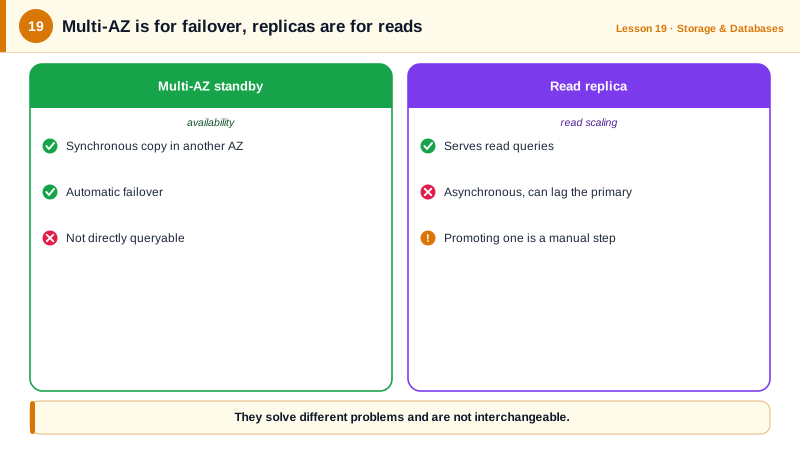
Production needs Multi-AZ. Read replicas are for reporting, analytics, or read-heavy traffic, and your application must tolerate their lag.
Creating a Multi-AZ RDS database and a read replica
Run against a local AWS emulator:
aws rds create-db-subnet-group --db-subnet-group-name orders-db \
  --db-subnet-group-description "Private subnets" \
  --subnet-ids subnet-private-a subnet-private-b

aws rds create-db-instance \
  --db-instance-identifier orders-db \
  --engine postgres --engine-version 17 \
  --db-instance-class db.r7g.large \
  --allocated-storage 200 --storage-type gp3 --storage-encrypted \
  --multi-az \
  --db-subnet-group-name orders-db \
  --master-username app_admin --manage-master-user-password \
  --backup-retention-period 14 \
  --no-publicly-accessible --deletion-protection

aws rds create-db-instance-read-replica \
  --db-instance-identifier orders-db-reporting \
  --source-db-instance-identifier orders-db \
--db-instance-class db.r7g.largeorders-db postgres True available
orders-db-reporting orders-dbWhat each choice buys you:
- Private subnets and
--no-publicly-accessible: only the app tier's security group can reach port 5432 (Day 10). --manage-master-user-password: RDS generates the password, stores it in Secrets Manager and can rotate it, so it never appears in your shell history or code. (On PostgreSQL,adminis a reserved name, henceapp_admin.)- Backups: 14 days of automated backups with point-in-time recovery to any second in that window. Restores create a new instance; practice them.
- Deletion protection stops an accidental
delete-db-instance. - Encryption at rest must be chosen at creation; you can't simply switch it on later.
Amazon Aurora
Aurora is AWS's own MySQL- and PostgreSQL-compatible engine. Storage is separate from compute, kept as six copies across three AZs and grown automatically. Up to 15 low-lag replicas share that storage, and failover is usually faster than standard RDS. Aurora Serverless v2 scales capacity in fine steps with load, and Global Database replicates to other regions with typically under a second of lag (Day 27). It costs more per hour than RDS, so it pays off for demanding or highly available workloads.
RDS day-to-day operations
- Connections: each PostgreSQL connection costs memory. Use a pool in the app, and RDS Proxy for Lambda or bursty clients.
- Performance: Performance Insights and CloudWatch Database Insights show the queries consuming time.
- Parameter groups hold engine settings; changing some requires a reboot.
- Upgrades: minor versions can apply automatically in a maintenance window; major versions need testing. Blue/green deployments let you switch with brief downtime.
Check yourself
Not automatically. A read replica is asynchronous, so it may be missing recent writes, and it must be promoted manually or by your own automation. Multi-AZ keeps a synchronous standby and fails over automatically in about a minute or two with no data loss.
RDS generates the master password, stores it in Secrets Manager and can rotate it, so it's never typed, put in a script, logged or committed. Applications read it from Secrets Manager at runtime.
Use point-in-time recovery to restore a new instance to that moment, then switch the application or copy back the data you need.
Its storage is a distributed volume replicated six ways across three AZs, so replicas share storage, failover is faster and replica lag is typically milliseconds.
Each concurrent Lambda environment opens its own database connections, and a traffic spike can exhaust the database's connection limit. RDS Proxy pools and shares a smaller set of connections, and also speeds up failover.