Vertical vs Horizontal Scaling Explained
On this page
Vertical vs horizontal scaling: the difference
Your API runs on one server at 60 percent CPU, and traffic is about to triple. You have two ways to get more capacity.
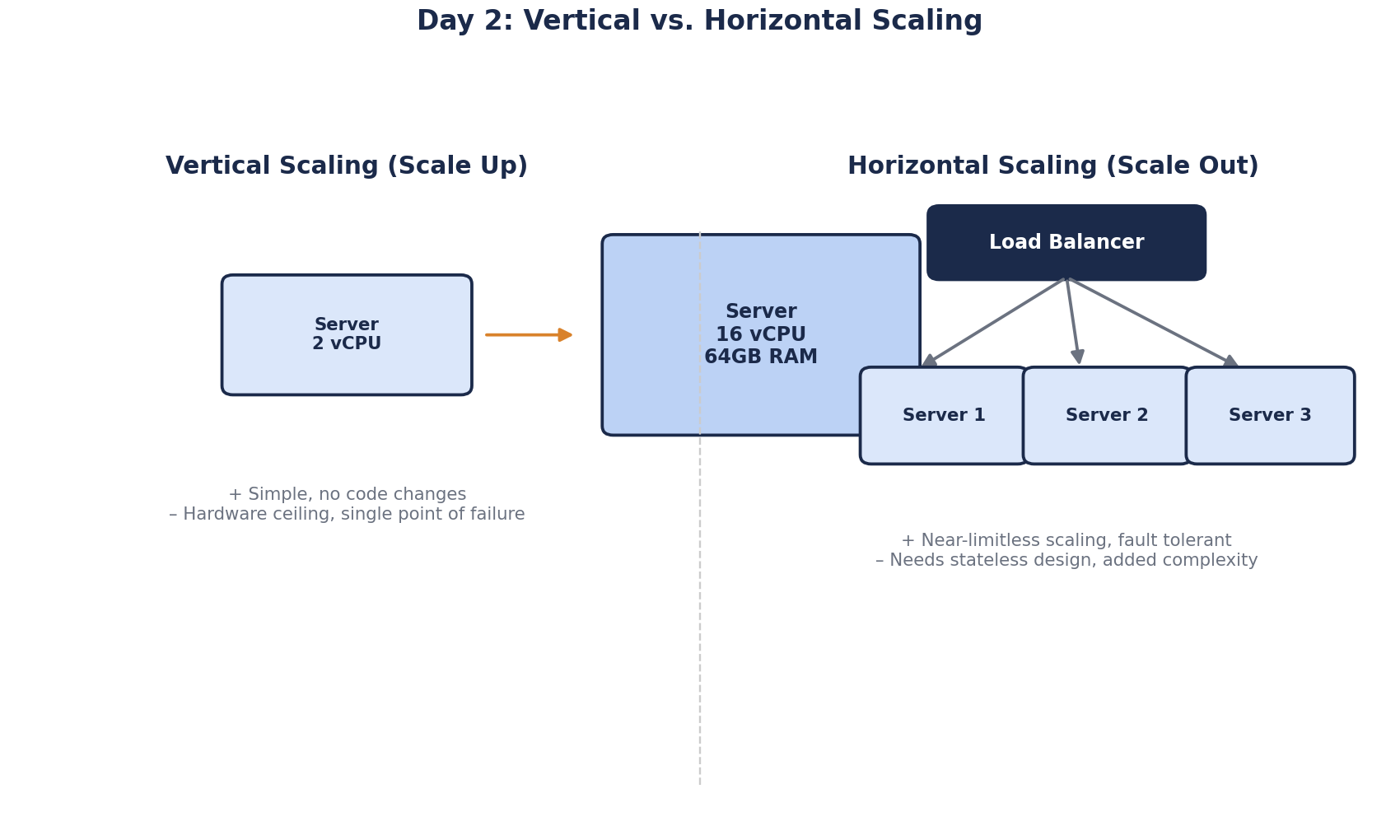
Vertical scaling (scale up): move to a bigger machine. Your code doesn't change, but resizing a cloud VM or managed database usually means a restart. There's a ceiling, the largest machine you can rent, and it's still one machine: if it dies, the service dies.
Horizontal scaling (scale out): run several identical copies behind a load balancer, which spreads requests across them (Day 19). One failing doesn't take the service down, and you can add or remove copies as traffic changes. The catch: your app has to work when one user's requests land on different machines.
| Vertical | Horizontal | |
|---|---|---|
| Code changes | None, but usually a restart | The app must keep no state on the server |
| Limit | The largest machine available | Whatever the shared parts (database, cache) can take |
| One machine fails | Full outage | The others keep serving |
| Cost | Roughly linear within an instance family, until sizes run out | Roughly linear, plus a load balancer and shared stores |
Why adding servers logs users out: state on the server
Most apps that can't scale out keep something in one server's memory that the next request needs. The typical case is in-process session state, such as the default InProc session in ASP.NET on .NET Framework. A user logs in on server A, the next request lands on server B, and they're logged out.
ASP.NET Core has a sneakier version. Auth cookies and antiforgery tokens are encrypted with Data Protection keys, and by default each server keeps its own. Server B can't decrypt server A's cookie, so users get logged out even if you never touched session state. The fix is to store the key ring somewhere every instance shares, such as Redis, blob storage or the database.
The rule: keep no user state on the server. Move it somewhere every instance can reach.
- Sessions: Redis or the database (Day 37 compares the options, including tokens).
- Uploaded files: object storage such as Amazon S3 or Azure Blob Storage, not the local disk.
- Caches that must agree: a shared cache.
- Scheduled jobs: coordinated so they run once, not once per instance.
A service that keeps nothing between requests is called stateless. Day 71 comes back to it in depth.
Sticky sessions, where the load balancer pins each user to one server, hide the problem. When that server dies or is replaced in a deploy, its users lose their sessions anyway.
Worked example: scaling an API from 200 to 600 requests per second
Today the API handles 200 requests per second at 60 percent CPU. If CPU grows roughly in line with traffic, 600 requests per second needs about three times today's capacity.
Option A, scale up. Move to a machine with about three times the cores. No code changes, but still a single point of failure, and the next tripling gets harder.
Option B, scale out.
- Put a load balancer in front, with health checks so it stops sending traffic to an instance that fails them.
- Move session state to Redis. On ASP.NET Core, share the Data Protection keys too.
- Run four instances. Three keep each near 60 percent CPU. The fourth lets you lose one, or take one down to deploy, without overloading the rest. This is called N+1 capacity.
- Check the database connection limit. SqlClient and Npgsql both default to pools of up to 100 connections, so four instances can open 400. PostgreSQL's default
max_connectionsis 100. Shrink each pool, or put a pooler such as PgBouncer in front (Day 28).
Step 4 is the one people miss. It turns "we scaled out" into "the database refused connections".
Need capacity by Friday and the app still keeps state in memory? Option A buys time. Then do Option B before you need it again.
Scaling the database: why it's different
Everything above is about the app tier, which you can make stateless. The database is the state. You can't run four copies and load-balance writes across them, because they would drift apart. Scaling a database out means read replicas (Day 25) or sharding (Day 26), and both are projects of their own.
So databases get scaled up for much longer than app servers. In 2016 Stack Overflow ran 11 web servers but 4 SQL Server machines with 384 GB of RAM each, and one primary per cluster took almost all the load (Nick Craver, 2016). Web tier out, database up: most systems end up with that split.
Check yourself
Each server has its own Data Protection keys, so it can't decrypt auth cookies issued by the other. Store the key ring in a shared location.
Each instance has its own connection pool, so the maximum number of database connections grew fivefold along with the instances. The database hit its connection limit. Shrink each instance's pool so the total stays under the limit, or put a connection pooler such as PgBouncer in front of the database.
Both copies would accept writes and drift apart. Scale the database up, add a cache or read replicas for reads, or shard if writes are the bottleneck.
When the bottleneck is one component, like the database, and a bigger machine is available. Scaling up needs no code changes and no new failure modes, so it buys time cheaply. Its limits are the largest machine available, cost growth at the top end, and a single point of failure.
State must move off the individual servers: sessions into a shared store or signed cookies, uploaded files into object storage, caches into a shared cache or accepted as per-instance, and data protection keys into shared storage. Then any instance can serve any request.