Kafka Architecture in System Design
On this page
Kafka is a log, not a queue
In a classic queue, a message is deleted once a consumer acknowledges it. Kafka works differently: messages are appended to a log and kept for a configured time (days, weeks or forever), whether or not anyone has read them. Each consumer just remembers how far it has read. That one difference explains most of what Kafka is good at.
Kafka was built at LinkedIn to move huge volumes of activity and log data between systems, and became an Apache project in 2011. The Apache Kafka course goes from a first topic to production.
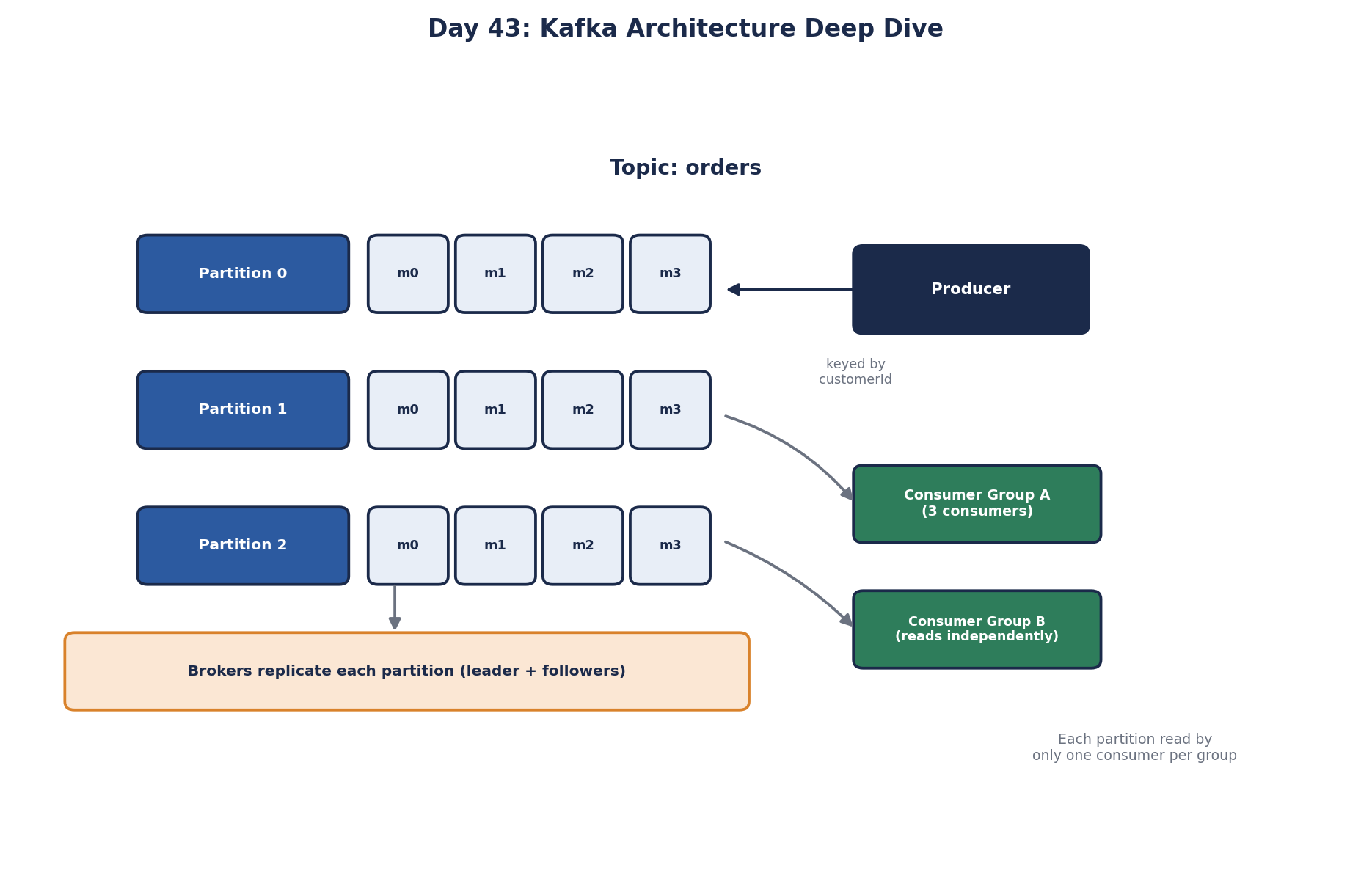
Kafka architecture: topics, partitions, brokers and consumer groups
Topic: a named stream of messages, like orders.
Partition: each topic is split into partitions. A partition is an ordered, append-only sequence; each message gets an increasing offset. Kafka guarantees order within a partition, not across partitions. Partitions are the unit of parallelism.
Broker: a Kafka server storing partitions. A cluster has several. Each partition has one leader broker that handles its reads and writes, and follower replicas on other brokers. With a replication factor of 3, a broker can fail without losing data. Recent Kafka versions manage cluster metadata with their own built-in consensus (KRaft) instead of ZooKeeper.
Producer: writes messages, optionally with a key. Messages with the same key always go to the same partition, so they stay in order relative to each other.
Consumer group: a set of consumers sharing the work for a topic. Each partition is read by exactly one consumer in the group, so a topic with 12 partitions can use up to 12 consumers in one group. Different groups read independently: billing and analytics each get every message.
Kafka offsets and replay
Each consumer group commits its offset per partition: "I've processed up to here." After a crash, consumers resume from the last committed offset. Because messages are retained, you can also:
- start a new consumer group that reads all history, for example a new search index built from past events,
- rewind a group's offset to reprocess after fixing a bug,
- keep a full event history as a source of truth (Day 47).
Worked example: sizing partitions for an orders topic
Peak load is 5,000 order events per second. Suppose one consumer instance processes about 500 per second.
consumers needed   5,000 / 500    = 10
partitions         at least 10; choose 24 for growth and rebalancing headroom
replication        factor 3, and require 2 in-sync replicas to acknowledge writes (acks=all, min.insync.replicas=2)
The partition key decides ordering:
- Key by
order_id: all events for one order (created,paid,shipped) stay in order. Good spread across partitions. - Key by
customer_id: all of one customer's orders are ordered, but a very active customer can make one partition hot. - No key: best spread, no ordering guarantee.
Choose the key from what must stay in order. Adding partitions later changes which partition a key maps to, which breaks per-key ordering during the change, so start with enough.
Size the disk too, because Kafka keeps everything for the retention period:
5,000 events/s × 1 KB × 86,400 s × 7 days ≈ 3 TB
× replication factor 3                   ≈ 9 TB across the cluster
Committing Kafka offsets safely
The moment a consumer commits its offset decides what a crash costs. Commit before processing, and a crash skips messages that were never handled. Commit after, and a crash reprocesses a few, which is at-least-once delivery. Auto-commit, the default, commits on a timer during the next poll. That's safe if you finish each batch before polling again, but if your code hands messages to background threads, offsets can be committed before the work is done. For important work, turn it off and commit after processing.
Slow processing has its own trap. If a consumer doesn't ask for more messages within max.poll.interval.ms, 5 minutes by default, Kafka assumes it's dead and gives its partitions to another consumer. The batch it was still working on gets processed again, and repeated rebalances can stall the whole group. Keep each batch's work well under the limit, or process slow items asynchronously.
Kafka's exactly-once features (idempotent producers and transactions) cover reading from and writing to Kafka. Side effects outside Kafka, like sending an email or charging a card, still need idempotent consumers (Day 65).
Kafka trade-offs
- It's a distributed system to operate: brokers, replication, rebalances, disk capacity for retention. Managed offerings (Confluent Cloud, Amazon MSK, Azure Event Hubs with Kafka support) remove much of that.
- No per-message routing rules or delays like RabbitMQ (Day 44).
- Parallelism is capped by partition count within a group.
Check yourself
Kafka assigns each partition to exactly one consumer within a group, which is how it keeps per-partition order. With 12 partitions, only 12 consumers can receive work, and the other 8 sit idle as standbys. To use more consumers, the topic needs more partitions.
Processing a batch exceeds max.poll.interval.ms, so Kafka treats the consumer as dead and reassigns its partitions. Shrink batches or speed up per-batch processing.
Use the order id as the message key. Kafka hashes the key to choose the partition, so all of that order's events land on the same partition, and Kafka preserves order within a partition. Events for different orders spread across partitions, so you keep ordering where it matters and parallelism everywhere else.
If the events are still within the topic's retention period, fix the consumer's bug, restore or clean the database, reset the consumer group's offsets to a point before the bug, and replay. Because Kafka keeps the log rather than deleting consumed messages, the history is still there to reprocess.
If the consumer crashes after committing but before finishing, those messages are skipped on restart, so they're lost. Commit after processing for at-least-once delivery, and make the processing idempotent to handle redeliveries.