Caching in System Design: Client, Server and CDN
On this page
Why the fastest request is the one you never make
A product page needs a database query, some rendering and a trip across the internet. Done for every visitor, that's thousands of identical queries a second for data that changes a few times a day. Caching stores a copy closer to where it's needed, so later requests skip some or all of that work.
The catch is always the same: a copy can be out of date. Every caching decision is a trade between speed and freshness.
The four caching layers: browser, CDN, application, database
1. Browser cache. The browser keeps responses on the device, controlled by HTTP headers like Cache-Control and ETag. A cached image or script costs no network trip at all. You control it only through headers; once a file is cached on a user's device, you can't reach in and delete it.
2. CDN. A content delivery network has servers in many cities. Users get responses from a nearby edge server instead of your origin. It's mainly for static files, and increasingly for public API responses too (Day 35).
3. Application cache. Inside or next to your app servers:
- In-process memory (such as ASP.NET Core's
IMemoryCacheor a Java Caffeine cache): fastest, but each server has its own copy, and they can disagree. - Distributed cache (Redis, Memcached): one shared copy every server sees, at the cost of a network hop of well under a millisecond.
Two .NET details. IMemoryCache has no size limit by default, so a cache keyed by something unbounded, such as search terms, grows until the process runs out of memory (docs). Set SizeLimit on a dedicated cache, or bound the keys. And HybridCache (.NET 9 and later) combines both levels: an in-process copy first, Redis or another distributed cache second, plus protection against many callers recomputing the same missing key at once (docs).
4. Database cache. The database keeps hot pages in memory (PostgreSQL's shared buffers, SQL Server's buffer pool). It's automatic, but the query still has to be parsed, planned and executed.
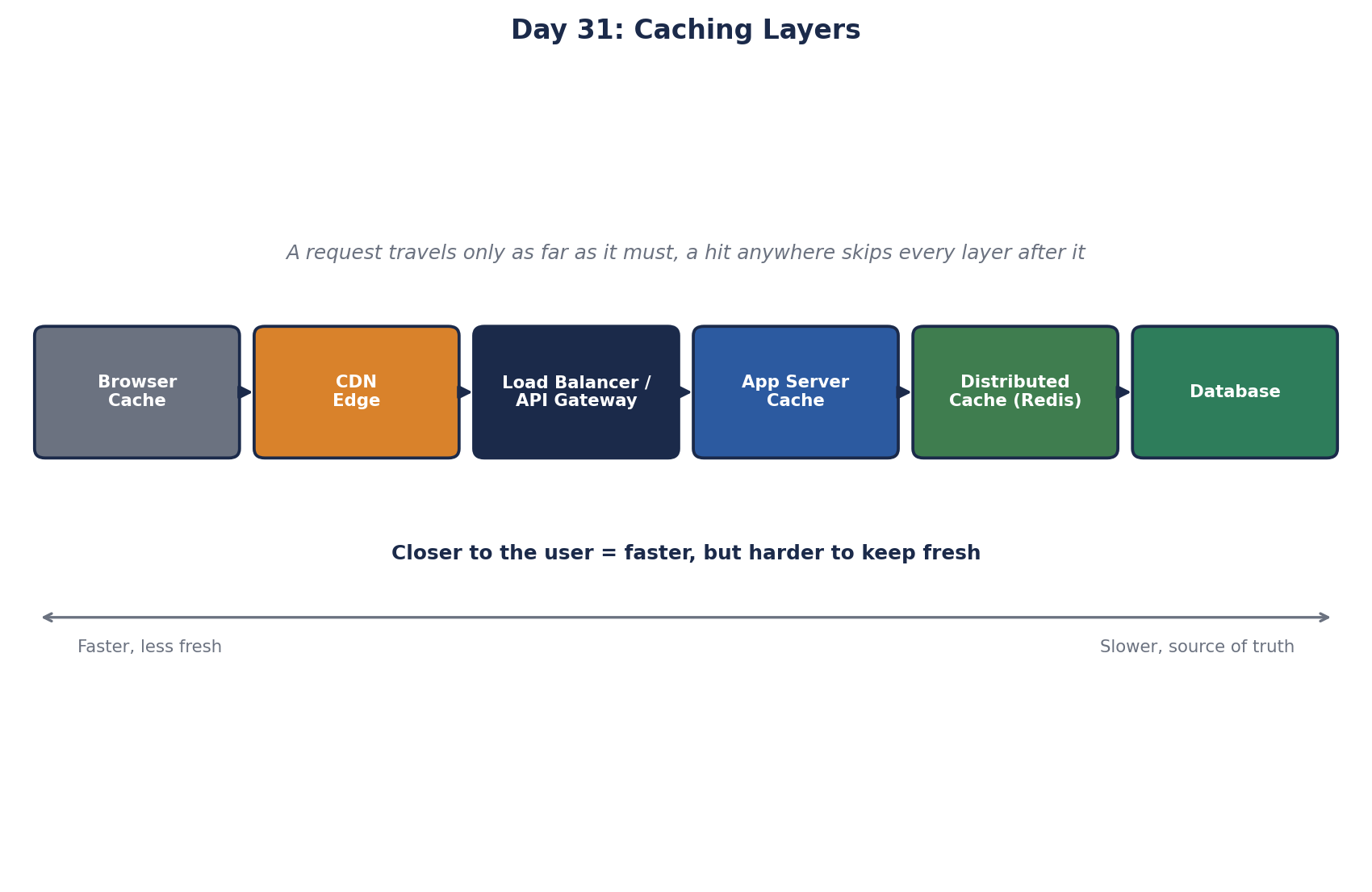
Worked example: caching one product page
- The page's JavaScript and images: browser and CDN, cached for a long time with versioned filenames (Day 38).
- The public product data: CDN for 60 seconds, plus Redis behind the API for 10 minutes. A hit at the CDN never reaches your servers.
- The user's cart: never cached at shared layers. It's personal, so at most the app caches it per user in Redis.
- Stock count: short or no caching, because overselling costs more than a database read.
Different parts of one page get different policies. That's normal.
Four questions to ask before adding a cache
| Question | Why it matters |
|---|---|
| How stale may this be? | Sets the TTL and whether you need invalidation (Day 36) |
| Is it the same for every user? | Personal data must never be cached at shared layers |
| How expensive is a miss? | Expensive misses justify more caching and stampede protection (Day 39) |
| What's the hit rate? | A cache with a 20 percent hit rate mostly adds complexity |
Measure the hit rate of every cache you add. If it's low, the data may be too varied or too short-lived to cache usefully.
When the cache becomes load-bearing
A cache with a 95 percent hit rate means the database only sees 5 percent of reads. Over months, the database gets sized for that 5 percent. Then Redis restarts, the hit rate drops to zero, and the database receives 20 times its usual load. The cache was meant to make things faster; it quietly became something the system can't run without.
Decide which kind you have. If the database can't survive without the cache, treat the cache as critical: replicas, failover, warming after restarts (Day 39), and a limit on how many misses reach the database at once.
Check yourself
In-process is faster but each server holds its own copy, which can disagree and multiplies memory use. Redis is shared and consistent across servers but costs a network hop.
The database is sized for the cache's hit rate, so the cache is load-bearing. Make Redis highly available, warm it after restarts, and cap concurrent misses.
Not the CDN or any shared layer. If cached at all, it's per user in the application cache, keyed by user id, and marked private for browsers.
Most requests miss, so the cache adds cost and complexity for little benefit. The keys may be too specific, the TTL too short, or the data not reused enough.
Is the data read much more than it's written? How stale can it be? What's the key, and how will you invalidate it? What happens to the database if the cache is empty or down? If the last answer is "it falls over", the cache has become load-bearing.