Containers and Kubernetes for Architects
On this page
What containers solve: "it works on my machine"
The app runs on the developer's laptop and fails on the server: different runtime version, a missing library, a different config. Containers remove that class of problem by packaging the application together with its exact runtime and dependencies into one image. The same image runs on a laptop, in CI and in production.
A container isn't a virtual machine. It shares the host's operating system kernel and isolates processes with kernel features, so it starts in seconds and uses far less memory than a VM.
The order of the Dockerfile matters. Each instruction is a cached layer, and a change invalidates every layer after it. Copying only the project file and restoring packages first means a code change reuses the cached restore instead of downloading every NuGet package again.
# Multi-stage build: compile with the SDK, run on the smaller runtime image
FROM mcr.microsoft.com/dotnet/sdk:9.0 AS build
WORKDIR /src
COPY Orders.Api/Orders.Api.csproj Orders.Api/
RUN dotnet restore Orders.Api/Orders.Api.csproj    # cached until the project file changes
COPY . .
RUN dotnet publish Orders.Api -c Release -o /app --no-restore

FROM mcr.microsoft.com/dotnet/aspnet:9.0
WORKDIR /app
COPY --from=build /app .
USER app                                     # don't run as root
ENTRYPOINT ["dotnet", "Orders.Api.dll"]
What Kubernetes does: reconciliation
One container is easy. Hundreds across many machines need something to place them, restart crashed ones, replace failed machines, roll out new versions without downtime, and scale with load. Kubernetes does this by reconciliation: you declare the desired state ("4 replicas of orders-api, version 1.8"), and controllers continuously compare it with reality and fix differences.
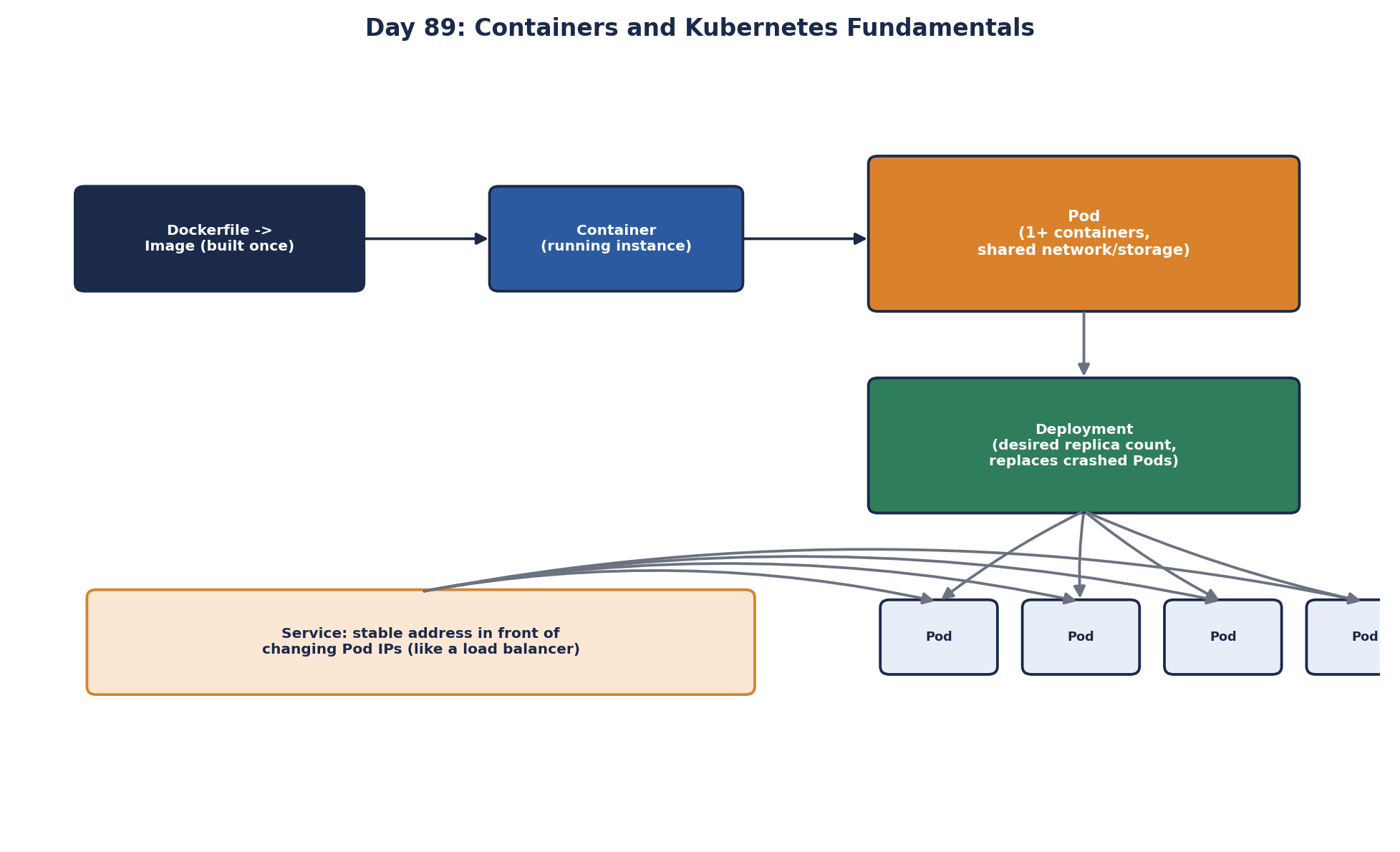
Kubernetes objects an architect needs
| Object | What it is |
|---|---|
| Pod | One or more containers that run together and share a network; the unit Kubernetes schedules |
| Deployment | Desired number of identical Pods and how to roll out new versions |
| Service | A stable name and virtual IP that load-balances to matching Pods (Day 54) |
| Ingress / Gateway | Routes external HTTP traffic to Services |
| ConfigMap / Secret | Configuration and secrets injected into Pods |
| HorizontalPodAutoscaler | Adds or removes Pods based on CPU, memory or custom metrics |
| StatefulSet | Pods with stable identities and their own storage, for databases and brokers |
| Namespace | A way to group and isolate resources by team or environment |
Kubernetes settings that decide reliability
Most Kubernetes reliability problems trace back to a few fields:
- Resource requests and limits. Requests reserve CPU and memory for scheduling; limits cap use. Without requests, nodes get overpacked; a memory limit set too low gets the container killed (OOMKilled). CPU limits have a subtler cost: a container that reaches its limit is throttled for the rest of each short scheduling period, so a service can show low average CPU and still have p99 latency spikes. Many teams set CPU requests but no CPU limits for latency-sensitive services. .NET reads the container's memory limit and by default caps the GC heap at 75 percent of it, so set the limit from measured use, not a guess.
- Readiness probes: only send traffic to Pods that can serve it (Day 19).
- Liveness probes: restart a Pod that's stuck. Keep them simple; a liveness probe that checks the database will restart every Pod when the database blips.
- Rolling updates and PodDisruptionBudgets: replace Pods gradually and keep a minimum available during deploys and node maintenance.
- Spreading: topology spread constraints or anti-affinity so replicas land in different zones, not all on one node.
- Graceful shutdown: handle
SIGTERMand finish in-flight requests within the termination grace period (Day 71).
The Docker & Kubernetes course covers each of these objects hands-on, with working manifests.
Is Kubernetes the right choice?
Kubernetes is powerful and complex. A small team with a few services may be better served by a managed container platform with less to operate: Azure Container Apps, AWS ECS or App Runner, Google Cloud Run. Even with Kubernetes, use a managed control plane (AKS, EKS, GKE) rather than running your own.
Check yourself
CPU throttling. Short bursts hit the limit and the container is paused until the next period. Check throttling metrics, and raise or remove the CPU limit while keeping the request.
It exceeded its memory limit and the kernel killed it. Raise the limit to match real usage, or fix a memory leak.
A database problem would make every Pod fail liveness and restart at once, turning a dependency issue into a full outage. Use readiness for dependency checks.
The request is what the scheduler reserves for the pod and guarantees under contention. The limit is the maximum it may use, and exceeding a CPU limit causes throttling. Many teams set requests carefully and avoid tight CPU limits for latency-sensitive services.
For a small team running a few services, where a managed platform like a container app service or a PaaS gives deployments, scaling and TLS without running a cluster. Kubernetes pays off with many services and teams who need its flexibility.