Serving Static vs Dynamic Content with a CDN
On this page
Static vs dynamic content: three kinds of response
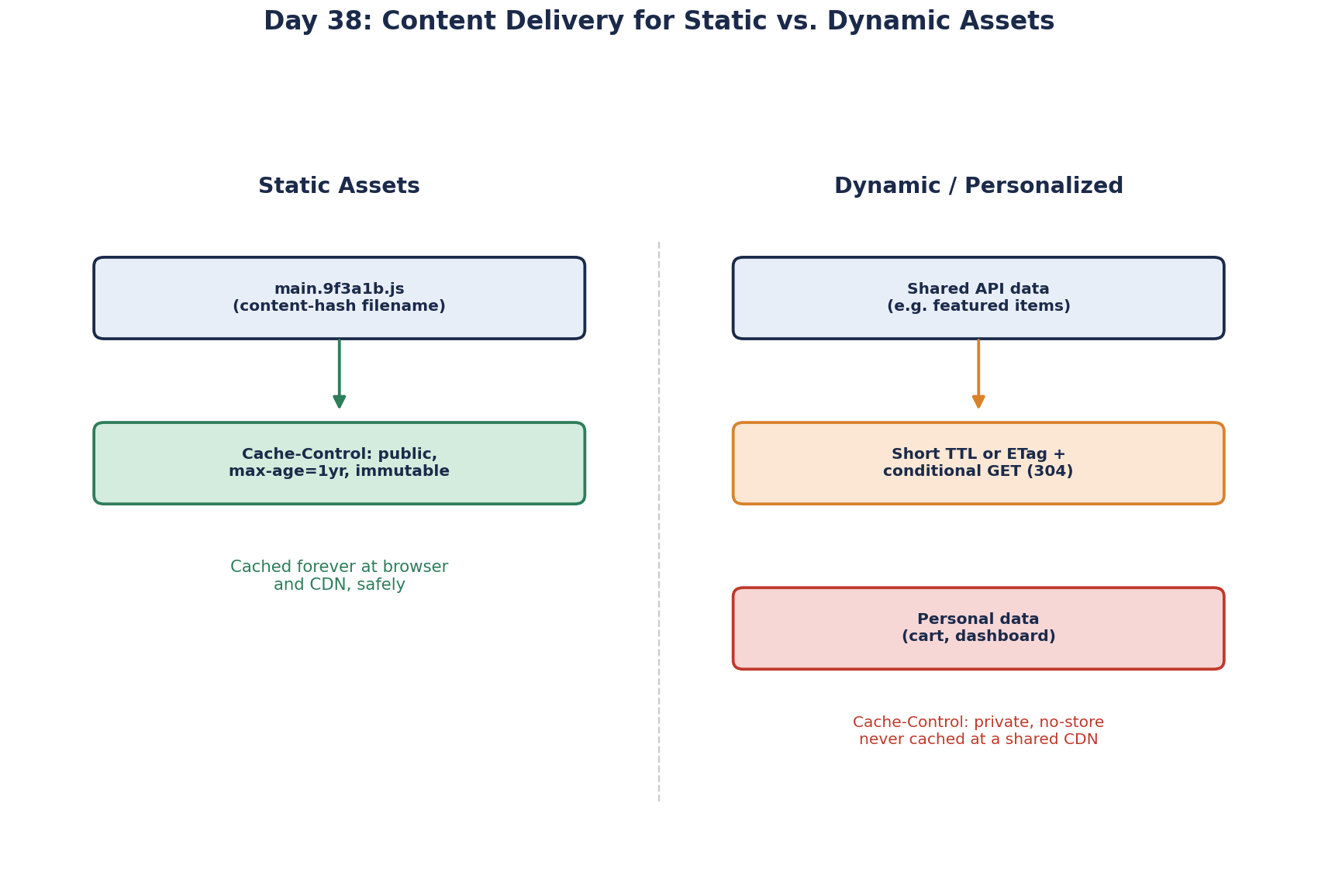
A deployed web app serves three very different things, and one caching rule can't fit them all:
- Static assets: JavaScript, CSS, images, fonts. Identical for everyone, change only on deploy.
- Shared dynamic responses: today's featured products, a public price list. Same for everyone, change during the day.
- Personal responses: a cart, an account page. Different for every user.
The tool for all three is the Cache-Control header. Getting it right is most of what "content delivery" means in practice.
Static assets: cache forever, rename on change
Build tools (Vite, webpack, the Angular CLI) put a content hash in each filename: main.9f3a1b.js. If the file changes, its name changes. So the file at a given URL never changes, and it can be cached for a year:
Cache-Control: public, max-age=31536000, immutableimmutable tells the browser not to even revalidate. The one file that must not be cached this way is the entry page, index.html, because it's what points to the new filenames:
Cache-Control: no-cache # may store it, but must check with the server before each useWith an ETag, that check is cheap: if nothing changed, the server answers 304 Not Modified with no body.
Dynamic content: short TTLs, s-maxage and stale-while-revalidate
Public but changing data gets a short lifetime. You can give shared caches (the CDN) a different lifetime than browsers with s-maxage. Wikipedia's home page, for example, sent this at the time of writing:
cache-control: s-maxage=86400, must-revalidate, max-age=3600The CDN may keep it for a day (because Wikipedia can purge it when it changes), browsers for an hour. For an API's featured-products list, something like public, s-maxage=60, max-age=0 lets the CDN absorb traffic while browsers always ask.
stale-while-revalidate smooths the moment of expiry:
Cache-Control: public, max-age=60, stale-while-revalidate=300For 60 seconds the response is fresh. For the next 5 minutes, a cache may serve the stale copy immediately while fetching a new one in the background. Users never wait on the refresh, and the origin sees one request instead of a burst. CDNs including Cloudflare and Fastly support it.
Personal responses: private or nothing
Cache-Control: private, no-cache     # browser may keep it, must revalidate; shared caches must not store it
Cache-Control: no-store              # nobody stores it: banking pages, one-time tokens
private keeps responses out of CDNs and proxies. Combine it with a CDN rule that bypasses caching for requests carrying session cookies or Authorization headers, as a second line of defense.
Cache-Control headers cheat sheet
| Response | Header | Notes |
|---|---|---|
| Hashed JS/CSS/images | public, max-age=31536000, immutable | New build, new filenames |
index.html | no-cache (plus ETag) | Revalidated each load, so deploys show up |
| Shared API data | public, s-maxage=60, stale-while-revalidate=300 | Tune to how stale it may be |
| Personal pages and APIs | private, no-cache or no-store | Never stored by shared caches |
Compression (Brotli or gzip) and HTTP/2 or HTTP/3 (Day 13) work alongside these headers: smaller files, fewer handshakes, and caching on top.
In ASP.NET Core, the static files middleware sends no Cache-Control header unless you add one. From .NET 9, MapStaticAssets fingerprints files, adds ETags and long cache headers, and serves precompressed versions, so you get most of this table without writing it by hand.
How a rolling deploy can cache a 404 at the CDN
A rolling deploy can poison the CDN. A new server returns a fresh index.html that points to main.4c2d.js. The browser asks the CDN for it, the CDN asks an origin server that is still running the old build, gets a 404, and caches the 404. Every user now gets a broken page until that error expires.
Two habits prevent it. Upload new hashed assets to their storage before any server starts serving the new index.html, and keep old assets around for a few deploys, so pages already open can still load them. And give error responses short or no caching at the CDN.
Check yourself
index.html is cached with a long max-age, so browsers keep loading the old one that points to old bundles. Serve it with no-cache and rely on hashed filenames for the bundles.
After expiry, caches serve the stale copy instantly while refreshing in the background, so users don't wait and the origin isn't hit by a burst of refreshes.
no-cache lets browsers and caches store the response but requires them to revalidate with the server before each use, often with an ETag, so they can still save bandwidth. no-store forbids storing the response anywhere, which is what sensitive, personal responses need.
During the rolling deploy, the CDN fetched the new bundle from an old server, got a 404 and cached it. Publish assets before the new HTML, keep old assets, and don't cache errors for long.