Zero Trust Architecture Explained
On this page
Why the trusted internal network fails
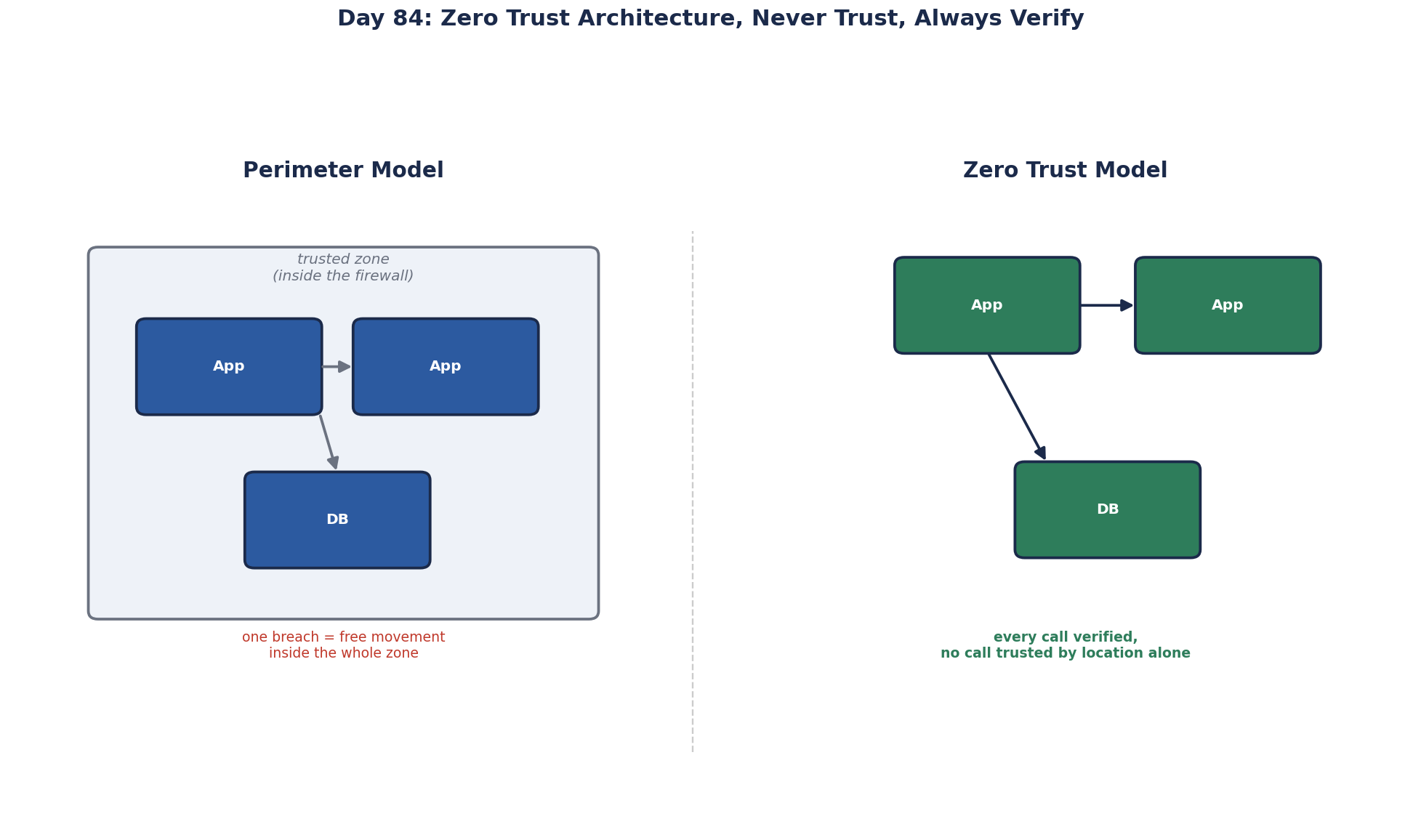
Classic security is a castle and moat: a strong firewall at the edge, and anything inside is trusted. Internal services talk over plain HTTP with no authentication because "only our servers can reach them". Then one laptop is phished, or one internet-facing server is compromised, and the attacker is inside the moat, where nothing asks who they are. They move from system to system until they find the data. Many large breaches followed exactly this path.
What is zero trust? Never trust, always verify
Zero trust removes implicit trust based on network location. Every request is authenticated, authorized and encrypted, whether it comes from the internet or the server next door. NIST's SP 800-207 describes it in detail; the core principles:
- Always verify: strong identity for every user, device and service, checked on every request.
- Least privilege: each identity gets only the access it needs, ideally just in time and for a limited time.
- Assume breach: design so that one compromised component can reach as little as possible, and watch for misuse.
Zero trust for users: BeyondCorp
Google's BeyondCorp program, started after the 2009 "Operation Aurora" attacks, is the best-known example: employees reach internal apps from any network through an access proxy that checks user identity, device health and policy on every request, with no VPN that grants blanket network access. Commercial equivalents exist from Cloudflare, Zscaler, Microsoft and others.
In practice:
- single sign-on with multi-factor authentication or passkeys,
- device checks (managed, patched, encrypted) as part of access decisions,
- per-application access instead of whole-network VPN access.
Zero trust for services: workload identity and mTLS
- Workload identity. Each service has a cryptographic identity, not just an IP address. SPIFFE is a standard for this; service meshes issue such identities automatically.
- Mutual TLS (mTLS). Both sides of every internal connection present certificates, so traffic is encrypted and each side knows who it's talking to. A mesh (Day 57) can do this without code changes.
- Service-to-service authorization. Explicit rules: checkout may call payments; the recommendation service may not. Default deny.
- Network segmentation as a second layer, not the only one: Kubernetes network policies and security groups limit which workloads can even connect.
- No shared, all-powerful credentials. Each service has its own database user with only the permissions it needs, and short-lived credentials from a vault instead of a password in a config file.
Better still is no stored secret at all. Cloud platforms give each workload an identity the platform vouches for: managed identities on Azure, IAM roles for service accounts on AWS, workload identity on Google Cloud. An ASP.NET Core app on Azure can connect to Azure SQL, Key Vault and Storage with DefaultAzureCredential and no password anywhere: the platform issues short-lived tokens, and there's nothing in configuration to leak.
A common gap: the database
Many teams secure their APIs carefully while every service connects to the database as the same highly privileged user, from anywhere inside the network. In a zero trust design, each service uses its own identity, is limited to its own schema and needed operations, connects over TLS, and its access is logged.
How to adopt zero trust incrementally
Zero trust is a direction, not a product. A practical order: SSO and MFA for every user; inventory services and data flows; mTLS and service identities for internal traffic; per-service database credentials; tighten network policies to default deny; continuous monitoring of access patterns.
Check yourself
It trusts everything inside the network perimeter. Once an attacker gets in, through a phishing email, a compromised laptop or one vulnerable server, they're treated as trusted and can move between systems freely. Zero trust verifies every request based on identity and context, wherever it comes from.
Managed identities. The app authenticates to Azure SQL and Key Vault with a platform-issued identity and short-lived tokens, so there's no password to store or leak.
It encrypts every internal connection and gives both sides verified identities, so services can authorize each other instead of trusting network location.
Give each service its own least-privilege credentials, preferably short-lived from a vault, scoped to its own data, over TLS and with access logged.
Start with strong identity for users, such as single sign-on with MFA, then replace shared secrets with managed workload identities, add mutual TLS or token-based authentication between services, and tighten database access per service. Each step removes implicit trust without a big-bang rebuild.