Synchronous vs Asynchronous Communication
On this page
- A checkout that fails because email is down
- Synchronous vs asynchronous communication
- Sync vs async trade-offs: latency, coupling and availability
- When to use synchronous or asynchronous calls
- Worked example: making checkout asynchronous
- Asynchronous request-reply for slow work
- The costs of asynchronous messaging
- Check yourself
A checkout that fails because email is down
The order endpoint validates the cart, charges the card, updates inventory, sends a confirmation email and notifies the warehouse, all in one HTTP request. The email provider has a bad afternoon and starts timing out. Now checkout times out too, and customers can't buy anything, because a confirmation email couldn't be sent. That's a design problem, not an email problem.
Synchronous vs asynchronous communication
Synchronous: the caller sends a request and waits for the response before continuing. HTTP and gRPC calls usually work this way. Simple to write and debug: the flow reads top to bottom and errors come back immediately.
Asynchronous: the caller sends a message, usually through a queue or broker, and carries on. Someone else processes it later. The sender doesn't wait and often doesn't know who handles it.
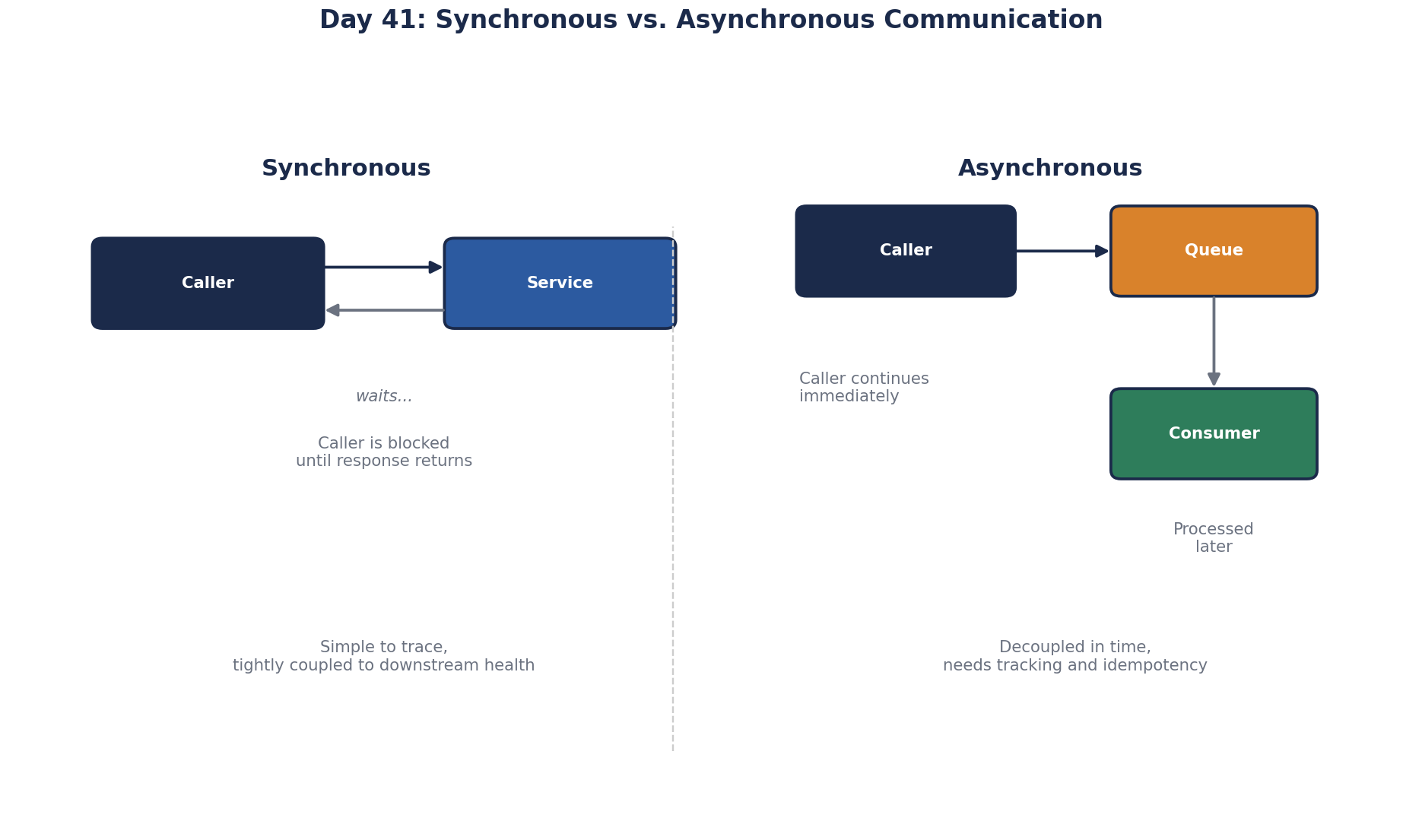
Sync vs async trade-offs: latency, coupling and availability
| Synchronous | Asynchronous | |
|---|---|---|
| Caller waits | Yes | No |
| Result available | Immediately | Later, or never seen by the caller |
| If the receiver is down | The caller fails or waits | Messages wait in the queue |
| Coupling | Caller depends on receiver being up and fast | Only on the queue being up |
| Latency of a chain | Adds up across every call | Caller's latency stays small |
| Debugging | One stack trace | Tracing across queues and consumers |
The key effect is on availability. A synchronous chain is only as available as its weakest link (Day 4). An asynchronous hand-off lets the receiver be down for a while without the caller noticing.
When to use synchronous or asynchronous calls
Does the user need the result to continue?
- "Is my card accepted?" Yes: synchronous.
- "Is this coupon valid?" Yes: synchronous.
- "Did the confirmation email go out?" No: asynchronous.
- "Has the warehouse been told?" No: asynchronous.
- "Did analytics record the purchase?" No: asynchronous.
Worked example: making checkout asynchronous
Keep in the request:
- Validate the cart.
- Authorize the payment.
- Save the order (and reserve stock) in one database transaction.
- Publish an
OrderPlacedevent, and return "Order confirmed".
Move to consumers of OrderPlaced:
- send the confirmation email,
- notify the warehouse,
- update analytics and loyalty points.
Checkout latency drops from several seconds to a few hundred milliseconds, and an email outage now means late emails, not lost sales. Consumers retry on their own schedule.
One detail matters: saving the order and publishing the event must not disagree. If the order commits and the publish fails, nobody gets an email. The transactional outbox pattern fixes this: write the event into an outbox table in the same transaction as the order, and have a separate process publish rows from that table. Day 50 uses it. In .NET, MassTransit, NServiceBus and Wolverine all include an outbox you can turn on rather than build.
Asynchronous request-reply for slow work
Some work is both slow and wanted: "export my last year of orders as a PDF" takes 40 seconds. Holding an HTTP request open that long ties up a server thread and hits load balancer timeouts. Use the asynchronous request-reply pattern instead:
POST /exports                   202 Accepted   Location: /exports/7f3a
GET  /exports/7f3a              200 { "status": "running" }
GET  /exports/7f3a              200 { "status": "done", "url": "https://files.example/7f3a.pdf" }
The request queues the job and returns at once. The client polls the status URL, or the server notifies it by webhook, SignalR or email when it's ready. The user still gets the result; nothing waits on an open connection.
The costs of asynchronous messaging
- Eventual completion: the email arrives seconds later. Usually fine; say so in the UI if not.
- Duplicates and ordering: messages can be delivered more than once or out of order, so consumers must be idempotent (Day 65).
- Visibility: "where is my order stuck?" needs tracing and dashboards across queues.
Check yourself
Validation, payment authorization and saving the order, because the customer needs an immediate yes or no. Notifications and downstream updates can be asynchronous.
A non-essential step sits in the synchronous request path, so its failure becomes the customer's failure, and checkout's availability is capped by the email provider's. Record the order, publish an event or queue a job, and let a separate worker send the email with retries. Checkout then succeeds even while email is down.
Accept the request with 202 Accepted and a status URL, run the report in the background, and let the client poll or receive a notification when it's done.
Eventual consistency, since the user may not see effects immediately; harder debugging across services; the need for idempotent consumers; and new infrastructure to run and monitor, such as a broker and dead-letter queues. It's worth it for work that doesn't need to finish before the user gets a response.
The API accepts the request, returns 202 Accepted with a status URL, and queues the work. The client polls the status URL, or receives a notification, and fetches the result when it's ready. No request has to stay open for minutes.