OAuth2 and OpenID Connect Explained
On this page
Why not just ask for the password?
A budgeting app wants to read your bank transactions. The old way: give it your bank password. Now it can do anything you can, forever, and you can't revoke it without changing your password everywhere. OAuth2 fixes this with delegated access: you approve a limited permission at the bank, and the app receives a token for just that permission, which you can revoke.
OpenID Connect (OIDC) builds on OAuth2 to answer a different question: who is the user? It's what "Sign in with Google" or your company's single sign-on uses.
The four OAuth 2.0 roles
- Resource owner: the user.
- Client: the app asking for access.
- Authorization server: issues tokens after the user logs in and consents (Entra ID, Okta, Auth0, Keycloak, Google).
- Resource server: the API that accepts tokens.
Authorization code flow with PKCE
The flow used by web apps, single-page apps and mobile apps today:
- The client creates a random code verifier and its SHA-256 hash, the code challenge.
- It redirects the user to the authorization server with the challenge, requested scopes (
openid profile orders.read) and astatevalue against CSRF. - The user logs in and consents.
- The authorization server redirects back with a short-lived authorization code.
- The client exchanges the code, plus the original verifier, for tokens. The server hashes the verifier and checks it matches the challenge.
PKCE (Proof Key for Code Exchange) ensures that an attacker who intercepts the code can't use it without the verifier, which never left the client.
# pkce.py: the client's secret-per-login for the authorization code flow
import base64, hashlib, secrets

def b64url(raw: bytes) -> str:
    return base64.urlsafe_b64encode(raw).rstrip(b"=").decode()

def new_pkce_pair() -> tuple[str, str]:
    verifier = b64url(secrets.token_bytes(32))                       # kept by the client
    challenge = b64url(hashlib.sha256(verifier.encode()).digest())   # sent in the authorize request
    return verifier, challenge
Checked against the example in RFC 7636, the verifier dBjftJeZ4CVP-mB92K27uhbUJU1p1r_wW1gFWFOEjXk produces the expected challenge E9Melhoa2OwvFrEMTJguCHaoeK1t8URWbuGJSstw-cM. In practice, use your framework's OIDC library rather than hand-rolling the flow.
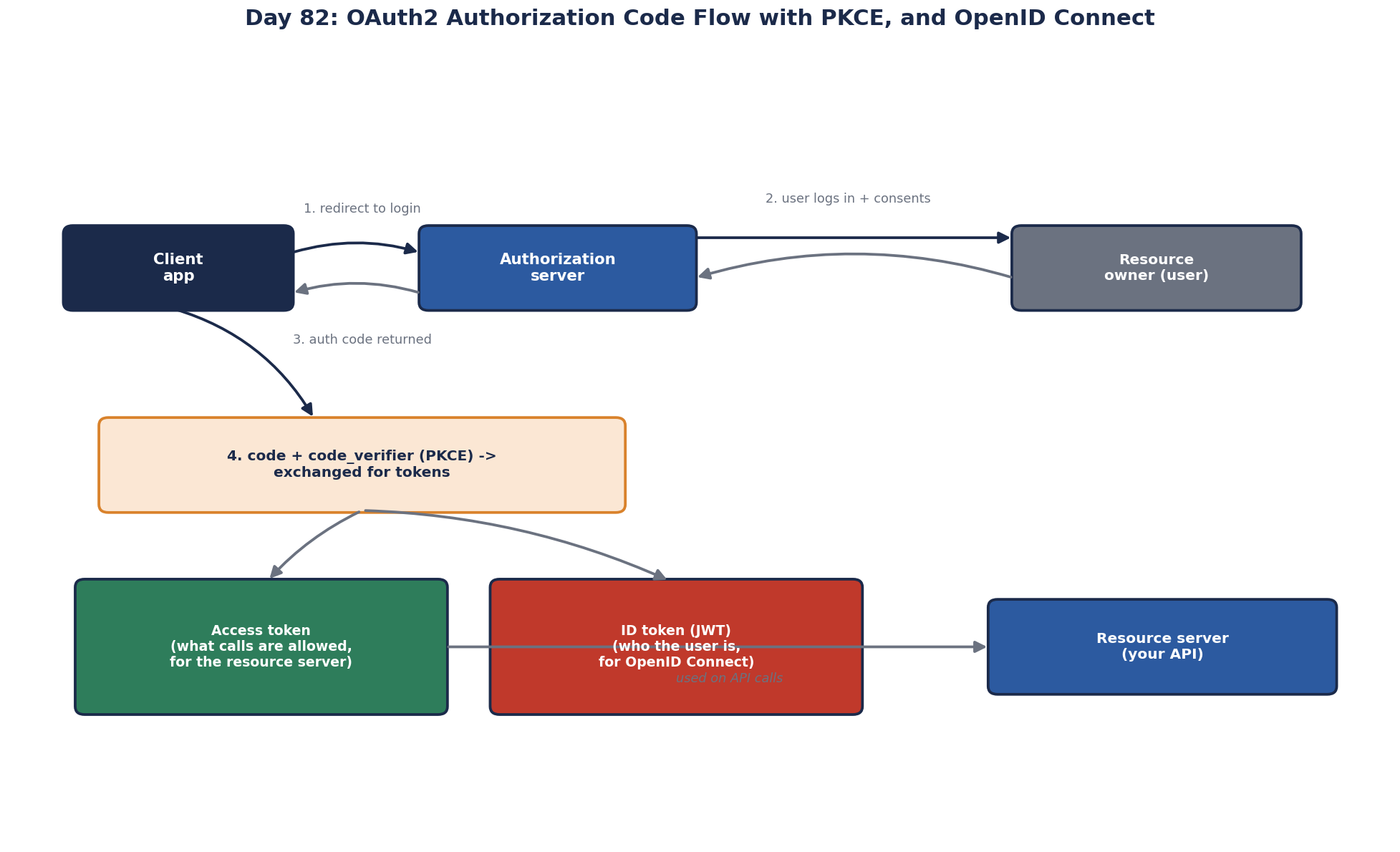
ID token vs access token vs refresh token
| Token | For | Read by | Lifetime |
|---|---|---|---|
| ID token (OIDC) | Telling the client who logged in | The client only | Short |
| Access token | Calling APIs with the granted scopes | The resource server | Minutes |
| Refresh token | Getting new access tokens without logging in again | The authorization server | Hours to weeks, revocable |
Access tokens are often JWTs: signed claims (sub, aud, scope, exp) that APIs verify with the issuer's public keys, without calling the authorization server.
Common OAuth and OpenID Connect mistakes
- Using an access token as proof of login in the client. That's the ID token's job.
- APIs not checking the audience (
aud): a token issued for another API must be rejected. - Storing tokens in
localStoragein browsers, where any injected script can read them. The backend-for-frontend pattern keeps tokens on the server and gives the browser an HTTP-only session cookie. - The implicit flow and password grant: both are deprecated by current guidance, the OAuth 2.0 Security Best Current Practice (RFC 9700, 2025), and OAuth 2.1 drafts drop them. Use the code flow with PKCE.
- Loose redirect URIs. The authorization server must match the registered redirect URI exactly. A wildcard or prefix match lets an attacker register
https://app.example.com.evil.net/or abuse an open redirect on your site to receive the code. - Trusting the token's own header. A JWT names its signing algorithm and key id. Validation must accept only the algorithms you expect and keys from the issuer's published key set (JWKS), refreshed when keys rotate. Use the framework's validation; ASP.NET Core's JwtBearer and Microsoft.Identity.Web do this correctly when configured with the issuer and audience.
- Using a user flow for machine-to-machine calls. Calls with no user should use the client credentials flow, with the secret kept in a vault (Day 83).
Check yourself
An attacker who intercepts the authorization code, for example through a malicious app registered for the same redirect scheme or a leaked log, exchanging it for tokens. The client sends a hash of a secret verifier when starting the flow and the verifier itself when redeeming the code, so a stolen code alone is useless.
Point the redirect at any path on the domain, such as an open redirect, so the authorization code lands where they can read it. Register and match exact redirect URIs.
The ID token tells the client who the user is; the access token authorizes calls to an API and is meant for that API to validate.
An audience check. A token issued for some other API is also validly signed, so without checking the aud claim this API would accept tokens meant for elsewhere. It should accept only tokens issued for itself, then check the scopes or roles each operation needs.
Access tokens are meant for the API, and their format may be opaque or change. The client should read the user's identity from the ID token or the userinfo endpoint, which are designed for that purpose and validated for the client.