Load Balancers: Layer 4 vs Layer 7 and Algorithms
On this page
Symptom: one server melts while others idle
An API has a fast endpoint (20 ms lookups) and a slow one (2-second reports). Under round-robin balancing, sometimes several report requests land on the same server in a row. That server's threads fill up and its fast requests start timing out, while the server next to it sits half idle. The load balancer is doing exactly what it was told. It was told the wrong thing.
Diagnose: layer 4 vs layer 7 load balancing
A load balancer decides which server handles each connection or request. It's what makes horizontal scaling work in practice (Day 2).
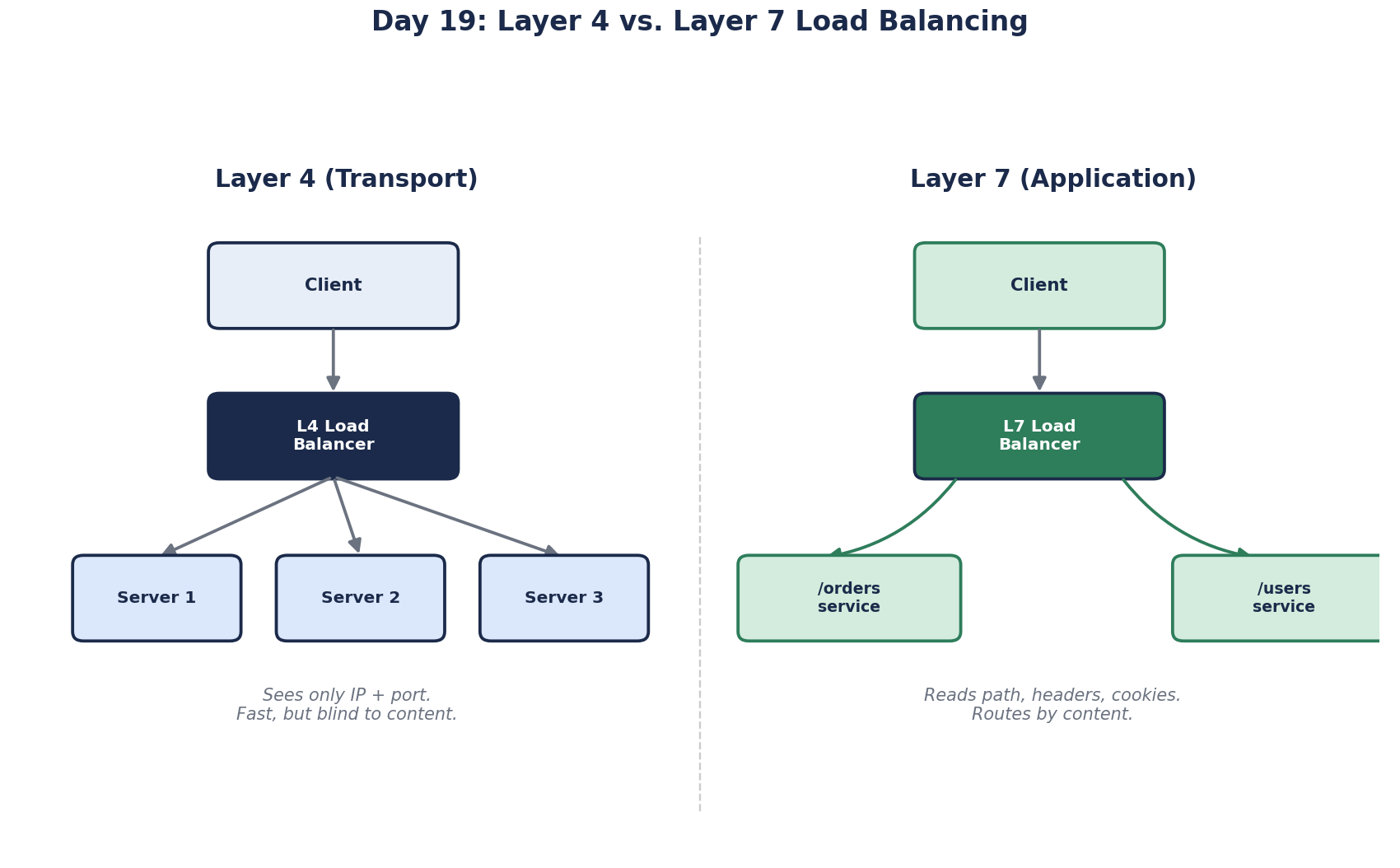
Layer 4 balancers work with TCP or UDP connections: they see addresses and ports, not HTTP. They forward connections fast and cheaply, and work for any protocol, including databases. They can't route by URL, because they never read it.
Layer 7 balancers read the HTTP request: path, host, headers, cookies. They can send /api/* to API servers and /images/* to a storage service, terminate TLS, retry a failed request on another server, and balance individual requests within one connection, which matters for HTTP/2 and gRPC.
| Layer 4 | Layer 7 | |
|---|---|---|
| Sees | IP addresses, ports | Full HTTP request |
| Routing by path or header | No | Yes |
| Overhead | Very low | Higher (parses HTTP, often TLS) |
| Examples | AWS Network Load Balancer, Google's Maglev | AWS Application Load Balancer, NGINX, Envoy, HAProxy in HTTP mode |
Large setups often stack them: a layer 4 balancer at the edge for raw throughput, in front of layer 7 balancers that do the smart routing.
Fix: choose the right load balancing algorithm
- Round robin: each server in turn. Fine when servers and requests are similar.
- Weighted round robin: bigger servers get proportionally more.
- Least connections: send to the server with the fewest active requests. The right fix for the opening story: a server busy with slow reports stops receiving new work until it catches up.
- Least response time / power of two choices: pick two servers at random and send to the less loaded one. Simple, and very effective at large scale.
- Hashing (client IP or a key): the same client or key goes to the same server. Useful for cache affinity; uneven if a few keys are very hot.
Prevent: liveness and readiness health checks
The balancer only routes around failures it can see. Two kinds of check:
- Liveness: is the process responding at all? A simple endpoint that returns 200.
- Readiness: can it do useful work? Can it reach the database and its critical dependencies?
A server whose database connection pool is exhausted still answers a basic ping, so a shallow check keeps sending it traffic that will fail. A readiness check at /health/ready that runs a quick database query catches it.
Be careful not to make checks too deep: if every server's readiness check fails because a shared dependency is down, the balancer removes all servers and the outage gets worse. Check what this instance controls, keep checks cheap, and require a few consecutive failures before removing a server. ASP.NET Core's health checks let you tag checks and expose separate /health/live and /health/ready endpoints.
Deploying without dropped requests: connection draining
Removing a server from the balancer mid-request cuts users off. Two settings prevent it:
- Connection draining (AWS calls it deregistration delay, 300 seconds by default): the balancer stops sending new requests to a server being removed, but lets in-flight ones finish. Set it a little longer than your slowest normal request, not five minutes if requests take two seconds, or deploys crawl.
- Graceful shutdown in the app: on the stop signal, fail the readiness check, finish current requests, then exit.
New servers have the opposite problem: cold caches and code that hasn't been compiled yet make the first requests slow. Some balancers offer slow start, ramping a new server's share of traffic up over a minute or two.
Long-lived connections also defeat per-connection balancing. A layer 4 balancer that spread WebSocket or gRPC connections evenly yesterday stays uneven after you add servers today (Days 16 and 17).
Check yourself
Layer 7. Routing by URL path means reading the HTTP request, which only an application-layer balancer does. A layer 4 balancer only sees IP addresses and ports, so it can't tell the two paths apart. Layer 7 also enables header-based routing, TLS termination and retries.
Connection draining and graceful shutdown. The balancer should stop sending new requests and let in-flight ones finish before the old instance exits.
Least connections, or power of two choices. Round robin hands out requests evenly by count, so a server that happens to get several slow requests falls behind. Least connections sends new requests to the server with the fewest in flight, which naturally steers them away from servers busy with slow work.
Its health check only confirms the process is running, not that it can do useful work. Add a readiness check that verifies critical dependencies like the database pool, so the balancer stops sending traffic to that server until it recovers, while a separate liveness check decides whether to restart it.