Redundancy and Failover Strategies
On this page
Active-active vs active-passive redundancy
Day 4 showed that redundancy raises availability. Now the practical question: should the spare copies serve traffic all the time, or wait on standby? And when the primary fails, how does traffic move to the spare, safely?
| Active-active | Active-passive | |
|---|---|---|
| Spares serve traffic | Yes, all the time | No, they wait (they may serve reads) |
| Failover | Remaining nodes absorb the load | A standby is promoted |
| Capacity | Must have headroom so survivors can carry the full load | Standby must be sized for full load but sits idle |
| Complexity | Every node must handle writes, or writes are partitioned | Simpler data model: one writer at a time |
| Typical use | Stateless app tiers, multi-region read-heavy services | Databases, stateful services, anything with one writer |
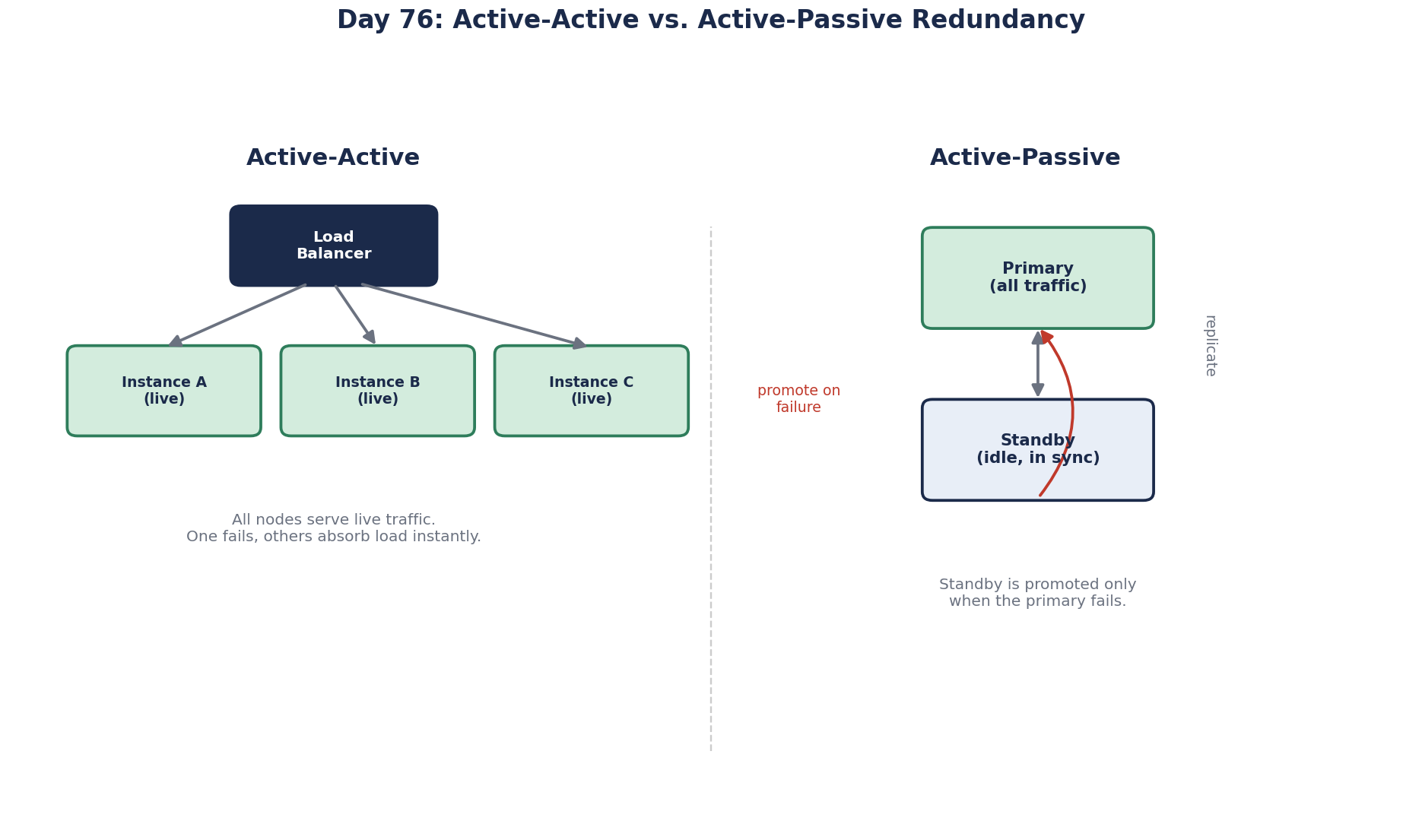
Stateless app servers are naturally active-active: several instances behind a load balancer, and health checks drop a failed one (Day 19). Make sure the survivors can carry the load: with three instances each at 70 percent CPU, losing one pushes the other two above 100 percent. N+1 sizing means you can lose one and still serve peak.
Databases are usually active-passive: one primary accepts writes, replicas wait to be promoted (Day 25).
How failover works: detection, promotion and redirection
1. Detection. Health checks or heartbeats notice the primary is gone. Too sensitive and you fail over on a network blip; too slow and the outage lasts longer. Typically several missed checks over 10 to 30 seconds.
2. Promotion. Pick the most up-to-date standby and make it the primary. With asynchronous replication, recent writes may be lost; know how much (your RPO, Day 77).
3. Redirection. Point clients at the new primary: update DNS, move a virtual IP, update the service registry, or let a proxy route to it. Clients must reconnect and retry.
Managed databases (Amazon RDS Multi-AZ, Azure SQL, Cloud SQL) automate all three, typically completing in tens of seconds to a couple of minutes. Patroni does it for self-managed PostgreSQL, using etcd or Consul for consensus.
Failover isn't finished until the app reconnects
The database can fail over in 30 seconds and the application still be down for 10 minutes. Common reasons:
- Pooled connections to the dead primary. The pool hands out connections that fail one by one. Make sure the driver clears the pool on connection errors and that retries pick up a fresh connection.
- A cached address. A DNS name resolved once at startup, or a long DNS TTL, keeps clients pointed at the old server (Day 12).
- The driver doesn't know about failover. For SQL Server availability groups across subnets, set
MultiSubnetFailover=Truein the connection string so SqlClient tries all listener addresses in parallel. Npgsql accepts several hosts withTarget Session Attributes=primaryand connects to whichever is currently the writer.
Practice with planned switchovers during maintenance windows, and measure the time until the app is healthy, not just until the database is.
Split-brain and how to prevent it
The dangerous case: the primary isn't dead, just cut off by a network partition. The standby is promoted, and now two nodes accept writes. Their data diverges, and reconciling it later is painful or impossible.
Defenses:
- Decide by majority: use a consensus-backed coordinator (Day 62) so only the side with a majority can promote.
- Fence the old primary: cut its access to storage or the network, or have it demote itself when it loses contact with the majority. Some systems physically power it off, a technique memorably called STONITH ("shoot the other node in the head").
- Fencing tokens checked by storage (Day 64).
Failback: returning to the old primary
When the old primary recovers, it must not simply resume as primary: its data is behind the new one, and it may hold writes that never replicated. Rejoin it as a replica, let it catch up, and only then, if you want, switch back in a planned, quiet window. Decide in advance whether you fail back at all; often the new primary just stays.
Test failover regularly
A failover path that has never run is a guess. Trigger failovers on purpose in staging and, carefully, in production (Day 79), and measure how long each phase takes.
Check yourself
The remaining two must carry 105 percent each, so they overload. Size for N+1: enough instances that losing one keeps the rest below capacity.
Two nodes both acting as primary after a partition, accepting conflicting writes. Prevent it with majority-based promotion and by fencing the old primary.
The client side: pooled connections to the old primary, DNS cached past the switch, or a driver not configured for failover. Measure recovery at the app, not the database.
Its data is behind the new primary and may contain unreplicated writes. It should rejoin as a replica and catch up first.
In active-active, every copy serves traffic all the time, so capacity is shared and failover is just losing one of them. In active-passive, a standby waits idle until the primary fails, which is simpler for stateful systems but wastes capacity and makes failover a distinct, riskier event.