How DNS Works at Scale
On this page
The migration that took a day to finish
A team moves api.example.com to a new cloud provider. They update the DNS record at 9:00 and switch off the old servers at 9:15. For the rest of the day, a share of users get errors. The record had a 24-hour TTL, and resolvers around the world kept handing out the old address. Knowing how DNS caching works would have prevented it.
How DNS resolution works
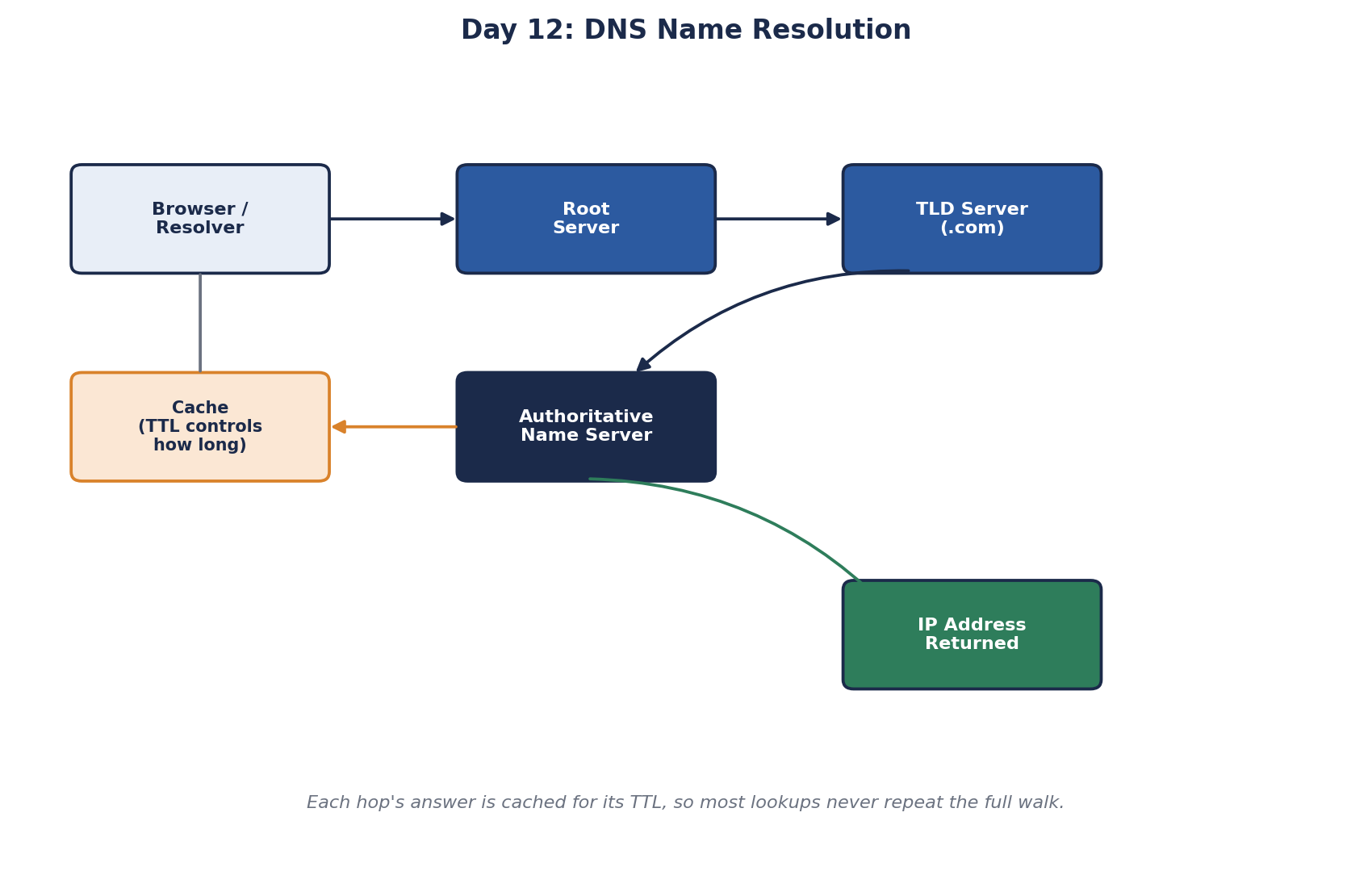
DNS (Domain Name System) maps names like api.example.com to IP addresses. A lookup with nothing cached walks a hierarchy:
- Your device asks a recursive resolver, usually run by your ISP, company or a public service.
- The resolver asks a root server, which points to the servers for
.com. - The TLD server for
.compoints to the domain's authoritative name servers. - The authoritative server returns the answer.
You can watch it happen:
dig +trace example.com
# ... from d.root-servers.net in 20 ms          (root: ask the .com servers)
# ... from k.gtld-servers.net in 47 ms          (.com: ask Cloudflare's name servers)
# example.com.  300  IN  A  104.20.23.154       (authoritative answer, TTL 300 s)
Every answer is cached by the resolver, the operating system and often the browser, for as long as its TTL (time to live) says. The 300 above means "you may reuse this for 5 minutes". Caching is why DNS can serve the whole internet: almost all lookups are answered from a nearby cache.
DNS TTL: long vs short
- Long TTLs (hours): fewer lookups, faster responses, but changes take hours to reach everyone.
- Short TTLs (a minute or less): changes spread fast, but more lookup traffic and slightly more latency.
Most records can have long TTLs most of the time. Lower them only around planned changes.
DNS load balancing and failover
Before a request reaches any load balancer, DNS can already steer it:
- Round-robin DNS returns several addresses, spreading clients across them. It's crude: clients cache answers and DNS doesn't know if a server is down.
- Geographic or latency-based routing answers with the address of the nearest region.
- Health-checked failover, such as AWS Route 53 failover records, stops returning a region's address when its health checks fail.
In most designs DNS points at a load balancer or CDN, not at individual servers. Those addresses rarely change, and the load balancer handles server-level health.
Worked example: a DNS cutover without downtime
- Two days before: lower the record's TTL from 24 hours to 5 minutes. Wait at least one old TTL, so every cache has picked up the short TTL.
- Cutover: point the record at the new load balancer. Keep the old servers running.
- Overlap: most clients switch within 5 minutes. Watch traffic on the old servers fall toward zero; some clients and resolvers ignore TTLs, so give it hours. Clients with long-lived connections are the other stragglers: they only resolve DNS when opening a connection.
- After: switch off the old servers and raise the TTL again.
The mistake in the opening story was step 1: lowering the TTL minutes before the change does nothing for answers already cached with the old 24-hour TTL.
Your services cache DNS too: HttpClient and other gotchas
In .NET, a shared HttpClient only resolves DNS when it creates a connection and ignores TTLs, so a service calling api.example.com can keep using the old address long after a cutover. Set PooledConnectionLifetime so connections, and DNS lookups, are refreshed every few minutes (docs):
var handler = new SocketsHttpHandler { PooledConnectionLifetime = TimeSpan.FromMinutes(2) };
var sharedClient = new HttpClient(handler);
Two more gotchas:
- "Doesn't exist" is cached too. Look up a name before its record exists, and resolvers cache the negative answer for a time set in the zone's SOA record. Create records before anything uses them.
- DNS is a dependency. If your DNS provider goes down, healthy servers are unreachable by name. Large sites serve the same records from two providers.
Check yourself
Resolvers already holding the record keep it for the old TTL. The new, short TTL only applies once they fetch the record again, so lower it at least one old TTL in advance.
Its shared HttpClient keeps pooled connections open and only resolves DNS for new ones. Set PooledConnectionLifetime so connections and lookups are refreshed.
Clients and resolvers cache answers, so load isn't spread evenly, and plain DNS keeps returning a server's address even after it fails.
Health checks remove a failed endpoint from DNS answers, so new lookups go to healthy ones. But clients and resolvers cache answers for the TTL, and some longer, so traffic keeps reaching the failed endpoint for a while. It suits coarse, regional failover, not fast failover between servers.
Lower the TTL well in advance, by at least the old TTL, so caches pick up the short value. Run old and new servers in parallel, switch the record, watch traffic move, and keep the old server serving until traffic has drained. Then raise the TTL again.