.NET SDK, Runtime and CLI: Your First Project
On this page
Learning Objective
Explain how the .NET SDK, runtime, and NuGet fit together, map them onto the Node.js, npm, and package.json toolchain you already use, create and run a first project with the dotnet CLI, and read a csproj file well enough to know what each line does.
Concept Explanation
.NET is a free, open-source, cross-platform development platform from Microsoft. It runs on Windows, macOS, and Linux, and production ASP.NET Core services are commonly deployed in Linux containers. The platform has three pieces you should keep separate in your mind. The SDK is the toolbox for developers: the compiler, the dotnet command line, project templates, and build tooling. The runtime is what executes compiled programs, including the garbage collector and the just-in-time compiler. The base class library is the large standard library that ships with the runtime, covering collections, files, networking, JSON, cryptography, and more. On a build server you install the SDK; on a production machine or in a container image you often need only the runtime.
If you know Node.js the mapping is close. Node.js is the runtime, npm is the package manager, and package.json describes a project. In .NET the runtime and SDK are installed together, NuGet is the package manager, and a project file ending in csproj describes a project. A solution file, ending in slnx with the .NET 10 SDK and in sln with older ones, groups several projects, similar to a monorepo workspace. One difference matters early: C# is compiled ahead of time to an intermediate language stored in a dll file, and the runtime compiles that to machine code as needed. That means a build step always exists, and the compiler catches an entire category of mistakes before the program ever runs.
Releases follow a predictable rhythm. A new major version ships every November. Even-numbered versions are long-term support releases with three years of support, and .NET 10, released in November 2025, is the current long-term support version and the one this course uses. Choosing a long-term support version for a production service is the safe default because it gives you a stable target and a long window for security patches. Pin the version in a global.json file so every developer and the build server use the same SDK.
The csproj file is short and readable. It declares which SDK to use, the target framework, whether nullable reference types are enabled, and which packages the project depends on. Unlike package.json, it does not list every transitive dependency, and there is no node_modules folder inside your project: packages are restored to a shared cache on the machine. Security tooling benefits from this structure. You can ask the CLI directly which of your dependencies have known vulnerabilities, which is something you will automate in Phase 8.
| Concept | .NET | Node.js and npm equivalent |
|---|---|---|
| Runtime | .NET runtime (CLR) | Node.js with V8 |
| Package manager | NuGet | npm |
| Project manifest | MyApp.csproj | package.json |
| Lock file | packages.lock.json (opt in) | package-lock.json |
| Multi-project workspace | Solution file (.slnx, or .sln in older SDKs) | npm workspaces |
| Run and build tool | dotnet run, dotnet build | npm run, tsc |
Worked Example: Creating, Running and Reading a Project
The commands below create a solution with a web API project and a test project, run the API, and check dependencies for known vulnerabilities. Then a minimal csproj shows what the tooling generated. Run these yourself in an empty folder; every later lesson assumes this workflow.
dotnet --version                       # confirm the SDK, expect 10.x
dotnet new globaljson --sdk-version 10.0.100 --roll-forward latestFeature
dotnet new sln -n TaskTracker
dotnet new webapi -n TaskTracker.Api
dotnet new xunit  -n TaskTracker.Tests
dotnet sln add TaskTracker.Api TaskTracker.Tests
dotnet add TaskTracker.Tests reference TaskTracker.Api

dotnet run --project TaskTracker.Api   # starts Kestrel on localhost
dotnet test                            # builds everything and runs tests
dotnet list package --vulnerable --include-transitive # supply chain check<!-- TaskTracker.Api/TaskTracker.Api.csproj -->
<Project Sdk="Microsoft.NET.Sdk.Web">
<PropertyGroup>
<TargetFramework>net10.0</TargetFramework>
<Nullable>enable</Nullable> <!-- nullable reference types on -->
<ImplicitUsings>enable</ImplicitUsings> <!-- common using directives added for you -->
<TreatWarningsAsErrors>true</TreatWarningsAsErrors> <!-- optional, but a good habit -->
</PropertyGroup>
<ItemGroup>
<PackageReference Include="Microsoft.AspNetCore.OpenApi" Version="10.0.0" />
</ItemGroup>
</Project>The Sdk attribute on the Project element is what makes this an ASP.NET Core web project rather than a plain library. Turning on Nullable and warnings-as-errors early is inexpensive and prevents a whole class of null reference bugs from reaching production.
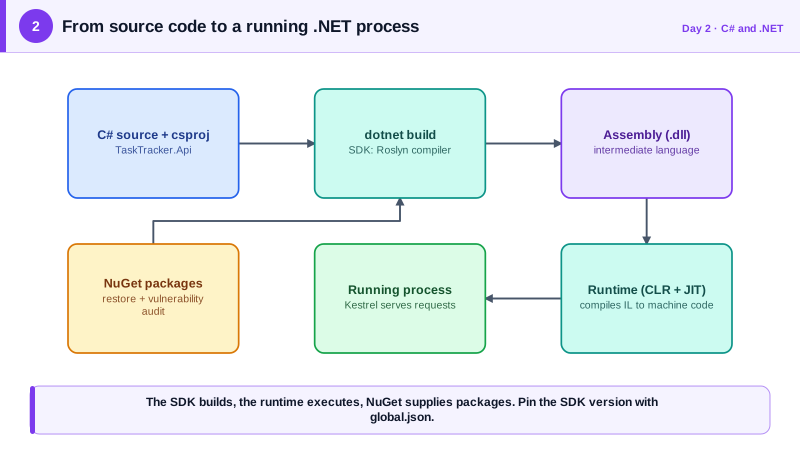
Real-World Examples
- Microsoft develops .NET in the open at github.com/dotnet/runtime under the MIT license, with design discussions, benchmarks, and security fixes visible in public issues and pull requests. Teams can read the actual source of the framework they depend on, which is unusual for a platform of this size.
- NuGet.org is the central public package registry for .NET, and the dotnet CLI can audit a project against known vulnerability advisories through the list package command with the vulnerable flag. Recent SDK versions also run this audit during restore by default and print warnings, which puts dependency security in front of developers without any extra setup.
Review Questions & Answers
The SDK contains the compiler, templates, and CLI tooling needed to build software, while the runtime only executes already-compiled programs. A production image normally needs just the ASP.NET Core runtime, which is smaller and has a reduced attack surface because it lacks build tooling an attacker could abuse. Build stages use the SDK image and the final stage copies the published output onto the runtime image, a pattern covered in Phase 9.
C# is a statically typed compiled language, so source code must be compiled to intermediate language before the runtime can execute it. That step is a feature: the compiler reports type errors, missing members, and nullability violations before anything runs. TypeScript projects have a similar compile step, but plain JavaScript defers the same mistakes to runtime.
Modern .NET, starting with .NET Core and continuing through .NET 5 and later, runs on Windows, macOS, and Linux. Most production ASP.NET Core services are deployed to Linux containers or Linux-based hosting. The Windows-only reputation comes from the older .NET Framework, which is still supported for legacy applications but is not what new projects should use.
Without it, each developer machine and the build server can silently use different SDK versions, which leads to builds that pass locally and fail in CI, or worse, produce subtly different output. A global.json makes the toolchain part of the repository, the same way a lock file makes dependency versions reproducible. It also makes upgrades a deliberate, reviewable change instead of an accident.