EF Core Migrations Explained
On this page
Learning Objective
Manage database schema changes with EF Core migrations, generate reviewable idempotent scripts or migration bundles for deployment, avoid destructive surprises like accidental column drops, and separate the privileges used for migrations from those used at runtime.
Concept Explanation
A production database is not disposable. Unlike the frontend, where a deploy replaces every file, a schema change must transform existing data in place, preserve everything users have stored, and run exactly once per environment. Migrations are the mechanism: each migration is a class with an Up method that applies a change and a Down method that reverses it, and EF Core records which migrations have run in a history table in the database. The dotnet ef tool compares your current model with a snapshot of the previous one and scaffolds the migration for the difference. The important word is scaffolds, because the generated code is a draft that you must read.
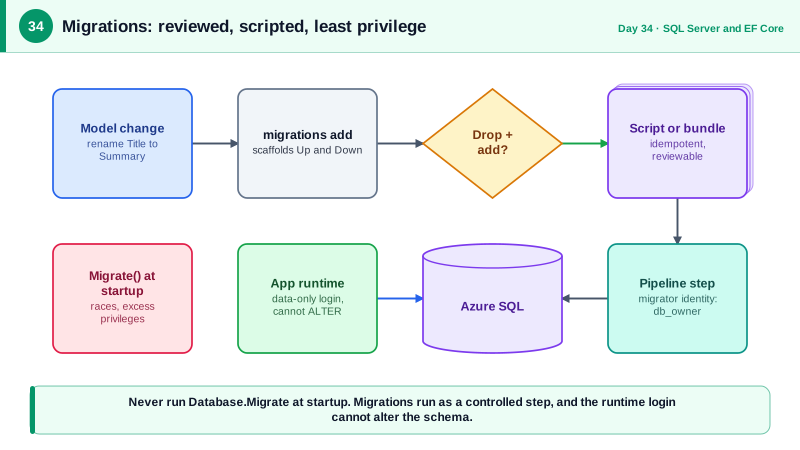
Reading migrations matters because of a well-known trap. EF Core detects a renamed property as a drop of the old column and creation of a new one, since it cannot know your intent. Applied as generated, that migration deletes the column and every value in it. If you rename a property, edit the migration to use RenameColumn instead. The same care applies to changing types, making a column non-nullable when existing rows contain nulls, and adding unique constraints when duplicates already exist. Each of these can fail or destroy data on a database with real content, so test migrations against a copy of production-like data, not just an empty development database.
How migrations reach production is a security and reliability decision. Calling Database.Migrate at application startup is convenient but hazardous: with several instances starting at once, they race, the application account needs schema-altering permissions permanently, and a failed migration prevents the application from starting. Better options are an idempotent SQL script generated with dotnet ef migrations script, which can be reviewed by a person and applied by a deployment step, or a migration bundle, a self-contained executable produced by dotnet ef migrations bundle that applies pending migrations and can run as a pipeline step or container job. Both let migration run under a privileged identity in the pipeline, while the running API uses a limited identity that can only read and write data.
Design the change itself for a system that is live. During a rolling deploy, the old and new versions of your code run against the same database at the same time, so a migration must be compatible with both. Adding a nullable column is safe, and dropping or renaming a column the old code still reads is not. The pattern for risky changes is expand and contract: add the new structure, deploy code that writes both, backfill existing data, switch reads, and only later remove the old structure. Day 86 applies this to zero-downtime deployments. Data changes, like reference values, belong in migrations too, written as explicit SQL or seeded with HasData, so every environment converges to the same state.
| Task | Command or approach | Why |
|---|---|---|
| Create a migration | dotnet ef migrations add Name | Scaffolds Up and Down from the model diff |
| Review it | Read the generated code | Catch drops disguised as renames |
| Generate a script | dotnet ef migrations script --idempotent | Reviewable, safe to run repeatedly |
| Apply in pipelines | dotnet ef migrations bundle | Self-contained executable, no SDK needed |
| Avoid in production | Database.Migrate at startup | Races between instances, excessive runtime privileges |
| Risky change | Expand and contract over several releases | Old and new code coexist during rollout |
Worked Example: Adding a Column, a Safe Rename and a Bundle
The first migration adds a nullable column and backfills it. The second corrects a scaffolded drop-and-add into a rename. The commands show script and bundle generation for the pipeline.
// Migration 1: additive and safe while old code is still running.
public partial class AddTaskDueDate : Migration
{
    protected override void Up(MigrationBuilder mb)
    {
        mb.AddColumn<DateTimeOffset>(name: "DueDate", table: "Tasks", nullable: true);
        // A data step belongs in the migration so every environment converges.
        mb.Sql("UPDATE Tasks SET DueDate = DATEADD(day, 14, CreatedAt) WHERE Status <> 3");
    }

    protected override void Down(MigrationBuilder mb) =>
        mb.DropColumn(name: "DueDate", table: "Tasks");
}

// Migration 2: the property Title was renamed to Summary. EF scaffolded DropColumn + AddColumn,
// which would delete every existing title. Edit it to a rename that preserves the data.
public partial class RenameTaskTitleToSummary : Migration
{
    protected override void Up(MigrationBuilder mb) =>
        mb.RenameColumn(name: "Title", table: "Tasks", newName: "Summary");

    protected override void Down(MigrationBuilder mb) =>
        mb.RenameColumn(name: "Summary", table: "Tasks", newName: "Title");
}dotnet tool install --global dotnet-ef
dotnet ef migrations add AddTaskDueDate --project src/Notes.Data --startup-project src/Notes.Api
# Review-friendly artifact: every migration from scratch, safe to re-run.
dotnet ef migrations script --idempotent --output artifacts/migrate.sql \
--project src/Notes.Data --startup-project src/Notes.Api
# Or a self-contained executable the pipeline runs with a privileged connection string.
dotnet ef migrations bundle --self-contained -r linux-x64 --output artifacts/efbundle \
--project src/Notes.Data --startup-project src/Notes.Api
./artifacts/efbundle --connection "$MIGRATION_CONNECTION_STRING"-- One-time setup: two identities with different power.
CREATE LOGIN notes_migrator WITH PASSWORD = '<from the secret store>';
CREATE USER notes_migrator FOR LOGIN notes_migrator;
ALTER ROLE db_owner ADD MEMBER notes_migrator; -- used only by the deployment pipeline
CREATE LOGIN notes_app WITH PASSWORD = '<from the secret store>';
CREATE USER notes_app FOR LOGIN notes_app;
ALTER ROLE db_datareader ADD MEMBER notes_app; -- the running API can read and write rows
ALTER ROLE db_datawriter ADD MEMBER notes_app; -- but cannot alter or drop tablesWith this split, a SQL injection flaw or leaked runtime credential in the API cannot drop a table or alter permissions, because the runtime identity has no schema privileges. The powerful credential exists only in the deployment pipeline for the duration of the migration step.
Real-World Examples
- GitLab publishes detailed migration guidelines for its own product, requiring that database changes be compatible with both the old and new application versions during deployment, and prescribing multi-release sequences for renames and removals. Their guidance is a practical model of expand and contract applied to a large production system deployed continuously.
- In August 2012, Knight Capital lost roughly 440 million dollars in about 45 minutes when a manual deployment left old code active on one of its eight servers, which then sent unintended orders to the market, according to the SEC's findings. The incident is a classic argument for scripted, repeatable, verified deployments in place of manual steps, which is what migration scripts and bundles provide for schema changes.
Review Questions & Answers
EF compares the old and new model and sees a column that no longer exists and one that is new, with no way to know they are the same data. Applied as generated, the migration deletes the old column and its data. You must edit the migration to use RenameColumn to preserve the values.
When several instances start together they may run the migration simultaneously and race or deadlock, the application must hold schema-altering permissions permanently, and a failing migration prevents the application from starting at all. Running migrations as a separate, controlled pipeline step avoids all three problems.
The runtime identity can only read and write rows, so an attacker who exploits the API, for example with a SQL injection flaw, cannot drop tables, change permissions, or alter the schema. The powerful identity is only available briefly in the pipeline, greatly reducing the impact of a compromised application.
During a rolling deployment, some instances run the previous version while others run the new one, and both talk to the same database. The schema therefore must work for both, so additive changes such as a nullable column are safe, while dropping or renaming something the old code still uses would break it. Risky changes are split across releases using expand and contract.