Scaling ASP.NET Core: Stateless Services and Sticky Sessions
On this page
Learning Objective
Design the application so any instance can serve any request, identify hidden state that breaks when you add instances, configure health-based load balancing, autoscaling and graceful shutdown, and avoid the connection-pool and cost traps that appear when scale grows.
Concept Explanation
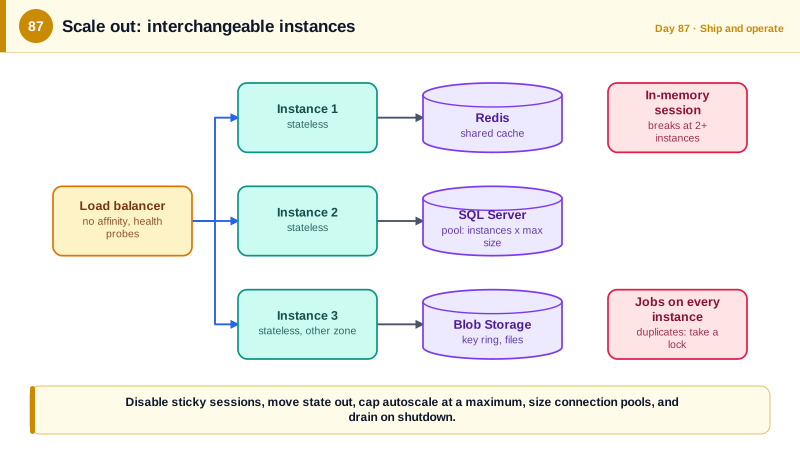
Scaling out means running several identical instances behind a load balancer instead of one bigger machine. It improves capacity and availability, since instances in different availability zones survive a zone failure, and it lets you deploy without downtime by replacing instances gradually. It only works if the application is stateless: any request can be handled by any instance, because nothing the request needs lives only in one instance's memory. The Twelve-Factor App methodology, published by Heroku engineers in 2011, states this as processes that are stateless and share nothing, with anything that must persist stored in a backing service such as a database or cache.
Hidden state is the enemy, and it shows up in places that worked perfectly with one instance. In-memory session data or a memory cache holding user-specific values means the second request may land on an instance that has never seen them. The ASP.NET Data Protection key ring, if stored locally, makes cookies unreadable across instances, as Day 49 warned. The built-in rate limiter counts per instance, so the effective limit multiplies with the instance count, as Day 28 noted. Scheduled tasks in a hosted service run on every instance, so a job meant to run once now runs five times, sending five emails. Local file storage vanishes when an instance is replaced. SignalR needs either a backplane or a managed service, since a message sent to a group on one instance will not reach connections on another, and clients doing the negotiation handshake across instances need consistency.
Sticky sessions, also called session affinity, route a user to the same instance repeatedly, usually with a cookie set by the load balancer. They seem like a cheap fix for hidden state, and Azure App Service enables the ARR affinity cookie by default. They are a trap: load becomes uneven, a scale-in or a deployment drops sessions along with the instance, a hot user overloads one instance, and the underlying statefulness is never fixed. The better approach is to disable affinity and remove the state, moving it to Redis, the database, or signed cookies, and using sticky routing only where a protocol truly requires it, which you should design around, for example with a backplane.
Operate scaling deliberately. Run at least two instances, spread across availability zones, so one failure does not cause an outage. Autoscale on signals that track load, such as HTTP request queue length or concurrent requests, not only CPU, with a sensible minimum and, importantly, a maximum. Without an upper bound, a flood of malicious traffic makes autoscaling multiply your bill, a form of economic denial of service, and can exhaust downstream resources. Connections to the database multiply with instances: each instance holds a pool of connections, so ten instances with a pool of a hundred each try to open a thousand, which can exceed the database's limit, so size pools with the total in mind. Drain instances gracefully: on a shutdown signal, fail readiness first so the load balancer stops sending traffic, finish in-flight requests, and only then exit.
| Hidden state | Symptom with several instances | Fix |
|---|---|---|
| In-memory session or cache | Data appears and disappears between requests | Redis or database, or signed cookies |
| Local Data Protection keys | Random sign-outs, decryption errors | Shared key ring in Blob with a Key Vault key |
| Per-instance rate limiter | Limits multiply with instance count | Gateway or Redis-backed limits |
| Scheduled jobs in every instance | Duplicate emails and work | Single scheduler with locking, or a durable scheduler |
| Local files | Lost on replacement | Blob Storage |
| Sticky sessions | Uneven load, sessions lost on scale-in | Disable affinity, remove the state |
Worked Example: Making the App Stateless, Locking a Job, Draining Gracefully and Sizing Pools
The snippets remove the common hidden state and show graceful shutdown. The commands set instance counts and autoscale limits.
// 1. Shared key ring and shared cache: no per-instance state.
builder.Services.AddDataProtection().SetApplicationName("taskboard")
    .PersistKeysToAzureBlobStorage(new Uri(builder.Configuration["DataProtection:BlobUri"]!), new DefaultAzureCredential())
    .ProtectKeysWithAzureKeyVault(new Uri(builder.Configuration["DataProtection:KeyUri"]!), new DefaultAzureCredential());
builder.Services.AddStackExchangeRedisCache(o => o.Configuration = builder.Configuration["Redis:Configuration"]);

// 2. SignalR across instances: a managed service holds the connections so any instance can message any client.
builder.Services.AddSignalR().AddAzureSignalR(builder.Configuration["SignalR:ConnectionString"]);

// 3. A scheduled job that must run once, even though every instance runs this code: take a distributed lock.
public sealed class NightlyDigest(IServiceScopeFactory scopes, ILogger<NightlyDigest> log) : BackgroundService
{
    protected override async Task ExecuteAsync(CancellationToken stop)
    {
        using var timer = new PeriodicTimer(TimeSpan.FromMinutes(1));
        while (await timer.WaitForNextTickAsync(stop))
        {
            if (DateTimeOffset.UtcNow is not { Hour: 2, Minute: 0 }) continue;
            using var scope = scopes.CreateScope();
            var db = scope.ServiceProvider.GetRequiredService<AppDb>();

            // sp_getapplock with a zero timeout: exactly one instance gets the lock, the others skip.
            await using var tx = await db.Database.BeginTransactionAsync(stop);
            // ToListAsync runs the batch as written. Composing First or Single on top would wrap it in a subquery, which EXEC cannot be part of.
            var result = (await db.Database.SqlQuery<int>(
                $"DECLARE @r INT; EXEC @r = sp_getapplock @Resource = 'nightly-digest', @LockMode = 'Exclusive', @LockOwner = 'Transaction', @LockTimeout = 0; SELECT @r AS [Value]")
                .ToListAsync(stop)).First();
            if (result < 0) { log.LogInformation("Another instance is running the digest"); continue; }

            await scope.ServiceProvider.GetRequiredService<DigestSender>().RunAsync(stop);
            await tx.CommitAsync(stop);                                    // releases the lock
        }
    }
}

// 4. Graceful shutdown: readiness fails first, in-flight requests finish, then the process exits.
builder.Services.Configure<HostOptions>(o => o.ShutdownTimeout = TimeSpan.FromSeconds(30));
public sealed class DrainOnShutdown(IHostApplicationLifetime lifetime, ReadinessState state) : IHostedService
{
    public Task StartAsync(CancellationToken ct)
    {
        lifetime.ApplicationStopping.Register(() =>
        {
            state.MarkNotReady();                                          // /health/ready now returns 503
            Thread.Sleep(TimeSpan.FromSeconds(10));                        // let the load balancer notice and stop routing to us
        });
        return Task.CompletedTask;
    }
    public Task StopAsync(CancellationToken ct) => Task.CompletedTask;
}# 5. Connection pool arithmetic. Total connections = instances x pool size (per connection string).
# Azure SQL General Purpose 4 vCores allows about 1,600 concurrent workers; a small tier allows far fewer.
# 10 instances x default Max Pool Size 100 = 1,000 possible connections -> often too many.
# Set "Max Pool Size=30" and keep queries short; watch "connection pool" metrics and sessions on the server.
ConnectionStrings__Default="Server=tcp:sql-taskboard.database.windows.net;Database=TaskBoard;Authentication=Active Directory Default;Max Pool Size=30;Encrypt=True"# 6. Scale settings: a floor for availability, a ceiling for cost and downstream protection, disable affinity.
az webapp update -g $RG -n $APP --client-affinity-enabled false # no ARR affinity cookie
az appservice plan update -g $RG -n $PLAN --number-of-workers 3 # zone redundancy is chosen when the plan is created (Bicep, Day 88)
az monitor autoscale create -g $RG --resource $PLAN --resource-type Microsoft.Web/serverfarms \
--name autoscale-taskboard --min-count 3 --max-count 8 --count 3 # max-count is the cost and DoS ceiling
az monitor autoscale rule create -g $RG --autoscale-name autoscale-taskboard \
--condition "HttpQueueLength > 100 avg 5m" --scale out 1
az monitor autoscale rule create -g $RG --autoscale-name autoscale-taskboard \
--condition "CpuPercentage < 30 avg 15m" --scale in 1Test statelessness directly: run two instances locally behind a simple proxy with affinity disabled, sign in, and click around. Random sign-outs, missing data, or duplicate job runs expose the hidden state before production does.
Real-World Examples
- The Twelve-Factor App, written by Heroku co-founder Adam Wiggins and colleagues in 2011, defines processes that are stateless and share nothing as a core factor for cloud applications, and describes storing all persistent state in backing services. It shaped how a generation of cloud-native applications are designed, and its guidance maps directly onto moving session, cache, and file state out of instances.
- Azure App Service enables an ARR affinity cookie by default so that a client's requests keep hitting the same instance, and Microsoft's guidance for stateless applications is to disable it. Many teams discover the setting only after seeing uneven load across instances or lost sessions during scale-in, which is a typical way that hidden statefulness is exposed.
Review Questions & Answers
They hide the statefulness instead of removing it: load becomes uneven, a scale-in or deployment discards the sessions on the removed instance, and a busy user can overload one instance. The application remains fragile, and the real fix is to move the state to a shared store so any instance can serve any request.
Every instance runs the same hosted service code, so each one triggers the job at the scheduled time. Without coordination the work runs once per instance. A distributed lock, such as a SQL application lock, or a single durable scheduler ensures only one instance executes the job.
Without a ceiling, a traffic flood, including a malicious one, makes the platform add instances without limit, driving up cost and potentially overwhelming downstream services such as the database with connections. A maximum caps the financial exposure and protects dependencies, so abuse degrades service instead of causing runaway spending.
On a termination signal the instance first reports itself not ready so the load balancer stops sending new requests, waits briefly for that to take effect, finishes requests already in progress within a timeout, and only then exits. This prevents dropped requests during scale-in and deployments.