ASP.NET Core Authorization: Roles, Claims, Policies
On this page
Learning Objective
Separate authentication from authorization, model permissions with roles, claims and policies, implement resource-based authorization so users can only touch their own data, and recognize and test for broken object level and function level authorization, the top API vulnerabilities.
Concept Explanation
Authentication answers who you are; authorization answers what you may do. The two are constantly confused, and mistakes in the second are the most damaging class of API flaw. The OWASP API Security Top 10 places Broken Object Level Authorization first: an endpoint accepts an identifier and returns or modifies that object without verifying that the caller is entitled to it. Broken Function Level Authorization is fifth: a regular user can call an administrative endpoint because nobody restricted it. Neither involves clever exploitation. The attacker simply changes an ID or a URL and the server obliges.
ASP.NET Core provides layers for expressing rules. Roles are the simplest: a user is an admin or a member. Claims are attributes of the user, such as a tenant identifier, a department, or a scope. Policies combine requirements, named rules like ProjectEditor or Over18, and are the recommended unit, because an endpoint that says RequireAuthorization with a policy states intent, and the rule can change in one place. For rules that depend on the data being accessed, such as only members of this project may edit its tasks, use resource-based authorization: inject IAuthorizationService, load the resource, and call AuthorizeAsync with the user, the resource, and a requirement. The handler then compares the user's identity to the resource.
Design the rules around a deny-by-default posture, as Day 12 set up with a fallback policy. Every endpoint requires authentication unless declared public, and every endpoint that touches an object must verify the caller's relationship to it. Prefer building the check into the data query so an unauthorized row is simply never found: filter by membership in the query rather than loading first and testing after. That approach fails safe and, as Day 40 showed, returns 404 rather than revealing existence. For administrative functions, use a distinct policy and, ideally, a separate route group, so it is obvious in review and in logs which endpoints are privileged.
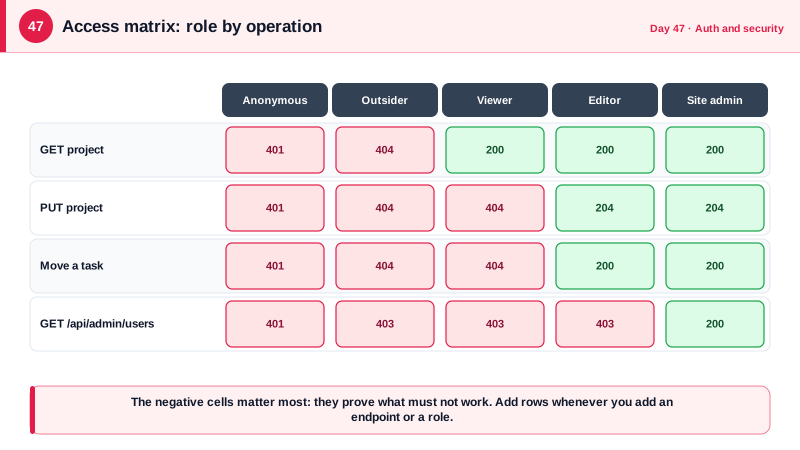
Authorization is only trustworthy if it is tested exhaustively, because the failure is silent. Build a matrix of roles against operations and assert the expected result for each pair, including the negative cells: an anonymous caller, a member of another project, a viewer attempting a write, and a regular user calling an admin route. Table-driven tests make this cheap. Where the token is a snapshot, remember that a role removed from a user stays in issued tokens until they expire, so sensitive operations may re-check permissions against the database, and permission changes should invalidate sessions in a BFF. Keep policy logic in one place rather than scattered if statements, so that changing a rule does not require finding every copy.
| Mechanism | Best for | Example |
|---|---|---|
| Role | Coarse groupings | Admin, Member |
| Claim | Attributes of the user | tenant id, scope notes.write |
| Policy | Named, reusable rule | ProjectEditor, RequiresMfa |
| Resource-based handler | Rules that depend on the object | User must be an editor of this project |
| Query filter | Prevent unauthorized rows from loading | Where project members include the caller |
| Fallback policy | Deny by default | Authenticated user required everywhere |
Worked Example: A Membership Requirement, Endpoint Use and a Test Matrix
The requirement and handler decide access based on the project's member table. The endpoint authorizes against the loaded project, and the tests cover the role matrix.
public sealed record ProjectAccessRequirement(ProjectRole Minimum) : IAuthorizationRequirement;

public sealed class ProjectAccessHandler(AppDb db)
    : AuthorizationHandler<ProjectAccessRequirement, Project>
{
    protected override async Task HandleRequirementAsync(
        AuthorizationHandlerContext context, ProjectAccessRequirement requirement, Project project)
    {
        var userId = context.User.GetUserId();
        var role = await db.ProjectMembers
            .Where(m => m.ProjectId == project.Id && m.UserId == userId)
            .Select(m => (ProjectRole?)m.Role)
            .FirstOrDefaultAsync();

        if (role is not null && role >= requirement.Minimum)
            context.Succeed(requirement);                   // otherwise no Succeed: access denied
    }
}

builder.Services.AddScoped<IAuthorizationHandler, ProjectAccessHandler>();
builder.Services.AddAuthorizationBuilder()
    .SetFallbackPolicy(new AuthorizationPolicyBuilder().RequireAuthenticatedUser().Build())
    .AddPolicy("SiteAdmin", p => p.RequireClaim("site_role", "admin"));

public enum ProjectRole { Viewer = 1, Editor = 2, Admin = 3 }// Resource-based check: load the object, ask the authorization service.
app.MapPut("/api/projects/{id:guid}", async (Guid id, UpdateProjectRequest body, AppDb db,
IAuthorizationService auth, ClaimsPrincipal user, CancellationToken ct) =>
{
var project = await db.Projects.FindAsync([id], ct);
if (project is null) return Results.NotFound();
var result = await auth.AuthorizeAsync(user, project, new ProjectAccessRequirement(ProjectRole.Editor));
if (!result.Succeeded) return Results.NotFound(); // hide existence from non-members: same as missing
project.Name = body.Name.Trim();
await db.SaveChangesAsync(ct);
return Results.NoContent();
});
// Object-level filtering inside the query: unauthorized rows are never loaded.
app.MapGet("/api/projects", async (AppDb db, ClaimsPrincipal user, CancellationToken ct) =>
{
var me = user.GetUserId();
return Results.Ok(await db.Projects.AsNoTracking()
.Where(p => p.Members.Any(m => m.UserId == me))
.Select(p => new ProjectSummary(p.Id, p.Name)).ToListAsync(ct));
});
// Function-level: a distinct policy on a distinct group makes privilege visible.
var admin = app.MapGroup("/api/admin").RequireAuthorization("SiteAdmin");
admin.MapGet("/users", ListAllUsers);// The matrix: every role against every operation, including the negative cells.
public static IEnumerable<object[]> Cases => new[]
{
// caller method url expected
new object[] { "anonymous", "GET", "/api/projects/{P}", 401 },
new object[] { "outsider", "GET", "/api/projects/{P}", 404 }, // not a member: hidden
new object[] { "viewer", "GET", "/api/projects/{P}", 200 },
new object[] { "viewer", "PUT", "/api/projects/{P}", 404 }, // may read, may not write
new object[] { "editor", "PUT", "/api/projects/{P}", 204 },
new object[] { "editor", "GET", "/api/admin/users", 403 }, // function-level
new object[] { "site-admin", "GET", "/api/admin/users", 200 },
};
[Theory, MemberData(nameof(Cases))]
public async Task Access_matrix(string caller, string method, string url, int expected) =>
Assert.Equal(expected, (int)(await Send(caller, method, url.Replace("{P}", _projectId.ToString()))).StatusCode);Whenever you add an endpoint or a role, add rows to the matrix. The suite becomes an executable statement of your authorization design, and a change that widens access turns a row red.
Real-World Examples
- In September 2022, the Australian telecom Optus disclosed a breach affecting roughly 9.8 million current and former customers, which was widely reported to have involved an API endpoint that required no authentication and returned customer records by sequential identifier. It is a textbook case of missing object-level authorization combined with guessable identifiers, and it triggered regulatory changes and litigation.
- In January 2021, the social network Parler's content was archived in bulk by researchers after its API was found to accept sequential post identifiers without adequate access control, allowing anyone to enumerate posts and media by incrementing a number. Coverage described tens of terabytes of data collected, illustrating how enumerable identifiers plus missing authorization scales into total exposure.
Review Questions & Answers
It is when an endpoint takes an object identifier from the request and returns or changes that object without checking that the caller may access it. It is common because authentication middleware makes an endpoint look protected, while the per-object check must be written in each handler and is easy to forget. The attacker only needs to change an identifier.
A query that includes the ownership or membership condition never returns a row the caller may not see, so there is no code path where an unauthorized object is loaded and then accidentally used or returned. It also naturally yields not found for other users' data. Check-after-load designs depend on every caller remembering the check.
For sensitive operations, or when permissions change frequently. A token is a snapshot valid until it expires, so a role revoked a minute ago is still present in tokens already issued. Re-checking against current data, or having a BFF invalidate the session on a permission change, makes revocation effective immediately.
It makes the whole authorization design visible and testable as a grid of caller types against operations, including negative cases like an outsider or a viewer attempting a write. Adding a role or endpoint means adding rows, so gaps are obvious, and a regression that widens access fails a specific row instead of going unnoticed.