React Login Flow and Protected Routes
On this page
Learning Objective
Implement sign-in, sign-out and protected routes in a React application that uses the backend-for-frontend session, handle expired sessions and 401 responses globally, synchronize logout across tabs, and use server-supplied permissions for the interface while treating all client-side gating as cosmetic.
Concept Explanation
With the backend-for-frontend of Day 46, the React application has a beautifully small authentication job. It never sees a token. It asks the BFF who the current user is, sends people to the BFF's login endpoint when they are not signed in, and calls the logout endpoint to end the session. The state it needs is just a user object, or null. Everything else, the redirect to the identity provider, the code exchange, the refresh of tokens, and the cookie, happens outside React. That makes the frontend less capable of getting authentication wrong, which is the point of the architecture.
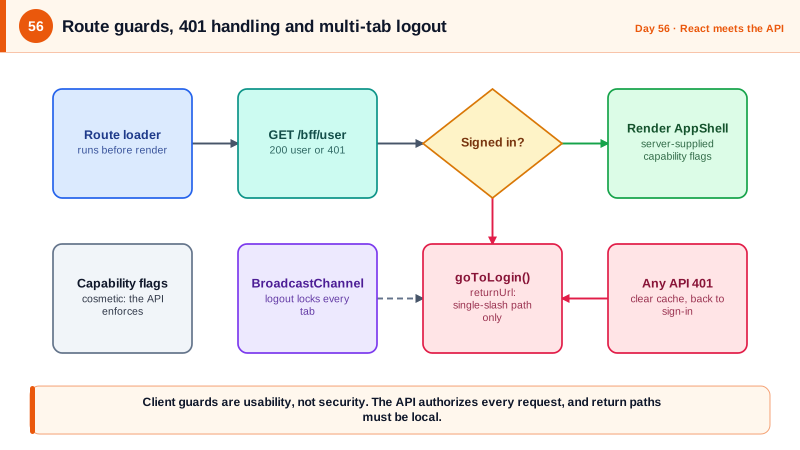
Protected routes are then a matter of checking that user. In React Router you can guard a branch of the route tree with a layout route that runs a loader before rendering: if the user is null, redirect to the BFF login URL with a return path, and otherwise render the children. The result is that unauthenticated visitors never see a flash of protected content. It is essential to understand what this does and does not achieve. It improves the experience by sending people to sign in at the right moment. It does not protect any data, because the data comes from API calls, and those are protected by the server. An attacker who edits the client to skip the guard reaches only an empty shell of screens that fail with 401 responses.
Sessions end in ways the user did not choose: a cookie expires, an administrator revokes access, or the person signs out in another tab. The client must handle this gracefully. A single response handler in the fetch wrapper should treat a 401 from any API call as a session change: clear the query cache, update the user state to null, and route to sign-in, preserving where the user was so they return after authenticating. Where there are several tabs open, the browser's BroadcastChannel lets them announce a logout to each other, so signing out in one immediately locks the rest instead of leaving stale data visible in a forgotten tab.
Permissions in the interface follow the same honest logic. The BFF's user endpoint can return a list of capabilities computed on the server, such as canInviteMembers, and components use them to hide or disable buttons, which avoids showing actions that would only fail. Store none of this in localStorage, and never derive authority from anything the user can edit. Treat any return path or redirect parameter as untrusted input: accept only relative paths that start with a single slash, or an attacker can craft a login link that sends users to a phishing site after they authenticate. OWASP once listed unvalidated redirects as a top-ten risk on its own for exactly this reason.
| Concern | Approach | Note |
|---|---|---|
| Who is signed in | GET /bff/user, null when 401 | The only auth state in React |
| Sign in | Navigate to /bff/login with a returnUrl path | Full-page redirect, the browser leaves the SPA |
| Route protection | Layout route with a loader that redirects | Usability only, not security |
| Session ended | Global 401 handling clears cache and routes to sign-in | Same handling for expiry and revocation |
| Multiple tabs | BroadcastChannel logout message | Locks all tabs immediately |
| UI permissions | Capability flags from the server | Cosmetic; the API enforces every rule |
| Return URL | Local path only, no double slash | Prevents open redirects |
Worked Example: Guarded Routes, a Global 401 Handler and Cross-Tab Logout
The router protects a subtree, the wrapper handles session loss in one place, and a small module synchronizes tabs.
// src/auth/session.ts
export type SessionUser = { id: string; name: string; email: string; can: { inviteMembers: boolean; manageBilling: boolean; editTasks: boolean } };

export async function fetchUser(): Promise<SessionUser | null> {
  const res = await fetch('/bff/user', { credentials: 'include' });
  return res.ok ? ((await res.json()) as SessionUser) : null;
}

export const safeReturnPath = (p: string | null): string =>
  p && p.startsWith('/') && !p.startsWith('//') && !p.includes('\\') ? p : '/';   // local paths only

export function goToLogin(returnTo = location.pathname + location.search) {
  location.assign(`/bff/login?returnUrl=${encodeURIComponent(safeReturnPath(returnTo))}`);
}

const channel = new BroadcastChannel('auth');
export function announceLogout() { channel.postMessage('logout'); }
export function onRemoteLogout(cb: () => void) {
  channel.addEventListener('message', (e) => e.data === 'logout' && cb());
}// src/routes.tsx: a layout route guards everything under it.
const router = createBrowserRouter([
{ path: '/login-required', element: <SignInPrompt /> },
{
loader: async () => {
const user = await queryClient.ensureQueryData({ queryKey: ['user'], queryFn: fetchUser, staleTime: 60_000 });
if (!user) { goToLogin(); return null; } // leaves the SPA; nothing protected renders
return user;
},
element: <AppShell />, // contains <Outlet />
errorElement: <RouteError />,
children: [
{ path: '/', element: <ProjectsPage /> },
{ path: '/projects/:projectId', element: <BoardPage /> },
{ path: '/settings', element: <RequireCan flag="manageBilling"><SettingsPage /></RequireCan> },
],
},
]);
// Cosmetic gating: hides screens users cannot use. The API still enforces the rule.
function RequireCan({ flag, children }: { flag: keyof SessionUser['can']; children: ReactNode }) {
const { data: user } = useUser();
return user?.can[flag] ? <>{children}</> : <NoAccess />;
}// src/api/client.ts: one place that reacts to a lost session.
async function handleSessionLoss() {
queryClient.clear(); // never keep the old user's data
goToLogin();
}
export async function request<S extends z.ZodTypeAny>(url: string, schema: S, init: RequestInit = {}) {
const res = await fetch(url, { credentials: 'include', ...init });
if (res.status === 401) { await handleSessionLoss(); throw new SessionEndedError(); }
// ... the rest as on Day 53 ...
}
// src/app/main.tsx: sign-out in one tab locks the others.
onRemoteLogout(() => { queryClient.clear(); location.assign('/login-required'); });
export async function signOut() {
await fetch('/bff/logout', { method: 'POST', headers: { 'X-CSRF': '1' }, credentials: 'include' });
queryClient.clear();
announceLogout();
location.assign('/');
}A test worth writing simulates a 401 from the API using a mock service worker handler and asserts that the cache is cleared and the browser navigates to the login URL with the encoded return path, and another feeds a return parameter such as //evil.example and asserts it collapses to slash.
Real-World Examples
- OWASP's 2013 Top 10 included Unvalidated Redirects and Forwards as its own category, describing attackers who craft links on a trusted domain that redirect victims to malicious sites after an action such as login. The category was later folded into broader ones, but phishing campaigns abusing open redirects on legitimate login flows remain common, so validating return paths is standard practice.
- React Router v7, released in late 2024, merged the Remix framework into the library and made data loaders and redirects in the routing layer a first-class pattern. Doing the authentication check in a loader, before the component tree renders, is the recommended way to avoid flashes of protected content and unnecessary requests.
Review Questions & Answers
Guards exist for usability: they send unauthenticated users to sign in at the right moment and avoid showing screens that would only fail. They are not a security boundary because the client is under the user's control. The data stays safe because every API call is authorized by the server, so bypassing the guard reveals nothing but an empty interface.
Every API call can hit an expired or revoked session, so handling it per component would be inconsistent and easy to forget. A single handler in the request wrapper guarantees the same recovery every time: clear cached data, drop the user state, and redirect to sign-in with the current location preserved.
It lets browser tabs of the same origin message each other, so when the user signs out in one tab, the others are told immediately and can clear their caches and lock themselves. Without it, a forgotten tab keeps displaying private data and making failing requests until something triggers a refresh.
Defense in depth: the client builds the login link, and code that trusts a query parameter can be used to steer people to attacker-controlled locations. Restricting return paths to local, single-slash paths on both sides means neither layer can be tricked into an open redirect on its own.