TanStack Query Tutorial: Caching and Mutations
On this page
Learning Objective
Use TanStack Query to fetch, cache and update server data, choose stale and cache times, invalidate and optimistically update queries after mutations, handle conflicts and errors sensibly, and make sure cached data can never leak between users.
Concept Explanation
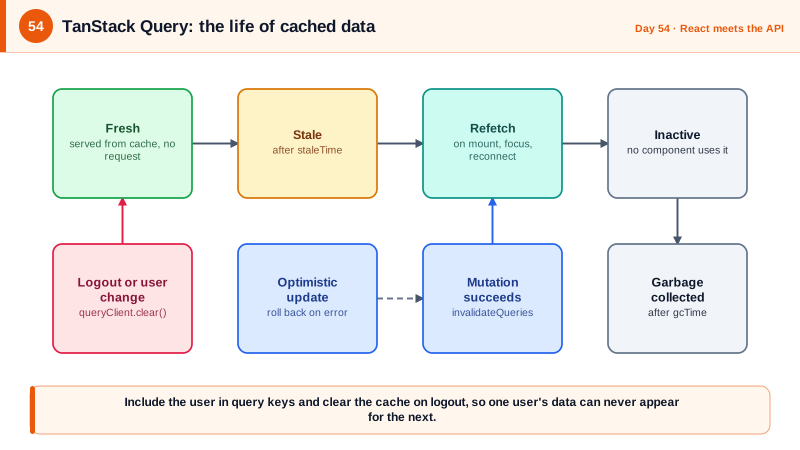
Server state has properties that ordinary component state does not: it lives somewhere else, it can change without you knowing, it is shared between components that need the same data, and it can be stale the moment it arrives. Hand-rolling loading flags, error flags, and refetching logic in every component produces inconsistent, buggy interfaces. TanStack Query, formerly React Query, manages this: every piece of data is identified by a query key, cached under that key, deduplicated when several components ask for it, refetched in the background when it might be stale, and garbage collected when nobody uses it.
The two timing settings to understand are staleTime and gcTime. staleTime is how long fetched data counts as fresh; while fresh, the query serves it from the cache without going to the network, and after that it is stale and refetches on triggers such as component mount, window focus, and reconnection. The default staleTime is zero, so data is considered stale immediately, which is safe but chatty; raise it for data that changes slowly. gcTime, called cacheTime in older versions, is how long unused data stays in memory before being discarded, five minutes by default. Retries deserve a policy too: the default retries failed queries several times with backoff, which is right for network glitches but wrong for a 403 or 404, so configure retry to stop on client errors.
Mutations change data on the server, and the question afterward is what the cache should now believe. The simplest correct answer is invalidation: after a successful mutation, call invalidateQueries with the affected keys, and the library refetches whatever is currently displayed. For a snappier interface, use an optimistic update: apply the expected change to the cache immediately, send the request, and roll back if it fails, refetching to settle on the truth. Optimistic updates fit low-risk, high-success actions such as toggling a task's status, and are wrong for operations where failure is common or consequences are serious. Combine mutations with the concurrency protocol of Day 26: send If-Match with the ETag, and on a 412 response refetch and tell the user the item changed.
The security responsibility unique to client-side caches is isolation between users. The cache lives in memory for the life of the page, and it happily holds one user's data after they sign out. If a second user signs in without a full page reload, for example on a shared computer or after switching accounts, stale cached results from the first user can flash on screen or, with a poorly keyed query, be shown as the second user's. Two rules fix this. Clear the whole cache on logout and on any change of authenticated user. And include the user's identity in query keys for user-specific data, so keys cannot collide across accounts. Be equally careful with the persistence plugins that write the cache to localStorage: never persist sensitive queries, since that puts personal data in a place readable by any script on the page.
| Concept | Meaning | Guidance |
|---|---|---|
| Query key | Unique cache identity for a piece of data | Structured arrays, include user and parameters |
| staleTime | How long data counts as fresh | Raise for slow-changing data, zero for volatile |
| gcTime | How long unused data stays cached | Default five minutes is fine for most |
| Invalidation | Mark data stale and refetch what is visible | Default response to a successful mutation |
| Optimistic update | Change the cache before the server confirms | Only for low-risk actions, with rollback |
| Cache isolation | Clear on logout and user change, key by user | Prevents cross-user data exposure |
Worked Example: Infinite List, Optimistic Toggle, Conflict Handling and Logout
The hooks below fetch a paged list with cursors from Day 24, update a note with If-Match and an optimistic change, and clear the cache when the user changes.
// src/features/notes/queries.ts
export const noteKeys = {
  all: (userId: string) => ['notes', userId] as const,                       // user id in the key: no cross-user collisions
  list: (userId: string, filter: string) => [...noteKeys.all(userId), 'list', filter] as const,
  detail: (userId: string, id: number) => [...noteKeys.all(userId), 'detail', id] as const,
};

export function useNotes(userId: string, filter: string) {
  return useInfiniteQuery({
    queryKey: noteKeys.list(userId, filter),
    queryFn: ({ pageParam }) =>
      request(`/api/notes?filter=${encodeURIComponent(filter)}&pageSize=25${pageParam ? `&cursor=${pageParam}` : ''}`,
              PageSchema(NoteSchema)),
    initialPageParam: null as string | null,
    getNextPageParam: (last) => last.nextCursor,                             // cursor pagination drives infinite scroll
    staleTime: 30_000,
  });
}

export function useRenameNote(userId: string, id: number) {
  const qc = useQueryClient();
  const key = noteKeys.detail(userId, id);

  return useMutation({
    mutationFn: ({ title, etag }: { title: string; etag: string }) =>
      request(`/api/notes/${id}`, NoteSchema, {
        method: 'PUT', headers: { 'Content-Type': 'application/json', 'If-Match': etag },
        body: JSON.stringify({ title }),
      }),

    onMutate: async ({ title }) => {                                          // optimistic update
      await qc.cancelQueries({ queryKey: key });
      const previous = qc.getQueryData<Note>(key);
      if (previous) qc.setQueryData<Note>(key, { ...previous, title });
      return { previous };
    },
    onError: (err, _vars, ctx) => {
      if (ctx?.previous) qc.setQueryData(key, ctx.previous);                  // roll back
      if (err instanceof ApiError && err.status === 412) toast('Someone else changed this note. Reloaded the latest version.');
    },
    onSettled: () => qc.invalidateQueries({ queryKey: noteKeys.all(userId) }), // settle on the server's truth
  });
}// src/app/queryClient.ts: sensible defaults, no retries on client errors.
export const queryClient = new QueryClient({
defaultOptions: {
queries: {
staleTime: 15_000,
retry: (count, err) => !(err instanceof ApiError && err.status >= 400 && err.status < 500) && count < 2,
},
},
});
// src/features/auth/useSession.ts: the cache must never outlive the identity that filled it.
export function useSessionCacheGuard(userId: string | null) {
const qc = useQueryClient();
const previous = useRef<string | null>(null);
useEffect(() => {
if (previous.current !== null && previous.current !== userId) qc.clear(); // logout or account switch
previous.current = userId;
}, [userId, qc]);
}
export async function signOut() {
await fetch('/bff/logout', { method: 'POST', headers: { 'X-CSRF': '1' } });
queryClient.clear(); // drop every cached response
location.assign('/');
}Deliberately avoid persisting this cache to storage. If an offline experience is required, persist only non-sensitive queries with an allowlist and encrypt or expire the data, or accept that the app requires a connection.
Real-World Examples
- TanStack Query grew out of React Query, created by Tanner Linsley and first released in 2019, and its model of stale-while-revalidate caching builds on the HTTP cache extension of the same name described in RFC 5861. Vercel's SWR library uses the same idea, and both reflect a shift from storing server data in global stores toward treating it as a cache with expiry and revalidation.
- Shared-computer data exposure through client-side caches is a recurring class of privacy bug: a single-page application that keeps the previous user's data in memory or storage after logout can display it to the next person. The safeguards, clearing caches on logout and scoping cached data to a user, are standard advice in secure front-end guidance and are cheap to implement from the start.
Review Questions & Answers
staleTime controls how long fetched data is considered fresh, during which it is served from the cache without a network request. gcTime controls how long data that no component is using stays in memory before being discarded. Fresh versus stale governs refetching, while garbage collection time governs memory retention.
The cache holds responses from the previous user in memory, so without clearing it a second user signing in on the same page session could see or have components render the first user's data. Clearing on logout and account switch removes that data, and including the user identity in query keys prevents collisions between accounts.
When an action almost always succeeds and the cost of briefly showing a wrong state is low, such as toggling a completion checkbox. It must be accompanied by a rollback on error and a final invalidation so the cache converges on the server's actual state. Payments and destructive operations should wait for server confirmation instead.
A 403, 404, or validation error will not succeed on retry, so repeated attempts waste bandwidth and delay the error message shown to the user, and for repeated authorization failures may look like abusive behavior to the server. Retrying is appropriate for transient failures like network errors and 5xx responses.