EF Core LINQ Queries: Projections and AsNoTracking
On this page
Learning Objective
Write LINQ queries against EF Core that translate to efficient SQL, distinguish IQueryable from IEnumerable, avoid client-side evaluation mistakes, use AsNoTracking and bulk operations appropriately, and inspect the SQL a query produces.
Concept Explanation
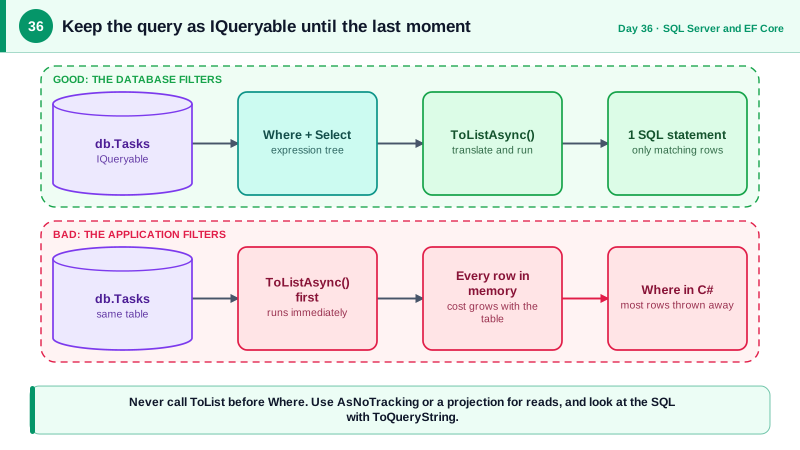
The LINQ you practiced on Day 5 against in-memory lists has a second life when the source is a DbSet. There the operators do not run in your process. Where, Select, OrderBy, and friends build an expression tree, and the provider translates that tree into SQL when you enumerate the result. The type that carries this deferred, translatable query is IQueryable of T, whereas IEnumerable of T means the work happens in memory. The boundary between them is the most important thing to understand: once a query is converted with ToList, AsEnumerable, or even accidentally by passing it to a method that takes IEnumerable, everything after that point runs in your application, on data that has already been fetched.
This explains a classic performance bug. Calling ToList on a whole table and then filtering with Where in C# downloads every row to throw most of them away. It also explains why EF Core sometimes throws an exception saying a LINQ expression could not be translated. Your own methods, most string and date helpers, and complex logic have no SQL equivalent, so the provider cannot convert them. Since EF Core 3.0 it refuses to silently fetch everything and filter locally, which makes the failure visible instead of catastrophic. The fix is to rewrite the predicate using translatable operations, or to fetch a narrowed set first and then apply the non-translatable step deliberately in memory.
Tracking is the next lever. By default, entities returned from a query are tracked by the change tracker, which costs memory and time so that EF can detect modifications. For read-only endpoints, which are most of an API, add AsNoTracking, or set it as the context default and opt in for updates. Projection with Select into a DTO is even better because projected results are not tracked and only the needed columns are selected. For bulk changes, EF Core 7 added ExecuteUpdateAsync and ExecuteDeleteAsync, which run a single UPDATE or DELETE statement on the server without loading entities, ideal for archiving a thousand rows or closing all expired items.
Always look at the SQL. ToQueryString on an IQueryable shows the statement EF will send, and logging shows the statements actually executed with timings. Reading the SQL turns EF Core from a black box into a tool you can reason about, and it catches surprises such as an unexpected join, a scan caused by a function applied to a column, or a Count that loads entities. Be aware of case sensitivity, which depends on the column's collation rather than on C#, so string comparisons that are case sensitive in memory may be insensitive in SQL Server by default. And remember untrusted input in queries: comparisons go through parameters automatically, but sort fields and column names still need an allowlist, as Day 24 showed.
| Concept | Behavior | Practical effect |
|---|---|---|
| IQueryable | Expression tree translated to SQL | Filters, sorts and paging run in the database |
| IEnumerable or ToList | Runs in memory | Everything after it operates on fetched rows |
| AsNoTracking | Skips change tracking | Faster, lighter reads for GET endpoints |
| Select projection | Fetch only chosen columns | Smaller queries, never tracked |
| ExecuteUpdateAsync and ExecuteDeleteAsync | Single set-based statement | Bulk changes without loading entities |
| ToQueryString | Shows the generated SQL | Debug and review queries |
Worked Example: Efficient Reads, a Translation Failure and a Bulk Update
The block below shows a list endpoint done well, the client-evaluation mistake, a corrected version, and a bulk operation.
// Good read: filter, sort, project and page in the database; nothing tracked.
public static async Task<IReadOnlyList<TaskRow>> OpenTasksAsync(AppDb db, Guid projectId, int take, CancellationToken ct)
{
    var query = db.Tasks
        .AsNoTracking()
        .Where(t => t.ProjectId == projectId && t.Status != TaskState.Done)
        .OrderByDescending(t => t.CreatedAt).ThenByDescending(t => t.Id)
        .Select(t => new TaskRow(t.Id, t.Title, t.Status, t.Estimate))
        .Take(take);

    Console.WriteLine(query.ToQueryString());       // inspect the SQL while developing
    return await query.ToListAsync(ct);
}
// SELECT TOP(@p1) t.Id, t.Title, t.Status, t.Estimate FROM Tasks AS t
// WHERE t.ProjectId = @p0 AND t.Status <> 3 ORDER BY t.CreatedAt DESC, t.Id DESC// Bug: ToList first downloads the entire table, then filters in memory.
var late = (await db.Tasks.ToListAsync(ct))
.Where(t => IsOverdue(t)) // custom method, cannot become SQL
.ToList();
// Fix: express the rule with translatable operations so the database filters.
var now = clock.GetUtcNow();
var overdue = await db.Tasks
.AsNoTracking()
.Where(t => t.DueDate < now && t.Status != TaskState.Done)
.ToListAsync(ct);
// Existence checks: ask a yes or no question, do not count or load.
bool hasOpen = await db.Tasks.AnyAsync(t => t.ProjectId == projectId && t.Status != TaskState.Done, ct);
// Bulk change without loading entities: one UPDATE statement, set-based and fast.
var archived = await db.Tasks
.Where(t => t.Status == TaskState.Done && t.CreatedAt < now.AddDays(-90))
.ExecuteUpdateAsync(s => s.SetProperty(t => t.IsArchived, true), ct);
// UPDATE Tasks SET IsArchived = 1 WHERE Status = 3 AND CreatedAt < @p0
// Case sensitivity follows the column collation in SQL Server, not C# rules.
var hits = await db.Tasks.Where(t => EF.Functions.Like(t.Title, $"%{EscapeLike(term)}%")).ToListAsync(ct);Two details are worth noticing. The AnyAsync form translates to an EXISTS query that stops at the first match, unlike loading rows and testing a count. And the user-provided search term is escaped for LIKE wildcards, so a caller typing percent signs cannot force expensive pattern scans or match more than intended.
Real-World Examples
- EF Core 3.0, released in September 2019, removed the behavior of silently evaluating untranslatable parts of a query on the client after fetching all rows, and made such queries throw instead. The change was made because production systems had been unknowingly pulling entire tables into memory, which is exactly the failure this lesson warns against.
- EF Core 7, released in November 2022, added ExecuteUpdate and ExecuteDelete for set-based modifications, answering a long-standing complaint that changing many rows required loading them all into memory first. Microsoft's performance guidance recommends both AsNoTracking for read paths and these bulk methods for mass changes.
Review Questions & Answers
ToList executes the query immediately, pulling every row from the database into memory, and the Where then runs in C# on that full set. The network transfer, memory, and CPU cost scale with the table size rather than with the number of matching rows. Applying Where before materializing lets the database use indexes and return only what is needed.
It stops the change tracker from registering returned entities, which saves memory and time because EF does not need to snapshot them for change detection. It is inappropriate when you intend to modify the loaded entities and call SaveChanges, since untracked entities will not be updated unless you attach them or use bulk operations.
Silent client evaluation meant a query that looked filtered could actually download an entire table and filter in memory, which worked in testing and collapsed in production with large data. Throwing an exception surfaces the problem at development time and forces the developer to express the condition in translatable form or choose in-memory processing deliberately.
Call ToQueryString on the IQueryable to view the statement without running it, or turn on EF Core command logging to see executed statements with parameters and timings. Reviewing the SQL reveals unexpected joins, scans, or loaded columns, and is a habit that catches performance problems before they reach production.