ASP.NET Core Pagination, Filtering and Sorting
On this page
Learning Objective
Implement offset and keyset pagination, explain when each is appropriate, enforce maximum page sizes, accept filters and sort fields through an allowlist, and design paged responses a React client can consume, while understanding the abuse cases unbounded queries create.
Concept Explanation
Any endpoint that returns a collection must decide how much to return. An endpoint that returns every row is fine with 20 test records and disastrous with 2 million, and, worse, it is an easy denial-of-service vector: a single request asks the server to read, serialize, and transmit an enormous result. Pagination bounds the work. Every collection endpoint needs a default page size and a hard maximum that the server enforces, so a client asking for a page size of one million is silently clamped to the limit, or rejected with a 400.
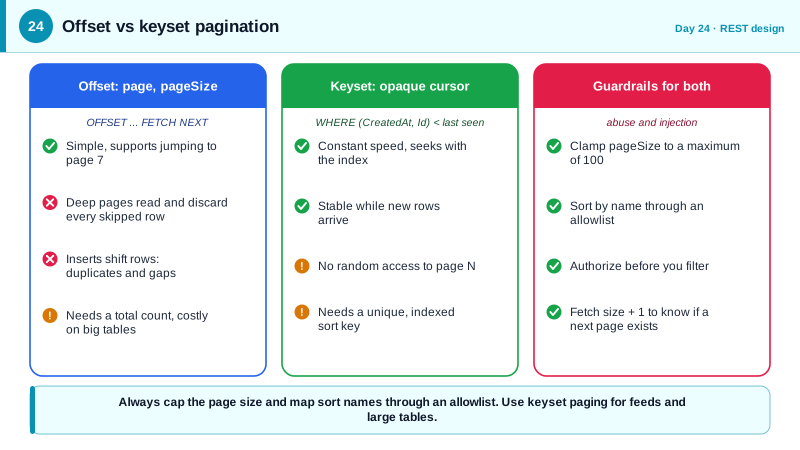
Offset pagination uses page and pageSize, or skip and take, and translates to OFFSET and FETCH in SQL. It is simple and lets users jump to page 7, so it suits small or medium datasets with page-number navigation. It has two weaknesses. Deep pages are slow because the database must still walk past all skipped rows, and results shift when rows are inserted or deleted between requests, so a user paging through a busy feed sees duplicates or misses items. It also usually needs a total count, which on a large table is itself an expensive query.
Keyset pagination, also called cursor pagination, fixes both. Instead of skipping N rows, the client asks for the rows after the last one it saw, for example created before a timestamp with an id tie-breaker, and the database uses an index to seek straight to that position. Performance stays constant on deep pages, and inserts do not cause duplicates. The trade-offs are that you cannot jump to an arbitrary page, sorting must be on a stable, indexed, unique combination of columns, and the cursor should be treated as opaque by the client. Infinite scroll and feeds suit cursors, while an admin table with page numbers suits offsets.
Filtering and sorting deserve the same discipline as anything else that touches a query. Never build sort or filter expressions by concatenating client strings into SQL or dynamic LINQ; map the sort parameter through an allowlist of permitted fields to known expressions, and reject anything else. Restrict filters to indexed columns that make sense, limit the number of values in a list filter, and remember that filtering must happen after applying authorization, so a filter cannot be used to probe records the caller may not see. Finally, describe the paging in the response, with the items, a nextCursor or total, and optionally a Link header, so the React side can drive TanStack Query's infinite queries directly.
| Approach | Strengths | Weaknesses | Best for |
|---|---|---|---|
| Offset (page, pageSize) | Simple, page numbers, jump ahead | Slow deep pages, unstable under changes, count cost | Small to medium tables, admin grids |
| Keyset (cursor) | Constant speed, stable results | No random access, needs unique sort key | Feeds, timelines, large tables |
| Page size cap | Bounds work per request | None | Always |
| Sort allowlist | Prevents injection and unindexed sorts | Slightly more code | Always |
| Total count | Enables page number UI | Extra query on big tables | Only when the UI needs it |
Worked Example: Keyset Paging with a Sort Allowlist and a Capped Page Size
The code implements a task list with an opaque cursor, a capped size, and an allowlisted sort. It uses in-memory data so the logic is visible; the same expressions work with Entity Framework.
public record PageQuery(string? Cursor, int PageSize = 25, string Sort = "created");
public record Page<T>(IReadOnlyList<T> Items, string? NextCursor);

public static class Paging
{
    public const int MaxPageSize = 100;

    // Allowlist: the client picks a name, never an expression.
    private static readonly Dictionary<string, Func<IQueryable<TaskEntity>, IOrderedQueryable<TaskEntity>>> Sorts = new()
    {
        ["created"] = q => q.OrderByDescending(t => t.CreatedAt).ThenByDescending(t => t.Id),
        ["due"]     = q => q.OrderBy(t => t.DueDate).ThenBy(t => t.Id),
    };

    // Cursor = "createdAtTicks:id", base64 encoded. Clients treat it as an opaque string.
    static string Encode(TaskEntity t) =>
        Convert.ToBase64String(Encoding.UTF8.GetBytes($"{t.CreatedAt.UtcTicks}:{t.Id}"));

    static bool TryDecode(string? cursor, out long ticks, out Guid id)
    {
        ticks = 0; id = default;
        if (cursor is null) return false;
        try
        {
            var parts = Encoding.UTF8.GetString(Convert.FromBase64String(cursor)).Split(':');
            return parts.Length == 2 && long.TryParse(parts[0], out ticks) && Guid.TryParse(parts[1], out id);
        }
        catch (FormatException) { return false; }
    }

    public static IResult List(IQueryable<TaskEntity> visibleToCaller, PageQuery q)
    {
        if (!Sorts.TryGetValue(q.Sort, out var order))
            return Results.Problem($"Unsupported sort '{q.Sort}'.", statusCode: 400);

        var size = Math.Clamp(q.PageSize, 1, MaxPageSize);      // enforce the cap
        var query = visibleToCaller;                              // authorization already applied

        if (q.Sort == "created" && TryDecode(q.Cursor, out var ticks, out var lastId))
        {
            var at = new DateTimeOffset(ticks, TimeSpan.Zero);
            query = query.Where(t => t.CreatedAt < at || (t.CreatedAt == at && t.Id.CompareTo(lastId) < 0));
        }

        var rows = order(query).Take(size + 1).ToList();          // fetch one extra to know if more exist
        var hasMore = rows.Count > size;
        var items = rows.Take(size).ToList();
        return Results.Ok(new Page<TaskEntity>(items, hasMore ? Encode(items[^1]) : null));
    }
}
The single extra row fetched beyond the page size tells you whether a next page exists without a separate count query. A malformed cursor is treated as no cursor rather than an error, and because the cursor carries only values already visible to the caller, decoding it reveals nothing. If cursors ever carry anything sensitive, sign them with the Data Protection API so they cannot be forged.
Real-World Examples
- GitHub's REST API documents a default page size of 30 and a maximum of 100 items per page for most list endpoints, and returns a Link header with next and last URLs. Enforcing a hard maximum server-side, whatever the client asks for, is the standard way public APIs protect themselves from unbounded requests.
- Slack migrated its Web API list methods to cursor-based pagination, returning a next_cursor value in response metadata, because offset pagination became unreliable and expensive for large workspaces where data changed constantly. Its documentation recommends cursors for any new client, which reflects the pattern for feed-like data.
Review Questions & Answers
The database must still read and discard all skipped rows to reach the requested offset, so deep pages cost more and more. And because the offset counts positions rather than identities, an insert or delete between two requests shifts every later row, so the client sees duplicates or misses records. Keyset pagination avoids both by seeking from the last seen key.
Because clients can send anything. Without a server-side ceiling, a caller can request a huge page, forcing the server to query, allocate, serialize, and transmit a large result, which is an inexpensive way to exhaust resources. Clamping or rejecting excessive sizes bounds the cost of any single request.
Passing client-provided names into dynamic queries risks injection, exposure of sensitive columns as sort keys, and sorts on unindexed columns that make queries slow. An allowlist maps friendly names to known, indexed expressions, so only safe and efficient orderings are possible and anything else is rejected with a clear error.
It must be deterministic and unique in combination, usually a column such as a timestamp plus the primary key as a tie-breaker. Without a unique tie-breaker, rows with equal sort values can appear in inconsistent order or be skipped across pages. The key should also be indexed so the seek is fast.