React State Management: Server, Client, URL, Form
On this page
Learning Objective
Classify the state in a React application into server, URL, form, local and shared client state, choose the right tool for each, keep state as close to where it is used as possible, and avoid the security mistakes of persisting or exposing sensitive state.
Concept Explanation
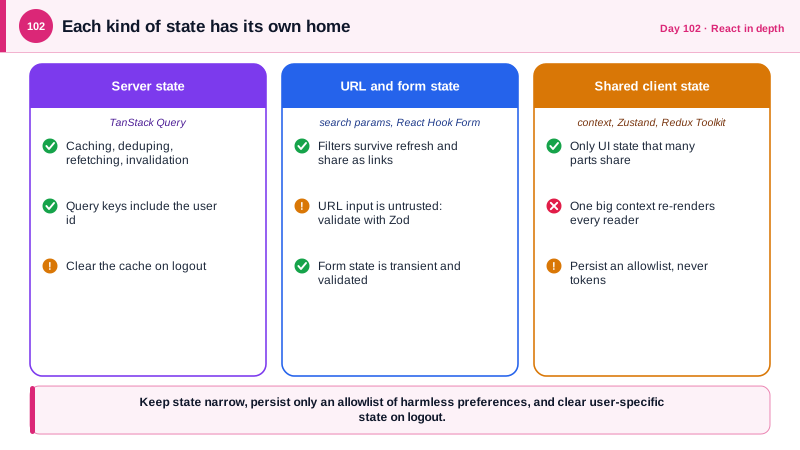
The phrase state management hides several different problems that deserve different tools. Server state is data owned by the backend and cached in the browser, and Day 54 showed that a query library handles it, so it should almost never live in a global store. URL state is the part of the interface that should survive a refresh and be shareable as a link: the current project, the active filter, the page or cursor. Form state is the transient, validated input a user is typing, which a form library manages. Local UI state, such as whether a menu is open, belongs in useState inside the component. What remains, shared client state, is smaller than most people expect: a theme, a sidebar, a multi-step wizard, an in-progress drawing.
The guiding rule is to put each piece of state in the narrowest scope that works and lift it only when a second component needs it. When two siblings need the same value, move it to their common parent and pass it down. When passing through many layers becomes painful, context is the built-in answer, but it has a cost: every component that reads a context re-renders whenever its value changes, so a single large context holding unrelated fields causes wide re-renders. Split contexts by concern, keep values stable, and put frequently changing values elsewhere.
For shared client state that outgrows context, there are two mainstream choices. Zustand offers a tiny store with selectors, so a component subscribes only to the slice it uses and re-renders only when that slice changes, with almost no boilerplate. Redux Toolkit is the officially recommended way to use Redux, suited to large applications with complex update logic, strong tooling, and teams that value strict conventions; it is the closest relative of NgRx for an Angular developer. Neither replaces the query library, and mixing server data into either store recreates the loading, error, and invalidation problems that TanStack Query already solved.
State has security consequences that are easy to overlook. Persisting a store to localStorage with a persistence helper writes everything in it to a place any script can read, so persist an explicit allowlist of harmless preferences and never tokens, personal data, or permissions. URL state is user-controlled input: parse it with a schema and bound it, since a crafted link can carry anything, and never render URL values as HTML. Developer tools that expose a store, such as browser extensions for Redux, should be disabled in production builds. And on a server-rendered page, state serialized into the HTML must be escaped, because a stringified object containing a script closing tag can break out of the script element.
| Kind of state | Lives in | Tool |
|---|---|---|
| Server data | The backend, cached in the browser | TanStack Query |
| Shareable view state | The URL | Search params validated with Zod |
| Form input | The form | React Hook Form and a schema |
| Local UI state | One component | useState |
| Shared client state | A small store or context | Zustand, Redux Toolkit, split contexts |
| Persisted preferences | localStorage, allowlisted | Store persistence with partialize |
Worked Example: URL Filters, a Small Store and Safe Persistence
The first hook keeps the board filter in the URL and validates it. The store holds only UI preferences and persists an allowlist. The context example shows splitting.
// URL state: shareable, refresh-safe, and validated because it is user input.
const FilterSchema = z.object({
  status: z.enum(['all', 'todo', 'inProgress', 'done']).catch('all'),
  q: z.string().max(100).catch(''),
});

export function useBoardFilter() {
  const [params, setParams] = useSearchParams();
  const filter = FilterSchema.parse(Object.fromEntries(params));           // crafted links cannot inject anything
  const update = (next: Partial<z.infer<typeof FilterSchema>>) =>
    setParams({ ...filter, ...next }, { replace: true });
  return [filter, update] as const;
}// Shared client state: preferences only. Server data stays in TanStack Query.
import { create } from 'zustand';
import { persist } from 'zustand/middleware';
type UiState = { sidebarOpen: boolean; density: 'compact' | 'comfortable'; draftTitle: string;
toggleSidebar: () => void; setDensity: (d: UiState['density']) => void; setDraft: (t: string) => void };
export const useUi = create<UiState>()(persist(
(set) => ({
sidebarOpen: true, density: 'comfortable', draftTitle: '',
toggleSidebar: () => set((s) => ({ sidebarOpen: !s.sidebarOpen })),
setDensity: (density) => set({ density }),
setDraft: (draftTitle) => set({ draftTitle }),
}),
{
name: 'ui-prefs',
partialize: (s) => ({ sidebarOpen: s.sidebarOpen, density: s.density }), // allowlist: never drafts, tokens or user data
},
));
// Selectors: this component re-renders only when density changes.
const density = useUi((s) => s.density);
// Clear anything user-specific on logout, including the store's non-persisted parts.
export const resetUiForLogout = () => { useUi.setState({ draftTitle: '' }); localStorage.removeItem('ui-prefs'); };// Context split by concern, with stable values, so a theme change does not re-render every consumer of the user.
const ThemeContext = createContext<Theme>('light');
const UserContext = createContext<SessionUser | null>(null);
// A single AppContext holding both would re-render everything that reads either one.Two details matter for safety. The persisted allowlist means a future field added to the store is not persisted by accident, which is the safe default. And the logout helper reminds you that client stores are part of the session: anything user-specific must be cleared when the identity changes, just like the query cache.
Real-World Examples
- Redux was created by Dan Abramov and Andrew Clark in 2015, inspired by Facebook's Flux architecture and the Elm language, and its official documentation now recommends Redux Toolkit as the standard way to write Redux logic. Its popularity produced the habit of putting all data in one global store, which query libraries later showed to be unnecessary for server data.
- Serializing application state into server-rendered HTML has caused real cross-site scripting vulnerabilities in JavaScript frameworks, because a string containing a closing script tag inside the serialized JSON ends the element early. The standard fix is to escape the serialized output, which is why frameworks and libraries such as serialize-javascript exist.
Review Questions & Answers
Server data needs caching, invalidation, deduplication, background refetching, and error and loading states, which a query library already provides. Copying it into a client store means rebuilding that machinery by hand and risks stale duplicates, so the store should hold only client-owned state.
Every component that reads the context re-renders when any field in it changes, so an update to a frequently changing value causes wide re-renders. Splitting contexts by concern, or using a store with selectors, limits updates to the components that use the changed slice.
Everything in it becomes readable by any script running on the page, and it survives logout and account switches on shared machines. Persisting an explicit allowlist of harmless preferences keeps sensitive or user-specific data out of storage.
Anyone can craft a link with arbitrary parameters and get a user to open it, so the values are untrusted input. Parsing them with a schema, applying defaults and bounds, and never rendering them as HTML prevents crafted links from breaking the interface or injecting content.