XSS in React: dangerouslySetInnerHTML and CSP
On this page
Learning Objective
Explain where React's default escaping protects you and where it does not, sanitize untrusted HTML and validate URLs before rendering them, deliver a strict Content Security Policy from the ASP.NET Core host, and test for XSS with hostile payloads.
Concept Explanation
Cross-site scripting is the attack in which an attacker gets their JavaScript to run in your page. The consequences are severe because that script runs with the user's privileges: it can call your API using their session, read anything rendered on the page, alter what they see, and capture what they type. React helps enormously by default. When you render a value inside JSX braces, React converts it to text and escapes it, so a title containing angle brackets and a script tag appears literally on screen instead of executing. Most XSS in server-rendered pages of earlier eras came from forgetting to encode output; React makes the safe way the default way.
The protection has gaps, and they are worth naming precisely because that is where real vulnerabilities live. dangerouslySetInnerHTML inserts a string as raw HTML, and the name is a warning label: with untrusted content it is XSS. URL-valued attributes are another gap, since href and src accept values with a javascript scheme, and rendering a user-supplied link as an anchor lets a click execute code. Direct DOM manipulation through refs and innerHTML, evaluating strings with eval or the Function constructor, and libraries that render markdown or rich text can all bypass the escaping. Server-side rendering can inject serialized state into a script tag unsafely. And a compromised third-party script is XSS by another route, because it already runs in your page.
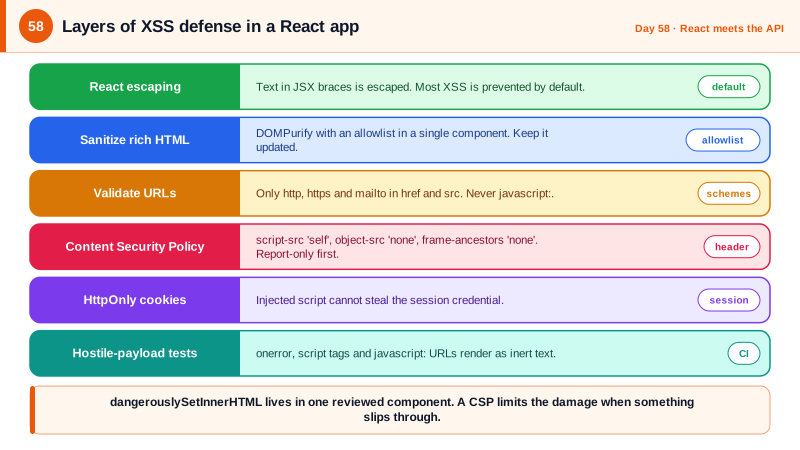
Each gap has a standard control. When you must render user-authored HTML, such as rich text, sanitize it first with a well-maintained library like DOMPurify, configured with a strict allowlist of tags and attributes, and do it as close to rendering as possible. Prefer formats that cannot carry scripts, such as Markdown rendered through a pipeline that escapes or sanitizes raw HTML. For links, validate the scheme against an allowlist of http, https, and mailto before rendering, and add rel noopener noreferrer for external targets. Avoid eval and string-based dynamic code entirely. Keep dependencies patched, since sanitizer bypasses are found periodically, and treat any use of the dangerous APIs as requiring review.
Content Security Policy is the second layer that limits the damage when something slips through. Delivered as a response header, it tells the browser which sources of script, style, images, and connections are allowed. A strict policy for a React application served from your BFF might allow scripts only from your own origin, forbid inline script and eval, restrict connections to your API, forbid framing, and forbid object embeds. If an attacker then injects an inline script or references an external one, the browser refuses to run it, and violation reports show you the attempt. Vite's production build emits external module scripts, so a strict script-src of self works, while the development server needs looser rules and is not served to users. The details of CSP directives, nonces, and Trusted Types are covered in the Browser Security course in this hub.
| Risk | Example | Control |
|---|---|---|
| Raw HTML injection | dangerouslySetInnerHTML with user content | Sanitize with DOMPurify allowlist, or avoid |
| Dangerous URLs | href set to a javascript URL | Allowlist http, https, mailto before rendering |
| DOM sinks | ref.current.innerHTML, eval | Do not use; use React state and text |
| Rich text and markdown | HTML in a markdown comment | Sanitizing pipeline, no raw HTML |
| Third-party script compromise | Injected tag manager code | CSP script-src self, SRI, fewer third parties |
| Defense in depth | Any missed injection | Strict Content Security Policy header |
Worked Example: Sanitizing, Safe Links and a CSP from the Host
The React parts sanitize HTML and validate URLs. The ASP.NET Core middleware sends a strict policy with reporting, and a test feeds hostile payloads.
// src/security/safe.tsx
import DOMPurify from 'dompurify';

const ALLOWED_TAGS = ['b', 'i', 'em', 'strong', 'p', 'ul', 'ol', 'li', 'a', 'code', 'pre', 'blockquote', 'br'];

export function SafeHtml({ html }: { html: string }) {
  const clean = DOMPurify.sanitize(html, {
    ALLOWED_TAGS,
    ALLOWED_ATTR: ['href', 'title'],
    ALLOWED_URI_REGEXP: /^(?:https?:|mailto:)/i,             // no javascript: or data: URLs
  });
  return <div dangerouslySetInnerHTML={{ __html: clean }} />;   // the only place this API is used
}

const SAFE_SCHEMES = new Set(['http:', 'https:', 'mailto:']);
export function safeHref(input: string): string | undefined {
  try {
    const url = new URL(input, location.origin);
    return SAFE_SCHEMES.has(url.protocol) ? url.toString() : undefined;
  } catch { return undefined; }
}

export function UserLink({ href, children }: { href: string; children: ReactNode }) {
  const safe = safeHref(href);
  if (!safe) return <span>{children}</span>;                  // render as text if the URL is unsafe
  const external = new URL(safe).origin !== location.origin;
  return <a href={safe} rel={external ? 'noopener noreferrer nofollow' : undefined} target={external ? '_blank' : undefined}>{children}</a>;
}// BFF: a strict CSP on HTML responses. Vite production output uses external module scripts, so no inline script is needed.
app.Use(async (ctx, next) =>
{
ctx.Response.OnStarting(() =>
{
if (ctx.Response.ContentType?.StartsWith("text/html") == true)
{
ctx.Response.Headers.ContentSecurityPolicy =
"default-src 'self'; " +
"script-src 'self'; " +
"style-src 'self' 'unsafe-inline'; " + // remove unsafe-inline once styles are extracted or nonce'd
"img-src 'self' data: https:; " +
"connect-src 'self' wss://app.example.com; " + // API and SignalR only
"object-src 'none'; base-uri 'none'; form-action 'self'; frame-ancestors 'none'; " +
"upgrade-insecure-requests; report-to csp";
ctx.Response.Headers["Reporting-Endpoints"] = "csp=\"/csp-reports\"";
ctx.Response.Headers.XContentTypeOptions = "nosniff";
ctx.Response.Headers["Referrer-Policy"] = "strict-origin-when-cross-origin";
}
return Task.CompletedTask;
});
await next();
});
// Report violations to your logging so attempted injections are visible.
app.MapPost("/csp-reports", (HttpContext ctx, ILogger<Program> log) =>
{
log.LogWarning("CSP violation reported from {Path}", ctx.Request.Headers.Referer.ToString()); // do not log the body verbatim
return Results.NoContent();
}).AllowAnonymous().RequireRateLimiting("csp");// Tests: hostile input must be neutralized.
const payloads = [
'<img src=x onerror=alert(1)>',
'<script>alert(1)</script>',
'<a href="javascript:alert(1)">click</a>',
'<svg onload=alert(1)>',
'<iframe src="javascript:alert(1)"></iframe>',
];
it.each(payloads)('SafeHtml strips %s', (p) => {
const { container } = render(<SafeHtml html={p} />);
expect(container.innerHTML).not.toMatch(/onerror|onload|<script|javascript:|<iframe/i);
});
it('renders an unsafe URL as plain text', () => {
render(<UserLink href="javascript:alert(1)">profile</UserLink>);
expect(screen.queryByRole('link')).toBeNull();
});Roll a new CSP out in report-only mode first, using the Content-Security-Policy-Report-Only header, watch the reports for legitimate resources you missed, and only then enforce it. Tightening later is far easier than debugging a broken production page.
Real-World Examples
- In October 2005, Samy Kamkar released a self-propagating cross-site scripting worm on MySpace that added him as a friend and copied itself into each visitor's profile, infecting over a million users in about 20 hours. It remains the classic demonstration that stored XSS can spread virally, and it led MySpace to shut the site down briefly to remove it.
- The DOMPurify sanitizer, maintained by the security firm Cure53, is the most widely used HTML sanitizer for browsers and has had several bypass reports fixed over the years, mostly involving mutation-based tricks in how browsers reparse markup. The lesson is that sanitization is powerful but not one-and-done: keep the library updated and combine it with a strict Content Security Policy.
Review Questions & Answers
Escaping protects text content, but an href value with a javascript scheme is a valid URL that the browser executes when clicked, and React passes it through. The fix is to parse the URL and allow only known-safe schemes before rendering, falling back to plain text otherwise.
It is a safety net for the case where something is missed, such as a sanitizer bypass or a compromised dependency. Even if a malicious script is injected, a policy forbidding inline scripts and untrusted origins makes the browser refuse to run it, and the violation report reveals the attempt. It reduces the impact of an injection but does not replace preventing it.
A strict policy blocks anything not explicitly allowed, including legitimate scripts, styles, or connections you forgot, which would break the site for real users. Report-only mode logs violations without blocking anything, so you can find and allow real dependencies, fix the policy, and then enforce with confidence.
In a single, reviewed component that receives content already sanitized by an allowlist-based library, so the dangerous API appears in one place instead of being scattered. Lint rules can flag any other use, and code review treats additions as high risk. Most applications can avoid it entirely.